

Managing table data
This document describes how to manage table data in BigQuery.You can work with BigQuery table data in the following ways:
- Load data into a table
- Append to or overwrite table data
- Browse (or preview) table data
- Query table data
- Modify table data using data manipulation language (DML)
- Copy table data
- Export table data
For information on managing table schemas, seeModifying table schemas.
Before you begin
Grant roles that give the necessary permissions to users who need to perform each task in this document. Permissions required (if any) to perform a task are listed in the "Required permissions" section of the task.
Loading data into a table
You canload data when you create atable, or you can create an empty table and load the data later. When you loaddata, you can useschema auto-detect forsupported data formats, or you canspecify the schema.
For more information on loading data, see the documentation for your sourcedata's format and location:
For more information on loading data from Cloud Storage, see:
For more information on loading data from a local source, seeLoading data from local files.
Appending to and overwriting table data
You can overwrite table data using a load or query operation. You can appendadditional data to an existing table by performing a load-append operation or byappending query results to the table.
For more information on appending to or overwriting a table when loading data,see the documentation for your source data format:
- Appending to or overwriting a table with Avro data
- Appending to or overwriting a table with CSV data
- Appending to or overwriting a table with JSON data
- Appending to or overwriting a table with Parquet data
- Appending to or overwriting a table with ORC data
- Appending to or overwriting a table with Datastore data
To append to or overwrite a table using query results, specify a destinationtable and set the write disposition to either:
- Append to table — Appends the query results to an existing table.
- Overwrite table — Overwrites an existing table with the same nameusing the query results.
You can use the following query to append records fromone table to another:
INSERTINTO<projectID>.<datasetID>.<table1>(<column2>,<column3>)(SELECT*FROM<projectID>.<datasetID>.<table2>)
For more information on using query results to append to or overwrite data,seeWriting query results.
Browsing table data
You can browse or read table data by:
- Using the Google Cloud console
- Using the bq command-line tool's
bq headcommand - Calling the
tabledata.listAPI method - Using the client libraries
Required permissions
To read table and partition data, you need thebigquery.tables.getData Identity and Access Management (IAM) permission.
bigquery.tables.getData permission.Each of the following predefined IAM roles includes the permissions that you need in order to browse table and partition data:
roles/bigquery.dataViewerroles/bigquery.dataEditorroles/bigquery.dataOwnerroles/bigquery.admin
If you have thebigquery.datasets.create permission, you can browse data in the tables and partitions of the datasets you create.
For more information on IAM roles and permissions inBigQuery, seePredefined roles and permissions.
Browsing table data
To browse table data:
Console
In the Google Cloud console, open the BigQuery page.
In the left pane, clickExplorer:

If you don't see the left pane, clickExpand left pane to open the pane.
In theExplorer pane, expand your project, clickDatasets, andthen select a dataset.
ClickOverview> Tables, and then select the table.
ClickDetails and note the value inNumber of rows. You may need thisvalue to control the starting point for your results using the bq command-line tool or API.
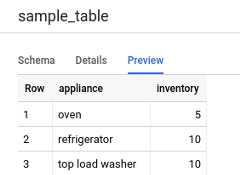
ClickPreview. A sample set of data is displayed.
Command-line
Issue thebq head command with the--max_rows flag to list all columns ina particular number of table rows. If--max_rows is not specified, the defaultis 100.
To browse a subset of columns in the table (including nested and repeatedcolumns), use the--selected_fields flag and enter the columns as a comma-separated list.
To specify the number of rows to skip before displaying table data, use the--start_row=integer flag (or the-s shortcut). Thedefault value is0. You can retrieve the number of rows in a table by usingthebq show command toretrieve table information.
If the table you're browsing is in a project other than your default project,add the project ID to the command in the following format:project_id:dataset.table.
bqhead\--max_rowsinteger1\--start_rowinteger2\--selected_fields"columns"\project_id:dataset.table
Where:
- integer1 is the number of rows to display.
- integer2 is the number of rows to skip before displaying data.
- columns is a comma-separated list of columns.
- project_id is your project ID.
- dataset is the name of the dataset containing the table.
- table is the name of the table to browse.
Examples:
Enter the following command to list all columns in the first 10 rows inmydataset.mytable.mydataset is in your default project.
bq head --max_rows=10 mydataset.mytableEnter the following command to list all columns in the first 100 rows inmydataset.mytable.mydataset is inmyotherproject, not your defaultproject.
bq head myotherproject:mydataset.mytableEnter the following command to display onlyfield1 andfield2 inmydataset.mytable. The command uses the--start_row flag to skip to row 100.mydataset.mytable is in your default project.
bq head --start_row 100 --selected_fields "field1,field2" mydataset.mytableBecause thebq head command does not create a query job,bq head commands donot appear in your query history, and you are not charged for them.
API
Browse through a table's data by callingtabledata.list.Specify the name of the table in thetableId parameter.
Configure these optional parameters to control the output:
maxResults— Maximum number of results to returnselectedFields— Comma-separated list of columns to return; Ifunspecified, all columns are returnedstartIndex— Zero-based index of the starting row to read
startIndex beyond the last row, the method will returnsuccessfully but without arows property. You can find out how many rows arein your table by calling thetables.getmethod and examining thenumRows property.Values are returned wrapped in a JSON object that you must parse, as describedin thetabledata.listreference documentation.
C#
Before trying this sample, follow theC# setup instructions in theBigQuery quickstart using client libraries. For more information, see theBigQueryC# API reference documentation.
To authenticate to BigQuery, set up Application Default Credentials. For more information, seeSet up authentication for client libraries.
usingGoogle.Api.Gax;usingGoogle.Apis.Bigquery.v2.Data;usingGoogle.Cloud.BigQuery.V2;usingSystem;usingSystem.Linq;publicclassBigQueryBrowseTable{publicvoidBrowseTable(stringprojectId="your-project-id"){BigQueryClientclient=BigQueryClient.Create(projectId);TableReferencetableReference=newTableReference(){TableId="shakespeare",DatasetId="samples",ProjectId="bigquery-public-data"};// Load all rows from a tablePagedEnumerable<TableDataList,BigQueryRow>result=client.ListRows(tableReference:tableReference,schema:null);// Print the first 10 rowsforeach(BigQueryRowrowinresult.Take(10)){Console.WriteLine($"{row["corpus"]}: {row["word_count"]}");}}}Go
Before trying this sample, follow theGo setup instructions in theBigQuery quickstart using client libraries. For more information, see theBigQueryGo API reference documentation.
To authenticate to BigQuery, set up Application Default Credentials. For more information, seeSet up authentication for client libraries.
TheCloud Client Libraries for Go automatically paginates by default, so you do not need to implement pagination yourself, for example:
import("context""fmt""io""cloud.google.com/go/bigquery""google.golang.org/api/iterator")// browseTable demonstrates reading data from a BigQuery table directly without the use of a query.// For large tables, we also recommend the BigQuery Storage API.funcbrowseTable(wio.Writer,projectID,datasetID,tableIDstring)error{// projectID := "my-project-id"// datasetID := "mydataset"// tableID := "mytable"ctx:=context.Background()client,err:=bigquery.NewClient(ctx,projectID)iferr!=nil{returnfmt.Errorf("bigquery.NewClient: %v",err)}deferclient.Close()table:=client.Dataset(datasetID).Table(tableID)it:=table.Read(ctx)for{varrow[]bigquery.Valueerr:=it.Next(&row)iferr==iterator.Done{break}iferr!=nil{returnerr}fmt.Fprintln(w,row)}returnnil}Java
Before trying this sample, follow theJava setup instructions in theBigQuery quickstart using client libraries. For more information, see theBigQueryJava API reference documentation.
To authenticate to BigQuery, set up Application Default Credentials. For more information, seeSet up authentication for client libraries.
importcom.google.cloud.bigquery.BigQuery;importcom.google.cloud.bigquery.BigQuery.TableDataListOption;importcom.google.cloud.bigquery.BigQueryException;importcom.google.cloud.bigquery.BigQueryOptions;importcom.google.cloud.bigquery.TableId;importcom.google.cloud.bigquery.TableResult;// Sample to directly browse a table with optional pagingpublicclassBrowseTable{publicstaticvoidrunBrowseTable(){// TODO(developer): Replace these variables before running the sample.Stringtable="MY_TABLE_NAME";Stringdataset="MY_DATASET_NAME";browseTable(dataset,table);}publicstaticvoidbrowseTable(Stringdataset,Stringtable){try{// Initialize client that will be used to send requests. This client only needs to be created// once, and can be reused for multiple requests.BigQuerybigquery=BigQueryOptions.getDefaultInstance().getService();// Identify the table itselfTableIdtableId=TableId.of(dataset,table);// Page over 100 records. If you don't need pagination, remove the pageSize parameter.TableResultresult=bigquery.listTableData(tableId,TableDataListOption.pageSize(100));// Print the recordsresult.iterateAll().forEach(row->{row.forEach(fieldValue->System.out.print(fieldValue.toString()+", "));System.out.println();});System.out.println("Query ran successfully");}catch(BigQueryExceptione){System.out.println("Query failed to run \n"+e.toString());}}}Node.js
Before trying this sample, follow theNode.js setup instructions in theBigQuery quickstart using client libraries. For more information, see theBigQueryNode.js API reference documentation.
To authenticate to BigQuery, set up Application Default Credentials. For more information, seeSet up authentication for client libraries.
TheCloud Client Libraries for Node.js automatically paginates by default, so you do not need to implement pagination yourself, for example:
// Import the Google Cloud client library and create a clientconst{BigQuery}=require('@google-cloud/bigquery');constbigquery=newBigQuery();asyncfunctionbrowseRows(){// Displays rows from "my_table" in "my_dataset"./** * TODO(developer): Uncomment the following lines before running the sample. */// const datasetId = "my_dataset";// const tableId = "my_table";// List rows in the tableconst[rows]=awaitbigquery.dataset(datasetId).table(tableId).getRows();console.log('Rows:');rows.forEach(row=>console.log(row));}PHP
Before trying this sample, follow thePHP setup instructions in theBigQuery quickstart using client libraries. For more information, see theBigQueryPHP API reference documentation.
To authenticate to BigQuery, set up Application Default Credentials. For more information, seeSet up authentication for client libraries.
Pagination happens automatically in theCloud Client Libraries for PHP using the generator functionrows, which fetches the next page of results during iteration.
use Google\Cloud\BigQuery\BigQueryClient;/** Uncomment and populate these variables in your code */// $projectId = 'The Google project ID';// $datasetId = 'The BigQuery dataset ID';// $tableId = 'The BigQuery table ID';// $maxResults = 10;$maxResults = 10;$startIndex = 0;$options = [ 'maxResults' => $maxResults, 'startIndex' => $startIndex];$bigQuery = new BigQueryClient([ 'projectId' => $projectId,]);$dataset = $bigQuery->dataset($datasetId);$table = $dataset->table($tableId);$numRows = 0;foreach ($table->rows($options) as $row) { print('---'); foreach ($row as $column => $value) { printf('%s: %s' . PHP_EOL, $column, $value); } $numRows++;}Python
Before trying this sample, follow thePython setup instructions in theBigQuery quickstart using client libraries. For more information, see theBigQueryPython API reference documentation.
To authenticate to BigQuery, set up Application Default Credentials. For more information, seeSet up authentication for client libraries.
fromgoogle.cloudimportbigquery# Construct a BigQuery client object.client=bigquery.Client()# TODO(developer): Set table_id to the ID of the table to browse data rows.# table_id = "your-project.your_dataset.your_table_name"# Download all rows from a table.rows_iter=client.list_rows(table_id)# Make an API request.# Iterate over rows to make the API requests to fetch row data.rows=list(rows_iter)print("Downloaded{} rows from table{}".format(len(rows),table_id))# Download at most 10 rows.rows_iter=client.list_rows(table_id,max_results=10)rows=list(rows_iter)print("Downloaded{} rows from table{}".format(len(rows),table_id))# Specify selected fields to limit the results to certain columns.table=client.get_table(table_id)# Make an API request.fields=table.schema[:2]# First two columns.rows_iter=client.list_rows(table_id,selected_fields=fields,max_results=10)rows=list(rows_iter)print("Selected{} columns from table{}.".format(len(rows_iter.schema),table_id))print("Downloaded{} rows from table{}".format(len(rows),table_id))# Print row data in tabular format.rows=client.list_rows(table,max_results=10)format_string="{!s:<16} "*len(rows.schema)field_names=[field.nameforfieldinrows.schema]print(format_string.format(*field_names))# Prints column headers.forrowinrows:print(format_string.format(*row))# Prints row data.Ruby
Before trying this sample, follow theRuby setup instructions in theBigQuery quickstart using client libraries. For more information, see theBigQueryRuby API reference documentation.
To authenticate to BigQuery, set up Application Default Credentials. For more information, seeSet up authentication for client libraries.
Pagination happens automatically in theCloud Client Libraries for Ruby usingTable#data andData#next.
require"google/cloud/bigquery"defbrowse_tablebigquery=Google::Cloud::Bigquery.newproject_id:"bigquery-public-data"dataset=bigquery.dataset"samples"table=dataset.table"shakespeare"# Load all rows from a tablerows=table.data# Load the first 10 rowsrows=table.datamax:10# Print row datarows.each{|row|putsrow}endQuerying table data
You canquery BigQuery databy using one of the following query job types:
Interactive query jobs. Bydefault, BigQuery runs queries as interactive query jobs, whichare intended to start executing as quickly as possible.
Batch query jobs. Batch querieshave lower priority than interactive queries. When a project or reservationis using all of its available compute resources, batch queries are morelikely to be queued and remain in the queue. After a batch query startsrunning, the batch query runs the same as an interactive query. For moreinformation, seequery queues.
Continuous query jobs.With these jobs, the query runs continuously, letting you analyzeincoming data in BigQuery in real time and then write theresults to a BigQuery table, or export the results toBigtable or Pub/Sub. You can use this capability toperform time sensitive tasks, such as creating and immediately acting oninsights, applying real time machine learning (ML) inference, andbuilding event-driven data pipelines.
You can run query jobs by using the following methods:
- Compose and run a query in theGoogle Cloud console.
- Run the
bq querycommand in thebq command-line tool. - Programmatically call the
jobs.queryorjobs.insertmethod in the BigQueryREST API. - Use the BigQueryclient libraries.
For more information on querying BigQuery tables, seeIntroduction to querying BigQuery data.
In addition to querying data stored in BigQuery tables, you canquery data stored externally. For more information, seeIntroduction to external data sources.
Modifying table data
You can modify data in a table using data manipulation language (DML) statementsin SQL. DML statements let youupdate,merge,insert, anddelete rows in tables. For syntax reference and examplesof each type of DML statement, seeData manipulation language statements in GoogleSQL.
The legacy SQL dialect does not support DML statements. To update or delete datausing legacy SQL, you must delete the table and then recreate it with newdata. Alternatively, you can write a query that modifies the data and writethe query results to a new, destination table.
Copying table data
You can copy a table by:
- Using the Google Cloud console
- Using the bq command-line tool's
bq cpcommand - Calling the
jobs.insertAPI methodand configuring acopy job - Using the client libraries
For more information on copying tables, seeCopying a table.
Exporting table data
You can export table data to a Cloud Storage bucket in CSV, JSON, Avro, orParquet (Preview) format. Exporting to yourlocal machine is not supported; however, you candownload and save query resultsusing the Google Cloud console.
For more information, seeExporting table data.
Table security
To control access to tables in BigQuery, seeControl access to resources with IAM.
What's next
- For more information on loading data, seeIntroduction to loading data.
- For more information on querying data, seeIntroduction to querying BigQuery data.
- For more information on modifying table schemas, seeModifying table schemas.
- For more information on creating and using tables, seeCreating and using tables.
- For more information on managing tables, seeManaging tables.
Except as otherwise noted, the content of this page is licensed under theCreative Commons Attribution 4.0 License, and code samples are licensed under theApache 2.0 License. For details, see theGoogle Developers Site Policies. Java is a registered trademark of Oracle and/or its affiliates.
Last updated 2025-12-15 UTC.