

Managed disaster recovery
This document provides an overview of BigQuery managed disasterrecovery and how to implement it for your data and workloads.
Overview
BigQuery supports disaster recovery scenarios in the case of atotal region outage. BigQuery disaster recovery relies oncross-region dataset replication to managestorage failover. After creating a dataset replica in a secondary region, youcan control failover behavior for compute and storage to maintain businesscontinuity during an outage. After a failover, you can access compute capacity(slots) and replicated datasets in the promoted region. Disaster recovery isonly supported with theEnterprise Plusedition.
Managed disaster recovery offers two failover options: hard failover andsoft failover. A hard failover immediately promotes the secondary region'sreservation and dataset replicas to become the primary. This action proceedseven if the current primary region is offline and does not wait for thereplication of any unreplicated data. Because of this, data loss can occurduring hard failover.Any jobs that committed data in the source region before the replica's value ofreplication_timemay need to be rerun in the destination region after failover.In contrast to a hard failover, a soft failover waits until all reservationand dataset changes committed in the primary region are replicated to the secondary region before completing the failover process. A soft failoverrequires both the primary and secondary region to be available.Initiating a soft failover sets thesoftFailoverStartTimefor the reservation. ThesoftFailoverStartTimeis cleared on soft failover completion.
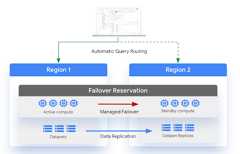
To enable disaster recovery, you are required to create anEnterprise Plus edition reservation in the primary region, which is theregion the dataset is in before failover. Standby compute capacity in the pairedregion is included in the Enterprise Plus reservation. You then attacha dataset to this reservation to enable failover for that dataset. You can onlyattach a dataset to a reservation if the dataset is backfilled and has the samepaired primary and secondary locations as the reservation. After a dataset isattached to a failover reservation, only Enterprise Plus reservationscan write to those datasets and you can't perform across-regionreplication promotion on the dataset. You canread from datasets attached to a failover reservation with any capacity model. For more information about reservations, seeIntroduction to workloadmanagement.
The compute capacity of your primary region is available in the secondary regionpromptly after a failover. This availability applies to yourreservation baseline, whether it is used or not.
You must actively choose to fail over as part of testing or in response to areal disaster. You shouldn't fail over more than once in a 10-minute window. Indata replication scenarios, backfill refers to the process of populating areplica of a dataset with historical data that existed before the replica wascreated or became active. Datasets must complete their backfill before you canfail over to the dataset.
The following diagram shows the architecture of managed disaster recovery:
Limitations
The following limitations apply to BigQuery disaster recovery:
Once a dataset is attached to a failover reservation, only Enterprise Plus reservations can write to that dataset. However, you can read from datasets attached to a failover reservation using any capacity model.
BigQuery disaster recovery is subject to the same limitationsascross-region dataset replication.
Autoscaling after a failover depends on compute capacity availability in the secondaryregion. Only the reservation baseline is available in the secondary region.
The
INFORMATION_SCHEMA.RESERVATIONSview doesn't have failoverdetails.If you have multiple failover reservations with the same administrationproject but whose attached datasets use different secondary locations, don't useone failover reservation with the datasets attached to a different failoverreservation.
If you want to convert an existing reservation to a failover reservation, theexisting reservation can't have more than 1,000reservation assignments.
A failover reservation can't have more than 1,000 datasets attached to it.
Soft failover can only be triggered if both the source and destination regionsare available.
Soft failover cannot be triggered if there are any errors transient orotherwise during reservation replication. For example, if there is insufficientslots quota in the secondary region for the reservation update.
The reservation and attached datasets cannot be updated during an active softfailover but they can still be read from.
Jobs running on a failover reservation during an active soft failover may not run on the reservation due to transient changes in the dataset and reservationrouting during the failover operation. However these jobs will use thereservation slots before any soft failover is initiated and after it completes.
For datasets using BigQuery disaster recovery, load and extract jobs cannot use the free shared slot pool. You must create a
PIPELINEtype reservation assignment, as only the Enterprise Plus edition supports writing to MDR configured datasets. This requirement ensures that all data ingestion is handled by the dedicated infrastructure necessary to support MDR's cross-region replication and the recovery point objective (RPO).
Locations
The following regions are available when creating a failover reservation:
| Location code | Region Name | Region Description |
|---|---|---|
ASIA | ||
ASIA-EAST1 | Taiwan | |
ASIA-SOUTHEAST1 | Singapore | |
AU | ||
AUSTRALIA-SOUTHEAST1 | Sydney | |
AUSTRALIA-SOUTHEAST2 | Melbourne | |
CA | ||
NORTHAMERICA-NORTHEAST1 | Montréal | |
NORTHAMERICA-NORTHEAST2 | Toronto | |
DE | ||
EUROPE-WEST3 | Frankfurt | |
EUROPE-WEST10 | Berlin | |
EU | ||
EU | EU multi-region | |
EUROPE-CENTRAL2 | Warsaw | |
EUROPE-NORTH1 | Finland | |
EUROPE-SOUTHWEST1 | Madrid | |
EUROPE-WEST1 | Belgium | |
EUROPE-WEST3 | Frankfurt | |
EUROPE-WEST4 | Netherlands | |
EUROPE-WEST8 | Milan | |
EUROPE-WEST9 | Paris | |
IN | ||
ASIA-SOUTH1 | Mumbai | |
ASIA-SOUTH2 | Delhi | |
US | ||
US | US multi-region | |
US-CENTRAL1 | Iowa | |
US-EAST1 | South Carolina | |
US-EAST4 | Northern Virginia | |
US-EAST5 | Columbus | |
US-SOUTH1 | Dallas | |
US-WEST1 | Oregon | |
US-WEST2 | Los Angeles | |
US-WEST3 | Salt Lake City | |
US-WEST4 | Las Vegas |
Region pairs must be selected withinASIA,AU,CA,DE,EU,IN or theUS. For example, a region within theUS cannot be paired with a region withinEU.
If your BigQuery dataset is in a multi-region location, you can'tuse the following region pairs. This limitation is required to make sure thatyour failover reservation and data are geographically separated afterreplication. For more information about regions that are contained withinmulti-regions, seeMulti-regions.
us-central1-usmulti-regionus-west1-usmulti-regioneu-west1-eumulti-regioneu-west4-eumulti-region
Before you begin
- Verify that you have the
bigquery.reservations.updateIdentity and Access Management (IAM) permission to update reservations. - Verify that you have existing datasets that are configuredfor replication. For more information, seeReplicate a dataset.
Turbo replication
Disaster recovery usesTurbo replication for faster data replication across regions,whichreduces the risk of data loss exposure, minimize service downtime, andhelps support uninterrupted servicefollowing a regional outage.
Turbo replication doesn't apply to the initial backfill operation. After theinitial backfill operation is completed, turbo replication aims to replicatedatasets to a single failover region pair with a secondary replica within 15minutes, as long as thebandwidth quotaisn't exceeded and there are no user errors.
Recovery time objective
A recovery time objective (RTO) is the target time allowed for recovery inBigQuery in the event of a disaster. For more information on RTO,seeBasics of DR planning.Manageddisaster recovery has a five minute RTO after you initiate a failover. Becauseof the RTO, capacity is available in the secondary region within five minutes ofstarting the failover process.
Recovery point objective
A recovery point objective (RPO) is the most recent point in time from whichdata must be able to be restored. For more information on RPO, seeBasics of DRplanning. Managed disaster recoveryhas a RPO that is defined per dataset. The RPO aims to keep the secondaryreplica within 15 minutes of the primary. To meet this RPO, you can't exceed thebandwidth quota and there can't be any usererrors.
Quota
You must have your chosen compute capacity in the secondary region beforeconfiguring a failover reservation. If there is not available quota in thesecondary region, you can't configure or update the reservation.For more information, seeQuotas and limits.
Turbo replication bandwidth has quota. For more information, seeQuotas andlimits.
Pricing
Configuring managed disaster recovery requires the following pricing plans:
Compute capacity: You must purchase theEnterprise Plus edition.
Turbo replication: Disaster recovery relies on turbo replication duringreplication. You are charged based on physical bytes and on a per physicalGiB replicated basis. For more information, seeData replication data transferpricing for Turbo replication.
Storage: Storage bytes in the secondary region are billed at the same price asstorage bytes in the primary region. For more information, seeStoragepricing.
Customers are only required to pay for compute capacity in the primary region.Secondary compute capacity (based on the reservation baseline) is available inthe secondary region at no additional cost.Idleslots can't use the secondary compute capacityunless the reservation has failed over.
If you need to perform stale reads in the secondary region, you mustpurchase additional compute capacity.
Create or alter an Enterprise Plus reservation
Caution: Before creating a failover reservation, verify that no reservation withthe same name already exists in the secondary region. Similarly, make sure a newassignment to a failover reservation does not reassign the same resource withthe same job type in the secondary location. Such conflicts can causereplication failures, which results in an inconsistency between the primary andsecondary locations. That can in turn prevent a successful failover operationlater.Before attaching a dataset to a reservation, you must create anEnterprise Plus reservation or alter an existing reservation andconfigure it for disaster recovery.
Create a reservation
Select one of the following:
Console
In the Google Cloud console, go to theBigQuery page.
In the navigation menu, clickCapacity management, andthen clickCreate reservation.
In theReservation name field, enter a name for the reservation.
In theLocation list, select the location.
In theEdition list, select the Enterprise Plus edition.
In theMax reservation size selector list, select the maximum reservation size.
Optional: In theBaseline slots field, enter the number of baselineslots for the reservation.
The number of available autoscaling slots is determined bysubtracting theBaseline slots value from theMax reservationsize value. For example, if you create a reservation with 100 baselineslots and a max reservation size of 400, your reservation has 300autoscaling slots. For more information about baseline slots, seeUsing reservations with baseline and autoscalingslots.
In theSecondary location list, select the secondary location.
To disableidle slot sharingand use only the specified slot capacity, click theIgnore idle slotstoggle.
To expand theAdvanced settings section, click theexpander arrow.
Optional: To set the target job concurrency, click theOverrideautomatic target job concurrency toggle to on, and then enter a value forTargetJob Concurrency.The breakdown of slots is displayed in theCost estimate table. Asummary of the reservation is displayed in theCapacity summarytable.
ClickSave.
The new reservation is visible in theSlot reservations tab.
SQL
To create a reservation, use theCREATE RESERVATION data definition language (DDL) statement.
In the Google Cloud console, go to theBigQuery page.
In the query editor, enter the following statement:
CREATERESERVATION`ADMIN_PROJECT_ID.region-LOCATION.RESERVATION_NAME`OPTIONS(slot_capacity=NUMBER_OF_BASELINE_SLOTS,edition=ENTERPRISE_PLUS,secondary_location=SECONDARY_LOCATION);
Replace the following:
ADMIN_PROJECT_ID: the project ID of theadministration project that owns the reservation resource.LOCATION: thelocation of the reservation. If you select aBigQuery Omni location, your edition option is limited to the Enterprise edition.RESERVATION_NAME: the name of the reservation.The name must start and end with a lowercase letter or a number and contain only lowercase letters, numbers, and dashes.
NUMBER_OF_BASELINE_SLOTS: the number of baseline slots to allocate to the reservation. You cannot set theslot_capacityoption and theeditionoption in the same reservation.SECONDARY_LOCATION: the secondarylocation of the reservation. In the case of an outage, any datasets attached to this reservation will fail over to this location.
ClickRun.
For more information about how to run queries, seeRun an interactive query.
Alter an existing reservation
Select one of the following:
Console
In the Google Cloud console, go to theBigQuery page.
In the navigation menu, clickCapacity management.
Click theSlot reservations tab.
Find the reservation that you want to update.
ClickReservations actions, and then clickEdit.
In theSecondary location field, enter the secondary location.
ClickSave.
SQL
To add or change a secondary location to a reservation, use theALTER RESERVATION SET OPTIONS DDL statement.
In the Google Cloud console, go to theBigQuery page.
In the query editor, enter the following statement:
ALTERRESERVATION`ADMIN_PROJECT_ID.region-LOCATION.RESERVATION_NAME`SETOPTIONS(secondary_location=SECONDARY_LOCATION);
Replace the following:
ADMIN_PROJECT_ID: the project ID of theadministration project that owns the reservation resource.LOCATION: thelocation of the reservation, for exampleeurope-west9.RESERVATION_NAME: the name of the reservation. The name must start and end with a lowercase letter or a number and contain only lowercase letters, numbers, and dashes.SECONDARY_LOCATION: the secondarylocation of the reservation. In the case of an outage, any datasets attached to this reservation will fail over to this location.
ClickRun.
For more information about how to run queries, seeRun an interactive query.
Attach a dataset to a reservation
To enable disaster recovery for the previously created reservation, complete thefollowing steps. The dataset must already be configured for replication in thesame primary and secondary regions as the reservation. For more information, seeCross-region dataset replication.
Caution: After a dataset is attached to a failover reservation, only Enterprise Plus reservations can write to that dataset. You can read from datasets attached to a failover reservation with any capacity model. For more information seeLimitations.Console
In the Google Cloud console, go to theBigQuery page.
In the navigation menu, clickCapacity management, and thenclick theSlot Reservations tab.
Click the reservation that you want to attach a dataset to.
Click theDisaster recovery tab.
ClickAdd failover dataset.
Enter the name of the dataset you want to associate with the reservation.
ClickAdd.
SQL
To attach a dataset to a reservation, use theALTER SCHEMA SET OPTIONS DDL statement.
In the Google Cloud console, go to theBigQuery page.
In the query editor, enter the following statement:
ALTERSCHEMA`DATASET_NAME`SETOPTIONS(failover_reservation=ADMIN_PROJECT_ID.RESERVATION_NAME);
Replace the following:
DATASET_NAME: the name of the dataset.ADMIN_PROJECT_ID.RESERVATION_NAME: the name of the reservation you want to associate the dataset to.
ClickRun.
For more information about how to run queries, seeRun an interactive query.
Detach a dataset from a reservation
To stop managing the failover behavior of a dataset through a reservation,detach the dataset from the reservation.This doesn't change the current primary replica for the dataset nordoes it remove any existing dataset replicas. For more information aboutremoving dataset replicas after detaching a dataset, seeRemove dataset replica.
Console
In the Google Cloud console, go to theBigQuery page.
In the navigation menu, clickCapacity management, and thenclick theSlot Reservations tab.
Click the reservation that you want to detach a dataset from.
Click theDisaster recovery tab.
Expand theActions option for the primary replica of the dataset.
ClickRemove.
SQL
To detach a dataset from a reservation, use theALTER SCHEMA SET OPTIONS DDL statement.
In the Google Cloud console, go to theBigQuery page.
In the query editor, enter the following statement:
ALTERSCHEMA`DATASET_NAME`SETOPTIONS(failover_reservation=NULL);
Replace the following:
DATASET_NAME: the name of the dataset.
ClickRun.
For more information about how to run queries, seeRun an interactive query.
Initiate a failover
In the event of a regional outage, you must manually failover your reservation tothe location used by the replica. Failing over the reservation also includes anyassociated datasets. To manually fail over a reservation, do the following:
Console
In the Google Cloud console, go to theBigQuery page.
In the navigation menu, clickDisaster recovery.
Click the name of the reservation that you want to fail over to.
Select eitherHard failover mode (default) orSoft failover mode.
ClickFailover.
SQL
To add or change a secondary location to a reservation, use theALTER RESERVATION SET OPTIONS DDL statement and setis_primary toTRUE.
In the Google Cloud console, go to theBigQuery page.
In the query editor, enter the following statement:
ALTERRESERVATION`ADMIN_PROJECT_ID.region-LOCATION.RESERVATION_NAME`SETOPTIONS(is_primary=TRUE,failover_mode=FAILOVER_MODE);
Replace the following:
ADMIN_PROJECT_ID: the project ID of theadministration project that owns the reservation resource.LOCATION: the new primarylocation of the reservation, that is the current secondary location before the failover - for example,europe-west9.RESERVATION_NAME: the name of the reservation. The name must start and end with a lowercase letter or a number and contain only lowercase letters, numbers, and dashes.PRIMARY_STATUS: a boolean status that declares whether the reservation is the primary replica.FAILOVER_MODE: an optional parameter used to describe the failover mode. This can be set to eitherHARDorSOFT. If this parameter is not specified,HARDis used by default.
ClickRun.
For more information about how to run queries, seeRun an interactive query.
Monitoring
To determine the state of your replicas, query theINFORMATION_SCHEMA.SCHEMATA_REPLICAS view. For example:
SELECTschema_name,replica_name,creation_complete,replica_primary_assigned,replica_primary_assignment_completeFROM`region-LOCATION`.INFORMATION_SCHEMA.SCHEMATA_REPLICASWHEREschema_name="my_dataset"
The following query returns the jobs from the last seven days that would fail iftheir datasets were failover datasets:
WITHnon_epe_reservationsAS(SELECTproject_id,reservation_nameFROM`PROJECT_ID.region-LOCATION`.INFORMATION_SCHEMA.RESERVATIONSWHEREedition!='ENTERPRISE_PLUS')SELECT*FROM(SELECTjob_idFROM(SELECTjob_id,reservation_id,ARRAY_CONCAT(referenced_tables,[destination_table])ASall_referenced_tables,queryFROM`PROJECT_ID.region-LOCATION`.INFORMATION_SCHEMA.JOBSWHEREcreation_timeBETWEENTIMESTAMP_SUB(CURRENT_TIMESTAMP(),INTERVAL7DAY)ANDCURRENT_TIMESTAMP())A,UNNEST(all_referenced_tables)ASreferenced_table)jobsLEFTOUTERJOINnon_epe_reservationsON(jobs.reservation_id=CONCAT(non_epe_reservations.project_id,':','LOCATION','.',non_epe_reservations.reservation_name))WHERECONCAT(jobs.project_id,':',jobs.dataset_id)INUNNEST(['PROJECT_ID:DATASET_ID','PROJECT_ID:DATASET_ID']);
Replace the following:
PROJECT_ID: the project ID.DATASET_ID: the dataset ID.LOCATION: thelocation.
What's next
Learn more aboutcross-region dataset replication.
Learn more aboutreliability.
Except as otherwise noted, the content of this page is licensed under theCreative Commons Attribution 4.0 License, and code samples are licensed under theApache 2.0 License. For details, see theGoogle Developers Site Policies. Java is a registered trademark of Oracle and/or its affiliates.
Last updated 2026-02-18 UTC.