

Manage materialized view recommendations
Preview
This product or feature is subject to the "Pre-GA Offerings Terms" in the General Service Terms section of theService Specific Terms. Pre-GA products and features are available "as is" and might have limited support. For more information, see thelaunch stage descriptions.
Note: To request access to this preview feature, complete theMaterialized view recommendations sign-up form.It might take up to a week from the request being accepted to when you canview your materialized view recommendations. To provide feedback or ask questions that are related to this preview release, contactbq-mv-help@google.com.This document describes how the materialized view recommender works,and also shows you how to view and apply any materialized view recommendations.
Introduction
The BigQuery materialized view recommender can help you improveworkload performance and save workload execution cost. These recommendations arebased on historical query execution characteristics from the past 30 days.
Materialized views are precomputedviews that periodically cache the results of a query for increased performanceand efficiency. Materialized views usesmart tuningto transparentlyrewrite queries against source tables to use existing materialized views forbetter performance and efficiency.
How the recommender works
The recommender generates recommendations daily for each project that executesquery jobs in BigQuery. Recommendations are based on the analysisof the workload execution over the past 30 days. The materialized viewrecommender looks for repetitive query patterns and computes any savings thatcould be made if the repetitive subquery could be moved to an incrementalmaterialized view. The recommender takes into account any savings at query timeand account maintenance cost for the materialized view. If these combinedfactors show a significant positive outcome, then the recommender makes arecommendation.
Consider the following query example:
WITHrevenueAS(SELECTl_suppkeyassupplier_no,sum(l_extendedprice*(1-l_discount))astotal_revenueFROMlineitemWHEREl_shipdate>=date'1996-01-01'ANDl_shipdate <date_add(date'1996-01-01',interval3MONTH)GROUPBYl_suppkey)SELECTs_suppkey,s_name,s_address,s_phone,total_revenueFROMsupplier,revenueWHEREs_suppkey=supplier_noANDtotal_revenue=(SELECTmax(total_revenue)FROMrevenue)ORDERBYs_suppkeyThis query example shows information about the top supplier. The query containsa common table expression (CTE) namedrevenue which represents the totalrevenue per every supplier (l_suppkey).revenue is joined with the suppliertable on the condition that the supplier'stotal_revenue matchesmax(total_revenue) across all suppliers. As a result, the query computesinformation (l_suppkey,s_name,s_address,s_phone,total_revenue)about the supplier with the maximum total revenue.
The whole query itself is too complicated to be put into an incrementalmaterialized view. However, thesupplier CTE is an aggregation over a singletable — a query pattern which is supported by incremental materializedviews. Thesupplier CTE is also the most computationally expensive part of thequery. Therefore, if the example query was run repeatedly over constantlychanging source tables, then the materialized view recommender might suggestputting thesupplier CTE into a materialized view. The materialized viewrecommendation for the preceding sample query might look similar to thefollowing:
CREATEMATERIALIZEDVIEWmvASSELECTl_suppkeyassupplier_no,sum(l_extendedprice*(1-l_discount))astotal_revenueFROMlineitemWHEREl_shipdate>=date'1996-01-01'ANDl_shipdate <date_add(date'1996-01-01',interval3MONTH)GROUPBYl_suppkeyThe Recommender API also returns query execution information in the form ofinsights.Insights are findings that help youunderstand your project's workload, providing more context on how a materializedview recommendation might improve workload costs.
Limitations
- The materialized view recommender doesn't support the standardprocess toopt out of data processing. To stopreceiving materialized view recommendations, follow the instructions in theMaterialized view recommendations sign-up form.
- The materialized view recommendations can't beexported to BigQuery.
Before you begin
Before you can view or apply materialized view recommendations, you need toenable the Recommender API.
Required permissions
To get the permissions that you need to access materialized view recommendations, ask your administrator to grant you theBigQuery Materialized View Recommender Viewer (roles/recommender.bigqueryMaterializedViewViewer) IAM role. For more information about granting roles, seeManage access to projects, folders, and organizations.
This predefined role contains the permissions required to access materialized view recommendations. To see the exact permissions that are required, expand theRequired permissions section:
Required permissions
The following permissions are required to access materialized view recommendations:
recommender.bigqueryMaterializedViewRecommendations.getrecommender.bigqueryMaterializedViewRecommendations.list
You might also be able to get these permissions withcustom roles or otherpredefined roles.
For more information about IAM roles and permissions inBigQuery, seeIntroduction to IAM.
View materialized view recommendations
This section describes how to view materialized view recommendations andinsights using the Google Cloud console, the Google Cloud CLI or the Recommender API.
Select one of the following options:
Console
In the Google Cloud console, go to theBigQuery page.
In the navigation menu, clickRecommendations.
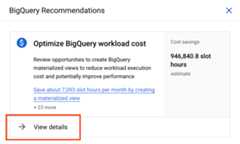
TheBigQuery Recommendations pane opens. UnderOptimize BigQuery workload cost,clickView details.
A recommendation list appears, showing all recommendations generated forthe current project. To see more information about a specific materializedview recommendation or table insight, clickDetails.
Alternatively, you can view all recommendations available for your projector organization by clickingRecommendations in the navigation menu.
gcloud
To view materialized view recommendations for a specific project, usethegcloud recommender recommendations list command:
gcloud recommender recommendations list \ --project=PROJECT_NAME \ --location=REGION_NAME \ --recommender=google.bigquery.materializedview.Recommender \ --format=FORMAT_TYPE \
Replace the following:
PROJECT_NAME: the name of the project thatexecutes query jobsREGION_NAME: the region in which query jobs areexecutedFORMAT_TYPE: a supportedgcloud CLI output format—forexample, JSON
| Property | Relevant for subtype | Description |
|---|---|---|
recommenderSubtype | CREATE_MATERIALIZED_VIEW | The type of recommendation. |
content.overview.sql | CREATE_MATERIALIZED_VIEW | Suggested DDL statement that creates a materialized view. |
content.overview.slotMsSavedMonthly | CREATE_MATERIALIZED_VIEW | Estimated slot milliseconds to be saved monthly by suggested view. |
content.overview.bytesSavedMonthly | CREATE_MATERIALIZED_VIEW | Estimated bytes scanned to be saved monthly by suggested view. |
content.overview.baseTables | CREATE_MATERIALIZED_VIEW | Reserved for future use. |
- For more information about other fields in the
recommendationsresponse, seeREST Resource:projects.locations.recommenders.recommendation. - For more information about using the Recommender API, seeUsing the API - Recommendations.
To view insights that prompted materialized view recommendationsusing the gcloud CLI, use thegcloud recommender insights list command:
gcloud recommender insights list \ --project=PROJECT_NAME \ --location=REGION_NAME \ --insight-type=google.bigquery.materializedview.Insight \ --format=FORMAT_TYPE \
Replace the following:
PROJECT_NAME: the name of the project thatexecutes query jobsREGION_NAME: the region in which query jobs areexecutedFORMAT_TYPE: a supportedgcloud CLI output format—forexample, JSON
| Property | Relevant for subtype | Description |
|---|---|---|
content.queryCount | CREATE_MATERIALIZED_VIEW | Number of queries in the observation period with repetitive pattern that can be optimized using materialized view. |
- For more information about other fields in the insights response, seeREST Resource:
projects.locations.insightTypes.insights. - For more information about using insights, seeUsing the API - Insights.
REST API
To view materialized view recommendations for a specific project,use the REST API. With each command, you must provide an authenticationtoken, which you can get using the gcloud CLI. For moreinformation about getting an authentication token, seeMethods for getting an ID token.
You can use thecurl list request to view all recommendations for aspecific project:
$ curl-H "Authorization: Bearer $(gcloud auth print-access-token)"-H "x-goog-user-project:PROJECT_NAME" https://recommender.googleapis.com/v1/projects/PROJECT_NAME/locations/LOCATION/recommenders/google.bigquery.materializedview.Recommender/recommendations
Replace the following:
PROJECT_NAME: the name of the projectcontaining your BigQuery tableLOCATION: the location where the project islocated.
| Property | Relevant for subtype | Description |
|---|---|---|
recommenderSubtype | CREATE_MATERIALIZED_VIEW | The type of recommendation. |
content.overview.sql | CREATE_MATERIALIZED_VIEW | Suggested DDL statement that creates a materialized view. |
content.overview.slotMsSavedMonthly | CREATE_MATERIALIZED_VIEW | Estimated slot milliseconds to be saved monthly by suggested view. |
content.overview.bytesSavedMonthly | CREATE_MATERIALIZED_VIEW | Estimated bytes scanned to be saved monthly by suggested view. |
content.overview.baseTables | CREATE_MATERIALIZED_VIEW | Reserved for future use. |
- For more information about other fields in the
recommendationsresponse, seeREST Resource:projects.locations.recommenders.recommendation. - For more information about using the Recommender API, seeUsing the API - Recommendations.
To view insights that prompted materialized view recommendations using RESTAPI run the following command:
$ curl-H "Authorization: Bearer $(gcloud auth print-access-token)"-H "x-goog-user-project:PROJECT_NAME" https://recommender.googleapis.com/v1/projects/PROJECT_NAME/locations/LOCATION/insightTypes/google.bigquery.materializedview.Insight/insights
Replace the following:
PROJECT_NAME: the name of the projectcontaining your BigQuery tableLOCATION: the location where the project islocated.
| Property | Relevant for subtype | Description |
|---|---|---|
content.queryCount | CREATE_MATERIALIZED_VIEW | Number of queries in the observation period with repetitive pattern that can be optimized using materialized view. |
- For more information about other fields in the insights response, seeREST Resource:
projects.locations.insightTypes.insights. - For more information about using insights, seeUsing the API - Insights.
View recommendations withINFORMATION_SCHEMA
You can also view your recommendations and insights usingINFORMATION_SCHEMAviews. For example, you can use theINFORMATION_SCHEMA.RECOMMENDATIONS view toview your top three recommendations based on slots savings, as seen in thefollowing example:
SELECTrecommender,target_resources,LAX_INT64(additional_details.overview.bytesSavedMonthly)/POW(1024,3)asest_gb_saved_monthly,LAX_INT64(additional_details.overview.slotMsSavedMonthly)/(1000*3600)asslot_hours_saved_monthly,last_updated_timeFROM`region-us`.INFORMATION_SCHEMA.RECOMMENDATIONSWHEREprimary_impact.category='COST'ANDstate='ACTIVE'ORDERbyslot_hours_saved_monthlyDESCLIMIT3;INFORMATION_SCHEMA view names are case sensitive.The result is similar to the following:
+---------------------------------------------------+--------------------------------------------------------------------------------------------------+| recommender | target_resources | est_gb_saved_monthly | slot_hours_saved_monthly | last_updated_time+---------------------------------------------------+--------------------------------------------------------------------------------------------------+| google.bigquery.materializedview.Recommender | ["project_resource"] | 140805.38289248943 | 9613.139166666666 | 2024-07-01 13:00:00| google.bigquery.table.PartitionClusterRecommender | ["table_resource_1"] | 4393.7416711859405 | 56.61476777777777 | 2024-07-01 13:00:00| google.bigquery.table.PartitionClusterRecommender | ["table_resource_2"] | 3934.07264107652 | 10.499466666666667 | 2024-07-01 13:00:00+---------------------------------------------------+--------------------------------------------------------------------------------------------------+
For more information, see the following resources:
INFORMATION_SCHEMA.RECOMMENDATIONSviewINFORMATION_SCHEMA.RECOMMENDATIONS_BY_ORGANIZATIONviewINFORMATION_SCHEMA.INSIGHTSview
Apply materialized view recommendations
You can apply a recommendation to create a materialized view by executing thesuggestedCREATE MATERIALIZED VIEW type DDL statement in the Google Cloud console.
CREATE MATERIALIZED VIEW DDL statement, youmust have therequired permissionsin all the following locations:- The query project
- The dataset containing the source tables
- The dataset containing the materialized view
In the Google Cloud console, go to theBigQuery page.
In the navigation menu, clickRecommendations.
TheBigQuery Recommendations pane opens. UnderOptimize BigQuery workload cost,clickView details.
A recommendation list appears, showing all recommendations generated forthe current project or organization, depending on the selected scope. Locate amaterialized view recommendation and clickDetails.
ClickView in BigQuery Studio. A SQL editor opens containing a
CREATE MATERIALIZED VIEWDDL statement.In the provided
CREATE MATERIALIZED VIEWstatement, modify theMATERIALIZED_VIEWplaceholder with a unique materialized view name.Run the
CREATE MATERIALIZED VIEWDDL statement to create a recommendedmaterialized view.
Troubleshoot recommendation issues
Issue: No recommendations appear for a specific table.
Materialized view recommendations might not appear under the followingcircumstances:
- There aren't any recurring query patterns found among query jobs executed by aproject.
- Recurring query patterns don't satisfylimitations for incremental materialized viewsand cannot be put into a materialized view suitable for smart tuning.
- Potential materialized view would have a high maintenance cost. For example,source tables are often modified by data manipulation language (DML)operations, and therefore a materialized view would undergo full refresh,incurring further costs.
- There is an insufficient number of queries that have a common recurringpattern.
- The estimated monthly savings is too insignificant (less than 1 slot).
- Query jobs executed by the project already use materialized views.
Pricing
There is no cost or adverse impact on workload performance when you viewrecommendations.
When you apply recommendations by creating materialized views, you can incurstorage, maintenance, and querying costs. For more information, seeMaterialized Views Pricing.
Except as otherwise noted, the content of this page is licensed under theCreative Commons Attribution 4.0 License, and code samples are licensed under theApache 2.0 License. For details, see theGoogle Developers Site Policies. Java is a registered trademark of Oracle and/or its affiliates.
Last updated 2025-12-15 UTC.