

Use BigQuery DataFrames in dbt
dbt (data build tool) is an open-source command-lineframework engineered for data transformation within modern data warehouses. dbtfacilitates modular data transformations through the creation of reusable SQLand Python based models. The tool orchestrates the execution of thesetransformations within the target data warehouse, focusing on the transformationstep of the ELT pipeline. For more information, see thedbt documentation.
In dbt, a Python model is a data transformation that is defined and executedusing Python code within your dbt project. Instead of writing SQL for thetransformation logic, you write Python scripts that dbt then orchestrates to runwithin the data warehouse environment. A Python model lets you perform datatransformations that might be complex or inefficient to express in SQL.This leverages the capabilities of Python while still benefiting from dbt'sproject structure, orchestration, dependency management, testing, anddocumentation features. For more information, seePython models.
Thedbt-bigquery adaptersupports running Python code that's defined inBigQuery DataFrames. This feature is available indbt Cloud anddbt Core.You can also get this feature by cloning the latest version of thedbt-bigquery adapter.
Before you begin
To use thedbt-bigquery adapter, enable the following APIs in your project:
- BigQuery API (
bigquery.googleapis.com) - Cloud Storage API (
storage.googleapis.com) - Compute Engine API (
compute.googleapis.com) - Dataform API (
dataform.googleapis.com) - Identity and Access Management API (
iam.googleapis.com) - Vertex AI API (
aiplatform.googleapis.com)
Roles required to enable APIs
To enable APIs, you need the Service Usage Admin IAM role (roles/serviceusage.serviceUsageAdmin), which contains theserviceusage.services.enable permission.Learn how to grant roles.
Required roles
Thedbt-bigquery adapter supports OAuth-based and service account-basedauthentication.
If you plan to authenticate to thedbt-bigquery adapter using OAuth, ask youradministrator to grant you the following roles:
- BigQuery User role(
roles/bigquery.user) on the project - BigQuery Data Editor role(
roles/bigquery.dataEditor) on the project or the dataset where tables aresaved - Colab Enterprise User role(
roles/colabEnterprise.user) on the project - Storage Admin role(
roles/storage.admin) on the staging Cloud Storage bucket for stagingcode and logs
If you plan to authenticate to thedbt-bigquery adapter using a serviceaccount, ask your administrator to grant the following roles to the serviceaccount you plan to use:
- BigQuery User role(
roles/bigquery.user) - BigQuery Data Editor role(
roles/bigquery.dataEditor) - Colab Enterprise User role(
roles/colabEnterprise.user) - Storage Admin role(
roles/storage.admin)
If you're authenticating using a service account, also ensure you have theService Account User role(roles/iam.serviceAccountUser) granted for the service account you plan to use.
If you're using Colab Enterprise in a Shared VPC environment,ask your administrator to grant the following roles and permissions:
compute.subnetworks.usepermission: Grant this permission to theservice account used by the Colab Enterprise runtime on the hostproject or specific subnets. This permission is included in theCompute Network User role(roles/compute.networkUser).compute.subnetworks.getpermission: Grant this permission to theservice account used by the Colab Enterprise runtime on the host project or specific subnets. This permission is included in theCompute Network Viewer role(roles/compute.networkViewer).Compute Network User role(
roles/compute.networkUser): Grant this role to the Vertex AI serviceagent,service-PROJECT_NUMBER@gcp-sa-aiplatform.iam.gserviceaccount.com,on the Shared VPC host project.Compute Network User role(
roles/compute.networkUser): If the notebook execution job feature is beingused, grant this role to the Colab Enterprise service agent,service-PROJECT_NUMBER@gcp-sa-vertex-nb.iam.gserviceaccount.com,on the Shared VPC host project.
For more information about granting roles, seeManage access to projects, folders, and organizations.
You might also be able to get the required permissions throughcustom rolesor otherpredefined roles.
Python execution environment
Thedbt-bigquery adapter utilizes theColab Enterprise notebook executor serviceto run the BigQuery DataFrames Python code. AColab Enterprise notebook is automatically created and executedby thedbt-bigquery adapter for every Python model. You can choose theGoogle Cloud project to execute the notebook in. The notebook executes the Pythoncode from the model, which is converted into BigQuery SQL by theBigQuery DataFrames library. The BigQuery SQL is thenexecuted in the configured project. The following diagram presents the controlflow:
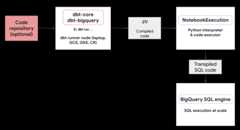
If there isn't a notebook template already available in the project and the userexecuting the code has the permissions to create the template, thedbt-bigqueryadapter automatically creates and uses the default notebook template. You canalso specify a different notebook template using adbt configuration.
Notebook execution requires a staging Cloud Storage bucket to store the codeand logs. However, thedbt-bigquery adapter copies the logs out to thedbt logs, so you don't haveto look through the bucket.
Supported features
Thedbt-bigquery adapter supports the following capabilities for dbt Pythonmodels running BigQuery DataFrames:
- Loading data from an existing BigQuery table with the
dbt.source()macro. - Loading data from other dbt models with the
dbt.ref()macro to builddependencies and create directed acyclic graphs (DAGs) with Python models. - Specifying and using Python packages from PyPi that can be used with Pythoncode execution. For more information, seeConfigurations.
- Specifying a custom notebook runtime template for yourBigQuery DataFrames models.
Thedbt-bigquery adapter supports the followingmaterialization strategies:
- Table materialization, where data is rebuilt as a table on each run.
- Incremental materialization with a merge strategy, where new or updateddata is added to an existing table, often using a merge strategy tohandle changes.
Setting up dbt to use BigQuery DataFrames
If you're usingdbt Core,you need to use aprofiles.yml file for usage with BigQuery DataFrames.The following example uses theoauth method:
your_project_name:outputs:dev:compute_region:us-central1dataset:your_bq_datesetgcs_bucket:your_gcs_bucketjob_execution_timeout_seconds:300job_retries:1location:USmethod:oauthpriority:interactiveproject:your_gcp_projectthreads:1type:bigquerytarget:devIf you're usingdbt Cloud,you canconnect to your data platformdirectly in the dbt Cloud interface. In this scenario, you don't need aprofiles.yml file. For more information, seeAbout profiles.yml
This is an example of a project-level configuration for thedbt_project.ymlfile:
# Name your project! Project names should contain only lowercase characters# and underscores. A good package name should reflect your organization's# name or the intended use of these models.name:'your_project_name'version:'1.0.0'# Configuring models# Full documentation: https://docs.getdbt.com/docs/configuring-models# In this example config, we tell dbt to build all models in the example/# directory as views. These settings can be overridden in the individual model# files using the config(...) macro.models:your_project_name:submission_method:bigframesnotebook_template_id:7018811640745295872packages:["scikit-learn","mlflow"]timeout:3000# Config indicated by + and applies to all files under models/example/example:+materialized:viewSome parameters can also be configured using thedbt.config methodwithin your Python code. If these settings conflict with yourdbt_project.yml file, the configurations withdbt.config will takeprecedence.
For more information, seeModel configurations anddbt_project.yml.
Configurations
You can set up the following configurations using thedbt.config method inyour Python model. These configurations override the project-levelconfiguration.
| Configuration | Required | Usage |
|---|---|---|
submission_method | Yes | submission_method=bigframes |
notebook_template_id | No | If not specified, then a default template is created and used. |
packages | No | Specify the additional list of Python packages, if required. |
timeout | No | Optional: Extend the job execution timeout. |
Example Python models
The following sections present example scenarios and Python models.
Loading data from a BigQuery table
To use data from an existing BigQuery table as a source in yourPython model, you first define this source in a YAML file. The followingexample is defined in asource.yml file.
version:2sources:-name:my_project_source# A custom name for this source groupdatabase:bigframes-dev# Your Google Cloud project IDschema:yyy_test_us# The BigQuery dataset containing the tabletables:-name:dev_sql1# The name of your BigQuery tableThen, you build your Python model, which can use the data sources configured inthis YAML file:
defmodel(dbt,session):# Configure the model to use BigFrames for submissiondbt.config(submission_method="bigframes")# Load data from the 'dev_sql1' table within 'my_project_source'source_data=dbt.source('my_project_source','dev_sql1')# Example transformation: Create a new column 'id_new'source_data['id_new']=source_data['id']*10returnsource_dataReferencing another model
You can build models that depend on the output of other dbt models, as shown inthe following example. This is useful for creating modular data pipelines.
defmodel(dbt,session):# Configure the model to use BigFramesdbt.config(submission_method="bigframes")# Reference another dbt model named 'dev_sql1'.# It assumes you have a model defined in 'dev_sql1.sql' or 'dev_sql1.py'.df_from_sql=dbt.ref("dev_sql1")# Example transformation on the data from the referenced modeldf_from_sql['id']=df_from_sql['id']*100returndf_from_sqlSpecifying a package dependency
If your Python model requires specific third-party libraries likeMLflow orBoto3,you can declare the package in the model's configuration, as shown in thefollowing example. These packages are installed in the execution environment.
defmodel(dbt,session):# Configure the model for BigFrames and specify required packagesdbt.config(submission_method="bigframes",packages=["mlflow","boto3"]# List the packages your model needs)# Import the specified packages for use in your modelimportmlflowimportboto3# Example: Create a DataFrame showing the versions of the imported packagesdata={"mlflow_version":[mlflow.__version__],"boto3_version":[boto3.__version__],"note":["This demonstrates accessing package versions after import."]}bdf=bpd.DataFrame(data)returnbdfSpecifying a non-default template
For more control over the execution environment or to use pre-configuredsettings, you can specify a non-default notebook template for yourBigQuery DataFrames model, as shown in the following example.
defmodel(dbt,session):dbt.config(submission_method="bigframes",# ID of your pre-created notebook templatenotebook_template_id="857350349023451yyyy",)data={"int":[1,2,3],"str":['a','b','c']}returnbpd.DataFrame(data=data)Materializing the tables
When dbt runs your Python models, it needs to know how to save the results inyour data warehouse. This is calledmaterialization.
For standard table materialization, dbt creates or fully replaces a table inyour warehouse with the output of your model each time it runs. This is doneby default, or by explicitly setting thematerialized='table' property, asshown in the following example.
defmodel(dbt,session):dbt.config(submission_method="bigframes",# Instructs dbt to create/replace this model as a tablematerialized='table',)data={"int_column":[1,2],"str_column":['a','b']}returnbpd.DataFrame(data=data)Incremental materialization with a merge strategy allows dbt to update yourtable with only new or modified rows. This is useful for large datasetsbecause completely rebuilding a table every time can be inefficient. The mergestrategy is a common way to handle these updates.
This approach intelligently integrates changes by doing the following:
- Updating existing rows that have changed.
- Adding new rows.
- Optional, depending on the configuration: Deleting rows that are no longerpresent in the source.
To use the merge strategy, you need to specify aunique_key property thatdbt can use to identify the matching rows between your model's output and theexisting table, as shown in the following example.
defmodel(dbt,session):dbt.config(submission_method="bigframes",materialized='incremental',incremental_strategy='merge',unique_key='int',# Specifies the column to identify unique rows)# In this example:# - Row with 'int' value 1 remains unchanged.# - Row with 'int' value 2 has been updated.# - Row with 'int' value 4 is a new addition.# The 'merge' strategy will ensure that only the updated row ('int 2')# and the new row ('int 4') are processed and integrated into the table.data={"int":[1,2,4],"str":['a','bbbb','d']}returnbpd.DataFrame(data=data)Troubleshooting
You can observe the Python execution in the dbt logs.
Additionally, you can view the code and the logs (including previous executions)in theColab Enterprise Executions page.
Go to Colab Enterprise Executions
Billing
When using thedbt-bigquery adapter with BigQuery DataFrames,there are Google Cloud charges from the following:
Notebook execution: You are charged for the notebook runtimeexecution. For more information, seeNotebook runtime pricing.
BigQuery query execution: In the notebook,BigQuery DataFrames converts Python to SQL and executes the code inBigQuery. You are charged according to your projectconfiguration and your query, as described for BigQuery DataFramespricing.
You can use the following billing label in the BigQuery billingconsole to filter out the billing report for notebook execution and for theBigQuery executions triggered by thedbt-bigquery adapter:
- BigQuery execution label:
bigframes-dbt-api
What's next
- To learn more about dbt and BigQuery DataFrames, seeUsing BigQuery DataFrames with dbt Python models.
- To learn more about dbt Python models, seePython models andPython model configuration.
- To learn more about Colab Enterprise notebooks, seeCreate a Colab Enterprise notebook by using the Google Cloud console.
- To learn more about Google Cloud partners, seeGoogle Cloud Ready - BigQuery Partners.
Except as otherwise noted, the content of this page is licensed under theCreative Commons Attribution 4.0 License, and code samples are licensed under theApache 2.0 License. For details, see theGoogle Developers Site Policies. Java is a registered trademark of Oracle and/or its affiliates.
Last updated 2026-02-19 UTC.