

Share sensitive data with data clean rooms
Data clean rooms provide a security-enhanced environment in which multipleparties can share, join, and analyze their data assets without moving orrevealing the underlying data.
BigQuery data clean rooms are built on the BigQuery sharing(formerly Analytics Hub) platform. While standardBigQuery sharing data exchangesprovide a way to share data across organizational boundaries at scale, dataclean rooms help you address sensitive and protected data-sharing use cases.Data clean rooms provide additional security controls to help protect theunderlying data and enforceanalysis rulesthat the data owner defines.
The following are primary use cases:
- Campaign planning and audience insights. Let two parties (such assellers and buyers) mix first-party data and improve data enrichment in aprivacy-centric way.
- Measurement and attribution. Match customer and media performance data tobetter understand the effectiveness of marketing efforts and make moreinformed business decisions.
- Activation. Combine customer data with data from other parties to enrichunderstanding of customers, enabling improved segmentation capabilities andmore effective media activation.
There are also several data clean room use cases beyond the marketing industry:
- Retail and consumer packaged goods (CPG). Optimize marketing andpromotional activities by combining point-of-sale data from retailers andmarketing data from CPG companies.
- Financial services. Improve fraud detection by combining sensitive datafrom other financial and government agencies. Build credit risk scoring byaggregating customer data across multiple banks.
- Healthcare. Share data between doctors and pharmaceutical researchers tolearn how patients are reacting to treatments.
- Supply chain, logistics, and transportation. Combine data from suppliersand marketers to get a complete picture of how products perform throughouttheir lifecycle.
Roles
There are three main roles in BigQuery data clean rooms:
- Data clean room owner: a user that manages permissions, visibility, andmembership of one or more data clean rooms within a project. This role isanalogous to theAnalytics Hub Admin IAM role.
- Data contributor: a user that is assigned by the data clean room ownerto publish data to a data clean room. In many cases, a data clean room owneris also a data contributor. This role is analogous to theAnalytics Hub Publisher IAM role.
- Data clean room subscriber: a user that is assigned by the data clean roomowner to subscribe to the data published in a data clean room, letting themrun queries on the data. This role is analogous to a combination of theAnalytics Hub SubscriberandAnalytics Hub Subscription Owner IAM roles.
Architecture
BigQuery data clean rooms are built on a publish and subscribemodel of BigQuery data. BigQuery architectureprovides a separation between compute and storage, enabling data contributors toshare data without having to make multiple copies of the data. The followingimage is an overview of the BigQuery data clean roomarchitecture:
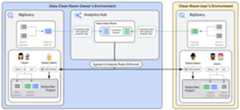
Data clean room
Adata clean room is an environment to share sensitive data where raw accessis prevented and query restrictions are enforced. Only users or groups that areadded as data clean room subscribers can subscribe to the shared data. Dataclean room owners can create as many data clean rooms as they want inBigQuery sharing.
Shared resources
Ashared resource is the unit of data sharing in a data clean room. Theresource must be a BigQuery table, view, or routine(table-valued function). As a data contributor, you create or use an existingBigQuery resource in your project that you want to share withyour data clean room subscribers.
Listings
Alisting is created when a data contributor adds data into a data clean room.It contains a reference to the data contributor's shared resource along withdescriptive information that helps subscribers use the data. Asa data contributor, you can create a listing and include information such as adescription, sample queries, and links to documentation for your subscribers.
Linked datasets
Alinked dataset is a read-only BigQuery dataset that serves asa symbolic link to all data in a data clean room. When data clean roomsubscribers query resources in a linked dataset, data from the shared resourcesis returned, satisfying analysis rules set by the data contributor. As asubscriber, a linked dataset is created inside your project when you subscribe toa data clean room. No copy of the data is created, and subscribers can't seecertain metadata, such as view definitions.
Analysis rules
As a data contributor, you configureanalysis rules on the resourcesthat you share in the data clean room.Analysis rules prevent raw access tounderlying data and enforce query restrictions. For example, data clean roomssupport theaggregation threshold analysis rule,which lets data clean room subscribers analyze data only through aggregationqueries.
Data egress controls
Data egress controlsare automatically enabled to help prevent data clean room subscribers fromcopying and exporting raw data from a data clean room. Data contributors canconfigure additional controls to help prevent the copy and export of queryresults that are obtained by the subscribers.
Query templates
Query templates(Preview) let dataclean room owners and BigQuery sharing publishers share predefined querieswithout sharing the underlying resources of tables and views.
Predefined queries usetable-valued functions (TVFs) inBigQuery to allow an entire table or specific fields to be passedas input parameters and return a table as the output.
Warning: Allowing data clean room subscribers to run arbitrary queries in yourdata clean rooms can create security vulnerabilities. To mitigate these risks andenhance data security, use query templates.Limitations
BigQuery data clean rooms have the following limitations:
- You can setanalysis rules only on views,not on tables or materialized views. Due to this limitation, if a datacontributor directly shares tables or materialized views (or views withoutanalysis rules) into a data clean room, then data clean room subscribers haveraw access to the data in those resources.
- As data clean rooms are built on the BigQuery sharing platform, allBigQuery sharing limitationsapply.
- Data clean rooms are only available inBigQuery sharing regions.
- As a data clean room subscriber, you can't search for shared resources inDataplex Universal Catalog or Data Catalog.
- As a data clean room subscriber, you can't query
INFORMATION_SCHEMAviews onlinked datasets. - As a data contributor, you can't publish an entire dataset directly to a dataclean room.
- As a data contributor, you can't publish models or routines (outside of querytemplates) to a data clean room.
- You can add a maximum of 100 shared resources to a data clean room. If youneed to increase this limit, contactbq-dcr-feedback@google.com.
- Listings for multiple regions (Preview)aren't supported in data clean rooms.
Before you begin
Grant Identity and Access Management (IAM) roles that give users the necessary permissionsto perform each task in this document, enable the Analytics Hub API, and assignthe Analytics Hub Admin role to your data clean room owner.
Required permissions
To get the permissions that you need to use data clean rooms, ask your administrator to grant you theBigQuery Data Editor (roles/bigquery.dataEditor) IAM role. For more information about granting roles, seeManage access to projects, folders, and organizations.
This predefined role contains the permissions required to use data clean rooms. To see the exact permissions that are required, expand theRequired permissions section:
Required permissions
The following permissions are required to use data clean rooms:
serviceUsage.services.getserviceUsage.services.listserviceUsage.services.enable
You might also be able to get these permissions withcustom roles or otherpredefined roles.
For more information about IAM roles and permissions inBigQuery, seeIntroduction to IAM.
Enable the Analytics Hub API
To enable the Analytics Hub API, select one of the followingoptions:
Console
Go to theAnalytics Hub API page and enable the Analytics Hub API foryour Google Cloud project.
bq
Run thegcloud services enable command:
gcloudservicesenableanalyticshub.googleapis.comAfter you enable the Analytics Hub API, you can access theSharing (Analytics Hub) page.
Assign the Analytics Hub Admin role
Your data clean room owner, who is the user who will create the data cleanroom, must have theAnalytics Hub Admin role(roles/analyticshub.admin).To learn how to grant this role to other users, seeCreate BigQuery sharing administrators.
Data clean room owner workflows
As a data clean room owner, you can do the following:
- Create a data clean room.
- Update data clean room properties.
- Delete a data clean room.
- Manage data contributors.
- Manage data clean room subscribers.
- Share a data clean room.
Additional data clean room owner permissions
You must have the Analytics Hub Admin role (roles/analyticshub.admin) on yourproject to perform data clean room owner tasks. This role can also be assignedat the folder or organization level, if applicable.
Create a data clean room
Console
In the Google Cloud console, go to theSharing (Analytics Hub) page.
ClickCreate clean room.
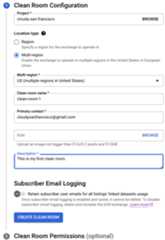
ForProject, select the project for the data clean room. TheAnalytics Hub API must be enabled for the project.
Specify the location, name, primary contact, icon (optional), anddescription for the data clean room. Only resources that are in the sameregion as the data clean room can be listed in the data clean room.
Optional: To log theprincipal identifiersof all users running jobs and queries on linked datasets, clicktheSubscriber Email Logging toggle. The logged data isavailable in the
Note: Once you enable and save email logging, this setting cannot beedited. To disable email logging, delete the data clean room and recreateit without clicking theSubscriber Email Logging toggle.job_principal_subjectfield of theINFORMATION_SCHEMA.SHARED_DATASET_USAGEview.ClickCreate clean room.
Optional: In theClean Room Permissions section, add other data cleanroom owners, data contributors, or data clean room subscribers.
API
Use theprojects.locations.dataExchanges.create methodand set thesharing environmenttodcrExchangeConfig.
The following example shows how to call theprojects.locations.dataExchanges.create method using thecurl command:
curl-H"Authorization: Bearer$(gcloudauthprint-access-token)"-H"Content-Type: application/json"-L-XPOSThttps://analyticshub.googleapis.com/v1/projects/PROJECT_ID/locations/LOCATION/dataExchanges?data_exchange_id=CLEAN_ROOM_ID-d'{ display_name: "CLEAN_ROOM_NAME", sharing_environment_config: {dcr_exchange_config: {}} }'
Replace the following:
PROJECT_ID: your project IDLOCATION: the location of the data clean roomCLEAN_ROOM_ID: your data clean room IDCLEAN_ROOM_NAME: the display name of your data clean room
In the body of the request, provide thedata exchange details.
If the request is successful, the response body contains the details of thedata clean room.
If you enable subscriber email logging with thelogLinkedDatasetQueryUserEmail field, the data exchange response containslog_linked_dataset_query_user_email: true. The logged data isavailable in thejob_principal_subject field of theINFORMATION_SCHEMA.SHARED_DATASET_USAGE view.
Update a data clean room
Console
In the Google Cloud console, go to theSharing (Analytics Hub) page.
Click the display name of the data clean room that you want to update.
In theDetails tab, clickEdit clean room details.
Update the data clean room name, primary contact, icon, description, orsubscriber email logging setting as needed.
Note: Once you enable and save email logging, this setting cannot beedited. To disable email logging, delete the data clean room and recreateit without clicking theSubscriber Email Logging toggle.ClickSave.
API
Use theprojects.locations.dataExchanges.patch methodand set thesharing environmenttodcrExchangeConfig.
The following example shows how to call theprojects.locations.dataExchanges.patch method using thecurl command:
curl-H"Authorization: Bearer$(gcloudauthprint-access-token)"-H"Content-Type: application/json"-L-XPATCHhttps://analyticshub.googleapis.com/v1/projects/PROJECT_ID/locations/LOCATION/dataExchanges/CLEAN_ROOM_ID?updateMask=UPDATEMASK-d'{ display_name: "CLEAN_ROOM_NAME", sharing_environment_config: {dcr_exchange_config: {}}}'
Replace the following:
PROJECT_ID: your project IDLOCATION: the location of the data clean roomCLEAN_ROOM_ID: your data clean room IDCLEAN_ROOM_NAME: the display name of your data clean room
ReplaceUPDATEMASK with the list of fields that youwant to update. To update multiple values, use a comma-separated list. Forexample, to update the display name and primary contact for a data exchange,enterdisplayName,primaryContact.
In the body of the request, specify updated values for the followingfields:
displayNamedescriptionprimaryContactdocumentationicondiscoveryTypelogLinkedDatasetQueryUserEmail
For details on these fields, seeResource: DataExchange.
Delete a data clean room
Console
In the Google Cloud console, go to theSharing (Analytics Hub) page.
In the row of the data clean room that you want to delete, clickMore actions> Delete.
To confirm, enter
delete, and then clickDelete. You can't undo thisaction.
API
Use theprojects.locations.dataExchanges.delete methodand set thesharing environmenttodcrExchangeConfig.
The following example shows how to call theprojects.locations.dataExchanges.delete method using thecurl command:
curl-H"Authorization: Bearer$(gcloudauthprint-access-token)"-H"Content-Type: application/json"-L-XDELETEhttps://analyticshub.googleapis.com/v1/projects/PROJECT_ID/locations/LOCATION/dataExchanges?data_exchange_id=CLEAN_ROOM_ID
Replace the following:
PROJECT_ID: your project IDLOCATION: the location of the data clean roomCLEAN_ROOM_ID: your data clean room IDCLEAN_ROOM_NAME: the display name of your data clean room
When you delete a data clean room, all the listings within it are deleted.However, the shared resources and linked datasets are not deleted. The linkeddatasets are unlinked from the source datasets, so querying resources in thedata clean room starts to fail for data clean room subscribers.
Manage data contributors
As a data clean room owner, you manage which users can add data to your dataclean rooms (your data contributors). To let a user add data to a dataclean room, grant them theAnalytics Hub Publisher role(roles/analyticshub.publisher) on a specific data clean room:
Console
In the Google Cloud console, go to theSharing (Analytics Hub) page.
Click the display name of the data clean room that you want to grantpermissions to.
In theDetails tab, clickSet permissions.
ClickAdd principal.
ForNew principals, enter the usernames or emails of the datacontributors that you're adding.
ForSelect a role, selectAnalytics Hub> Analytics Hub Publisher.
ClickSave.
You can delete and update data contributors at any time by clickingSet Permissions.
API
Use theprojects.locations.dataExchanges.setIamPolicy method.
The following example shows how to call theprojects.locations.dataExchanges.setIamPolicy method using thecurl command:
curl-H"Authorization: Bearer$(gcloudauthprint-access-token)"-H"Content-Type: application/json"-L-XPOSThttps://analyticshub.googleapis.com/v1/projects/PROJECT_ID/locations/LOCATION/dataExchanges/CLEAN_ROOM_ID:setIamPolicy-d'{ "policy": { "bindings": [ { "members": [ "my-service-account@my-project.iam.gserviceaccount.com" ], "role": "roles/analyticshub.publisher" } ] }}'
The policy in the request body should conform to the structure of aPolicy.
You can grant the Analytics Hub Publisher role (roles/analyticshub.publisher)for an entire project from theIAM page,which gives a user permission to add data to any data clean room in a project.However, we don't recommend this action, as it might result in users havingoverly permissive access.
Manage data clean room subscribers
As a data clean room owner, you manage which users can subscribe to your dataclean rooms (your subscribers). To allow a user to subscribe to a data cleanroom, grant them theAnalytics Hub Subscriber(roles/analyticshub.subscriber) andAnalytics Hub Subscription Owner(roles/analyticshub.subscriptionOwner) roles on a specific data clean room:
Console
In the Google Cloud console, go to theSharing (Analytics Hub) page.
Click the display name of the data clean room that you want to grantpermissions to.
In theDetails tab, clickSet permissions.
ClickAdd principal.
ForNew principals, enter the usernames or emails of the data cleanroom subscribers that you're adding.
ForSelect a role, selectAnalytics Hub> Analytics Hub Subscriber.
ClickAdd another role.
ForSelect a role, selectAnalytics Hub> Analytics Hub Subscription Owner.
ClickSave.
You can delete and update subscribers at any time by clickingSet Permissions.
API
Use theprojects.locations.dataExchanges.setIamPolicy method.
The following example shows how to call theprojects.locations.dataExchanges.setIamPolicy method using thecurl command:
curl-H"Authorization: Bearer$(gcloudauthprint-access-token)"-H"Content-Type: application/json"-L-XPOSThttps://analyticshub.googleapis.com/v1/projects/PROJECT_ID/locations/LOCATION/dataExchanges/CLEAN_ROOM_ID:setIamPolicy-d'{ "policy": { "bindings": [ { "members": [ "user:mike@example.com" ], "role": "roles/analyticshub.subscriptionOwner" }, { "members": [ "user:mike@example.com" ], "role": "roles/analyticshub.subscriber" } ] }}'
The policy in the request body should conform to the structure of aPolicy.
You can grant the Analytics Hub Subscriber (roles/analyticshub.subscriber) andAnalytics Hub Subscription Owner (roles/analyticshub.subscriptionOwner)roles for an entire project from theIAM page, which gives a userpermission to subscribe to any data clean room in a project. However, we don'trecommend this action, as it might result in users having overly permissiveaccess.
Share a data clean room
You can directly share a data clean room with subscribers:
In the Google Cloud console, go to theSharing (Analytics Hub) page.
In the row of the data clean room that you want to share, clickMore actions> Copy share link.
Share the copied link with data clean room subscribers to let them view andsubscribe to the data clean room.
Data contributor workflows
As a data contributor, you can do the following:
- Add data to a data clean room by creating a listing.
- Update a listing.
- Delete a listing.
- Share a data clean room.
- Monitor listings.
Additional data contributor permissions
To perform data contributor tasks, you must have theAnalytics Hub Publisher role(roles/analyticshub.publisher) on a data clean room.
In addition, you need thebigquery.datasets.link permission for the datasetsthat contain the resources that you want to list in a data clean room. You alsoneed theresourcemanager.organization.get permission if you want to view dataclean rooms in your organization that are not in your current project.
Create a listing (add data)
Note: If your collaboration environment requires common identifiers to joindata across data contributor and data clean room subscriber datasets, configureanentity resolutionbefore following these steps.To prepare data withanalysis rules andpublish to a data clean room as a listing, do the following:
Console
In the Google Cloud console, go to theSharing (Analytics Hub) page.
Click the display name of the data clean room that you want to create alisting in.
If you're in a different organization than your data clean room owner andthe data clean room is not visible to you, ask the data clean room owner fora direct link.
ClickAdd data.
ForSelect dataset andTable/view name, enter the table or view thatyou want to list in the data clean room and its corresponding dataset. Youwill add analysis rules to prevent raw access to this underlying data in afew steps.
Select the columns of your resource that you want to publish.
Set the view name, primary contact, and description (optional) for thelisting.
ClickNext.
Choose an analysis rule for your listing and configure the details.
Setdata egresscontrols for the listing.
ClickNext.
Review the data and analysis rule that you're adding to the data cleanroom.
ClickAdd data. A view is created for your data and is added as alisting to the data clean room. The source table or view itself isn't added.
API
Use theprojects.locations.dataExchanges.listings.create method.
The following example shows how to call theprojects.locations.dataExchanges.listings.create method using thecurl command:
curl-H"Authorization: Bearer$(gcloudauthprint-access-token)"-H"Content-Type: application/json"-H'x-goog-user-project:DCR_PROJECT_ID'-XPOSThttps://analyticshub.googleapis.com/v1/projects/DCR_PROJECT_ID/locations/LOCATION/dataExchanges/CLEAN_ROOM_ID/listings?listingId=LISTING_ID-d'{"bigqueryDataset":{"dataset":"projects/PROJECT_ID/datasets/DATASET_ID","selectedResources":[{"table":"projects/PROJECT_ID/datasets/DATASET_ID/tables/VIEW_ID"}],},"displayName":LISTING_NAME"}'
Replace the following:
DCR_PROJECT_ID: the project ID of the project where the data clean room was createdPROJECT_ID: the project ID of the project where the source dataset was containedDATASET_ID: your source dataset IDLOCATION: the location of the data clean roomCLEAN_ROOM_ID: your data clean room IDLISTING_ID: your listing IDLISTING_NAME: your listing nameVIEW_ID: your view ID. The view that you add to a data clean room must be anauthorized view that is configured withanalysis rules.
By listing a resource in a data clean room, you grant all current and future dataclean room subscribers access to the data in your shared resource.
If you try to create a listing with a shared resource that doesn't have ananalysis rule, you're shown a warning that subscribers will be able to accessthe raw data for that resource. If you confirm that you're willingly publishingsuch resources without analysis rules, you can still create the listing.
If you get theFailed to save listing error, ensure that you have thenecessary permissions to perform data contributor tasks.
Update a listing
Console
In the Google Cloud console, go to theSharing (Analytics Hub) page.
Click the display name of the data clean room that contains the listing.
In the row of the listing that you want to update, clickMore actions> Edit listing.
Update the primary contact or description as needed.
ClickNext.
Update the analysis rule as needed. You can only update the parameters ofthe chosen rule. You can't switch to a different rule.
ClickNext.
Review the listing and clickAdd data.
API
Use theprojects.locations.dataExchanges.listings.patch method.
The following example shows how to call theprojects.locations.dataExchanges.listings.patch method using thecurl command:
curl-H"Authorization: Bearer$(gcloudauthprint-access-token)"-H"Content-Type: application/json"-H'x-goog-user-project:DCR_PROJECT_ID'-XPATCHhttps://analyticshub.googleapis.com/v1/projects/DCR_PROJECT_ID/locations/LOCATION/dataExchanges/CLEAN_ROOM_ID/listings/listingId=LISTING_ID?updateMask=displayName-d'{"displayName":LISTING_NAME"}'
Replace the following:
DCR_PROJECT_ID: the project ID of the project where the clean room was createdLOCATION: the location of the data clean roomCLEAN_ROOM_ID: your data clean room IDLISTING_ID: your listing IDLISTING_NAME: your listing name
You can't change the source resource or data egress controls for a listingafter it's created.
Delete a listing
Console
In the Google Cloud console, go to theSharing (Analytics Hub) page.
Click the display name of the data clean room that contains the listing.
In the row of the listing that you want to delete, clickMore actions> Delete listings.
To confirm, enter
delete, and then clickDelete. You cannot undo thisaction.
API
Use theprojects.locations.dataExchanges.listings.delete method.
The following example shows how to call theprojects.locations.dataExchanges.listings.delete method using thecurl command:
curl-H"Authorization: Bearer$(gcloudauthprint-access-token)"-H"Content-Type: application/json"-H'x-goog-user-project:DCR_PROJECT_ID'-XDELETEhttps://analyticshub.googleapis.com/v1/projects/DCR_PROJECT_ID/locations/LOCATION/dataExchanges/CLEAN_ROOM_ID/listings?listingId=LISTING_ID
Replace the following:
DCR_PROJECT_ID: the project ID of the project where the clean room was createdLOCATION: the location of the data clean roomCLEAN_ROOM_ID: your data clean room IDLISTING_ID: your listing ID
When you delete a listing, the shared resources and linked datasets are notdeleted. The linked datasets are unlinked from the source datasets, so queryingdata in that listing starts to fail for data clean room subscribers.
Share a data clean room
You can directly share a data clean room with data clean room subscribers:
In the Google Cloud console, go to theSharing (Analytics Hub) page.
In the row of the data clean room that you want to share, clickMore actions> Copy share link.
Share the copied link with subscribers to let them view and subscribe to thedata clean room.
Monitor listings
You can view the usage metrics on the source datasets of the resources that youshare in a data clean room by querying theINFORMATION_SCHEMA.SHARED_DATASET_USAGE view.
To view your listing data clean room subscribers, do the following:
In the Google Cloud console, go to theSharing (Analytics Hub) page.
Click the display name of the data clean room.
In the row of a listing that you want to view, clickMore actions> View subscriptions.
Data clean room subscriber workflows
A subscriber can view and subscribe to a data clean room. Subscribing to a dataclean room creates one linked dataset in the subscriber's project. Each linkeddataset has the same name as the data clean room.
You can't subscribe to a specific listing within a data clean room. You can onlysubscribe to the data clean room itself.
Additional subscriber permissions
You must have theAnalytics Hub Subscriber(roles/analyticshub.subscriber) andAnalytics Hub Subscription Owner(roles/analyticshub.subscriptionOwner) roleson a data clean room to perform subscriber tasks.
In addition, you need thebigquery.datasets.create permission in a project tocreate a linked dataset when you subscribe to a clean room.
Subscribe to a data clean room
Subscribing to a data clean room gives you query access to the data in thelistings by creating a linked dataset in your project. To subscribe to a dataclean room, do the following:
Console
In the Google Cloud console, go to theBigQuery page.
In theExplorer pane, clickAdd data.
SelectSharing (Analytics Hub). A discovery page opens.
To display the data clean rooms that you have access to, in the filterslist, selectClean rooms.
Click the data clean room that you want to subscribe to. A description pageof the data clean room opens. On this page, you can also see if theprovider has enabled subscriber email logging.
ClickSubscribe.
Select the destination project for the subscription and clickSubscribe.
API
Use theprojects.locations.dataExchanges.subscribe method.
The following example shows how to call theprojects.locations.dataExchanges.subscribe method using thecurl command:
curl-H"Authorization: Bearer$(gcloudauthprint-access-token)"-H"Content-Type: application/json"-L-XPOSThttps://analyticshub.googleapis.com/v1/projects/DCR_PROJECT_ID/locations/LOCATION/dataExchanges/CLEAN_ROOM_ID:subscribe--data'{"destination":"projects/SUBSCRIBER_PROJECT_ID/locations/LOCATION","subscription":"SUBSCRIPTION"}'
Replace the following:
DCR_PROJECT_ID: the project ID of the project where the clean room was createdSUBSCRIBER_PROJECT_ID: the project ID of the subscriber projectLOCATION: the location of the data clean roomCLEAN_ROOM_ID: your data clean room IDSUBSCRIPTION: the name of your subscription
In the body of the request, specify the dataset where you want to create thelinked dataset.If the request is successful, the response body contains thesubscription object.
If you enable subscriber email logging for the data clean room with thelogLinkedDatasetQueryUserEmail field, the subscription response containslog_linked_dataset_query_user_email: true. The logged data isavailable in thejob_principal_subject field of theINFORMATION_SCHEMA.SHARED_DATASET_USAGE view.
A linked dataset is now added to the project that you specified and is availablefor query.
As a data clean room subscriber, you can edit some metadata of your linkeddatasets, such as description and labels. You can also set permissions on yourlinked datasets. However, changes to linked datasets don't affect the sourcedatasets. You also can't see view definitions.
Resources that are contained in linked datasets are read-only. As a subscriber,you can't edit data or metadata for resources in linked datasets. You also can'tspecify permissions for individual resources within the linked dataset.
To unsubscribe to the data clean room, delete your linked dataset.
Query data in a linked dataset
To query data in a linked dataset, use theSELECT WITH AGGREGATION_THRESHOLD syntax,which lets you run queries on analysis rule-enforced views. For anexample of this syntax, seeQuery an aggregation threshold analysis rule–enforced view.
Example scenario: Advertiser and publisher attribution analysis
An advertiser wants to track the effectiveness of its marketing campaigns. Theadvertiser has first-party data on its customers, including their purchasehistory, demographics, and interests. The publisher has data from its website,including which ads were shown to visitors and their conversions.
The advertiser and publisher agree to use a data clean room to combine data andmeasure the results of their campaigns. In this case, the publisher creates thedata clean room and makes their data available for the advertiser to perform theanalysis. The result is an attribution report that shows the advertiser whichads were most effective in driving sales. The advertiser can then use thisinformation to improve its future marketing campaigns.
The advertiser and publisher orchestrate the BigQuery data cleanroom through the following process:
Create the data clean room (publisher)
- A data clean room owner in the publisher organization enables theAnalytics Hub API in their BigQuery projectand assigns User A as the data clean room owner(Analytics Hub Admin (
roles/analyticshub.admin)). - User A creates a data clean room called
Campaign Analysisand assigns thefollowing permissions:- Data contributor (Analytics Hub Publisher (
roles/analyticshub.publisher)):User B, a data engineer in the publisher organization. - Data clean room subscriber (Analytics Hub Subscriber(
roles/analyticshub.subscriber) and Subscription Owner(roles/analyticshub.subscriptionOwner)):User C, a marketing analyst in the advertiser organization.
- Data contributor (Analytics Hub Publisher (
Add data to the data clean room (publisher)
- User B creates a new listing in the data clean room called
Publisher Conversion Data. As part of listing creation, a new view withanalysis rules is created.
Subscribe to the data clean room (advertiser)
- User C subscribes to the data clean room, which creates a linked dataset forall listings in the data clean room, including the
Publisher Conversion Datalisting. - User C can now run aggregation queries to combine the data from this linkeddataset with their first-party data to measure the campaign effectiveness.
Entity resolution
Data clean room use cases often require linking entities across data contributorand data clean room subscriber datasets that don't include a common identifier.Subscribers and data contributors might represent the samerecords differently in multiple datasets, either because datasets originate fromdifferent data sources or because datasets use identifiers from differentnamespaces.
As a part ofdata preparation, entity resolution inBigQuery does the following:
- For data contributors, it deduplicates and resolves records in their sharedresources by using identifiers from a common provider of their choice. Thisprocess enables cross-contributor joins.
- For data clean room subscribers, it deduplicates and resolves records in theirfirst-party datasets and links to entities in data contributor datasets. Thisprocess enables joins between subscriber and data contributor data.
To set up entity resolution with the identity provider of your choice, seeConfigure and use entity resolution in BigQuery.
Discover data clean room assets
To find all the data clean rooms that you have access to, do the following:
For data clean room owners and data contributors, in theGoogle Cloud console, go to theSharing (Analytics Hub) page.
All the data clean rooms that you can access are listed.
For data clean room subscribers, do the following:
In the Google Cloud console, go to theBigQuery page.
In theExplorer pane, clickAdd data.
SelectSharing (Analytics Hub). A discovery page opens.
To display the data clean rooms that you have access to, in the filterslist, selectClean rooms.
To find all the linked datasets created by data clean rooms in your project, runthe following command in a command-line environment:
PROJECT=PROJECT_ID\fordatasetin$(bqls--project_id$PROJECT|tail+3);\do["$(bqshow-d--project_id$PROJECT$dataset|egrepLINKED)"]\&&echo$dataset;done
ReplacePROJECT_ID with the project that contains yourlinked datasets.
Pricing
Data contributors are only charged fordata storage.Data clean room subscribers are only charged forcompute (analysis)when they run queries.
What's next
- Learn how touse query templates.
- Learn how torestrict data access with analysis rules.
- Learn how touse VPC Service Controls.
Except as otherwise noted, the content of this page is licensed under theCreative Commons Attribution 4.0 License, and code samples are licensed under theApache 2.0 License. For details, see theGoogle Developers Site Policies. Java is a registered trademark of Oracle and/or its affiliates.
Last updated 2025-12-15 UTC.