

Analyze data with conversations
Early access
This feature is subject to the "Pre-GA Offerings Terms" in the General Service Terms section of theService Specific Terms. Pre-GA features are available "as is" and might have limited support. For more information, see thelaunch stage descriptions.
Note: To enroll in conversational analytics early access, fill out therequest form.To request support or provide feedback for this feature, emailbq-ca-users-external@google.com.Use this document to learn how to create, edit, and delete conversations inBigQuery. Conversations are persisted user chats with adata agent or data source.Users can ask data agents multi-part questions that use common terms like"sales" or "most popular", without having to specify table field names, ordefine conditions to filter the data. The chat response returned to the userprovides the answer to the user's question as text and code, and also generatescharts where appropriate. The response also includes the reasoning behindthe results.
You can create a conversation with a data agent, or a direct conversation withone or more tables. When you create a direct conversation, theConversational Analytics APIinterprets your question without the context and processinginstructions offered by a data agent.
Before you begin
In the Google Cloud console, on the project selector page, select or create a Google Cloud project.
Roles required to select or create a project
- Select a project: Selecting a project doesn't require a specific IAM role—you can select any project that you've been granted a role on.
- Create a project: To create a project, you need the Project Creator role (
roles/resourcemanager.projectCreator), which contains theresourcemanager.projects.createpermission.Learn how to grant roles.
Verify that billing is enabled for your Google Cloud project.
Enable the BigQuery, Gemini Data Analytics, and Gemini for Google Cloud API APIs.
Roles required to enable APIs
To enable APIs, you need the Service Usage Admin IAM role (
roles/serviceusage.serviceUsageAdmin), which contains theserviceusage.services.enablepermission.Learn how to grant roles.
Required roles
To create conversations, you must have one of the followingConversational Analytics API IAM roles:
- View and create conversations with any data agent that has been shared with you: Gemini Data Analytics Data Agent User (
roles/geminidataanalytics.dataAgentUser) at the project level. - Create a direct conversation: Gemini Data Analytics Stateless Chat User (
roles/geminidataanalytics.dataAgentStatelessUser)
Additionally, any user that creates a conversation must have thefollowing roles:
- BigQuery Data Viewer (
roles/bigquery.dataViewer) on any table that thedata agent uses as a data source. - If a data source table usescolumn-level access control,Fine-Grained Reader (
roles/datacatalog.categoryFineGrainedReader) on theappropriate policy tag. For more information, seeRoles used with column-level access control. - If a data source table usesrow-level access control,you must be granted the role-level access policy on that table. For more information, seeCreate or update row-level access policies.
- If a data source table usesdata masking,Masked Reader (
roles/bigquerydatapolicy.maskedReader) on theappropriate data policy. For more information, seeRoles for querying masked data.
If a conversation user doesn't have appropriate roles on the source datatables used by the data agent, the following error is returned when theuser chats with the data agent:
Schema_Resolution: Access DeniedCreate a conversation with a data agent
Use the following steps to create a conversation with a data agent. Youmustcreate a data agentbefore you can initiate a conversation with one.
Go to the BigQueryAgents page.
On theConversations tab, on theChat with your data pane,click the agent card of the data agent thatyou want to chat with. The conversation page opens.
In theAsk a question field, type a question that you want the dataagent to answer. You can also click one of theGemini-suggested questions to get started.
The data agent responds, stating the action it is taking to address yourquestion, and then returning the results.
To see the steps that the data agent took, clickView steps.
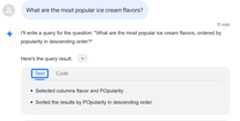
To see information about how the results were calculated, clickHow was this calculated?:

TheText tab decribes the generated code, and theCode tab providesthe generated code:
If appropriate for the data, the data agent also provides charts, tables,and other visualizations.
Create a direct conversation with a data source
Follow these steps to create a direct conversation with a data source:
Go to the BigQueryAgents page.
On theConversations tab, on theChat with your data pane,clickData sources.
Select one or more tables and clickCreate Conversation.
In theAsk a question field, type a question that you want the dataagent to answer. You can also click one of theGemini-suggested questions to get started.
The Conversational Analytics API processes your question and returns theresults.
To see the steps that the Conversational Analytics API took, clickView steps.
To see information about how the results were calculated, clickHow was this calculated?:
TheText tab decribes the generated code, and theCode tab providesthe generated code:
Open an existing conversation
Follow these steps to open a conversation:
Go to the BigQueryAgents page.
On theConversations tab, in the conversations list, click theconversation that you want to open.
Rename a conversation
Follow these steps to rename a conversation:
Go to the BigQueryAgents page.
On theConversations tab, in the conversations list, click theconversation that you want to rename.
ClickView actions>Rename.
In theRename conversation dialog, type a new name for the conversationin theConversation name field.
ClickRename.
Delete a conversation
Follow these steps to delete a conversation:
Go to the BigQueryAgents page.
On theConversations tab, in the conversations list, click theconversation that you want to rename.
ClickView actions>Delete.
In theDelete conversation? dialog, clickDelete.
Locations
Conversational analytics operates globally, you can't choose which region touse.
What's next
- Learn more aboutConversational analytics in BigQuery.
- Learn more about theConversational Analytics API.
- Create data agents.
Except as otherwise noted, the content of this page is licensed under theCreative Commons Attribution 4.0 License, and code samples are licensed under theApache 2.0 License. For details, see theGoogle Developers Site Policies. Java is a registered trademark of Oracle and/or its affiliates.
Last updated 2025-12-15 UTC.