

Column-level encryption with Cloud KMS
You can useCloud Key Management Service (Cloud KMS)to encrypt the keys that in turn encrypt the values withinBigQuery tables. You can use theAEAD encryptionfunctions with Cloud KMSkeysetsorwrapped keysetsto provide a second layer of protection at the column level.
Introduction
To provide an extra layer of protection, Cloud KMS encrypts yourdata encryption key (DEK) with a second key encryption key (KEK).In BigQuery, referencing an encrypted keyset instead of aplaintext keyset helps reduce the risk of key exposure. The KEK is a symmetricencryption keyset that is stored securely in Cloud KMS and managedusing Identity and Access Management (IAM) roles and permissions.
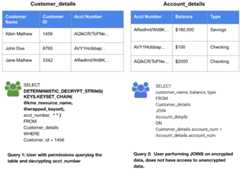
BigQuery supports deterministic and non-deterministic encryptionfunctions. With deterministic encryption, if both the pieces of stored data andthe additional authenticated data (optional) are identical, then the ciphertextis identical. This allows for support of aggregation and joinsbased on the encrypted column. With non-deterministic encryption, the storedciphertext is unique regardless of the encrypted data, which preventsclustering, aggregation, and joins.
At query execution time, you provide the Cloud KMS resource path of theKEK and the ciphertext from the wrapped DEK. BigQuery callsCloud KMS to unwrap the DEK, and then uses that key to decrypt the datain your query. The non-wrapped version of the DEK is only stored in memory forthe duration of the query, and then destroyed.
If you use Cloud KMS in aregion whereCloud External Key Manager is supported, you can use Cloud EKM based keys inCloud KMS.
Note: Using Cloud EKM keys might introduce additionallatency to each key access.Use cases
Use cases for encryption with Cloud KMS keys include the following:
- Externally encrypted data that needs to be stored inBigQuery without storing the keyset in plaintext. Your datacan then be exported from the table or decrypted with a SQL query.
- "Double access control" on encrypted data in BigQuery. Auser must be granted permission to both the table and the encryption key toread data in cleartext.
| User Permission Matrix | ||
|---|---|---|
| Permission on Table | No Permission on Table | |
| Permissions on Key | Read and decrypt encrypted data. | No access. |
| No Permissions on Key | Read encrypted data. | No access. |
If a user has permission to access the KMS key and has access to the wrappedkeyset, SQL functions can unwrap the keyset and decrypt the ciphertext. Userscan also use the Cloud KMSREST API orCLI to unwrap the keyset.
The following query sample uses KMS SQL functions to decrypt non-deterministicciphertext:
SELECTAEAD.DECRYPT_STRING(KEYS.KEYSET_CHAIN(@kms_resource_name,@first_level_keyset),ciphertext,additional_authenticated_data)FROMciphertext_tableWHERE...
Use-case example
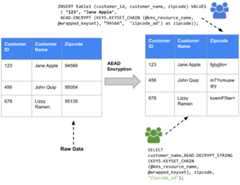
Assume an implementation where zip codes are consideredsensitive information. Zip code data can be inserted into theBigQuery table using the AEAD encrypt function, therebyencrypting theZipcode column. In this example, we use theAEAD.ENCRYPT function with the wrapped keyset management function. TheKEYS.KEYSET_CHAIN function decrypts the digital encryption key with the KEK,and theAEAD.ENCRYPT function passes the information to KMS.
The keyset chain for encryption and decryption ensures that the data encryptionkey (DEK) is encrypted or wrapped with a KEK and passed with that KEK. Thewrapped DEK is decrypted or unwrapped within the SQL function, and then used toencrypt or decrypt data.
The AEAD non-deterministic function can decrypt data when it is accessed byusing the function in the query that is being run on the table.
The AEAD deterministic function can decrypt data when it is accessed byusing the function in the query that is being run on the table and supportsaggregation and joins using the encrypted data.
Non-deterministic function syntax
The supported syntax for using non-deterministic functions includes thefollowing:
AEAD.ENCRYPT(KEYS.KEYSET_CHAIN(kms_resource_name,first_level_keyset),plaintext,additional_authenticated_data)
AEAD.DECRYPT_STRING(KEYS.KEYSET_CHAIN(kms_resource_name,first_level_keyset),ciphertext,additional_authenticated_data)
AEAD.DECRYPT_BYTES(KEYS.KEYSET_CHAIN(kms_resource_name,first_level_keyset),ciphertext,additional_authenticated_data)
SeeAEAD.DECRYPT_BYTES,AEAD.ENCRYPT,AEAD.DECRYPT_STRING,andKEYS.KEYSET_CHAINfunction syntax.
Deterministic function syntax
The supported syntax for using deterministic functions includes thefollowing:
DETERMINISTIC_ENCRYPT(KEYS.KEYSET_CHAIN(kms_resource_name,first_level_keyset),plaintext,additional_data)
DETERMINISTIC_DECRYPT_STRING(KEYS.KEYSET_CHAIN(kms_resource_name,first_level_keyset),ciphertext,additional_data)
DETERMINISTIC_DECRYPT_BYTES(KEYS.KEYSET_CHAIN(kms_resource_name,first_level_keyset),ciphertext,additional_data)
SeeDETERMINISTIC_DECRYPT_BYTES,DETERMINISTIC_ENCRYPT,DETERMINISTIC_DECRYPT_STRING,andKEYS.KEYSET_CHAINfunction syntax.
Roles and permissions
For a list of roles for Cloud KMS,seeCloud KMS permissions and roles.
Limitations
Encryption with Cloud KMS has the following limitations andrestrictions:
The Cloud KMS keys are restricted to the sameregion or multi-region as the query. Using global Cloud KMS keys is disallowed forreliability reasons.
It is not possible to rotate a wrapped keyset using the
KEYS.ROTATE_KEYSETfunction.The constant parameters in a BigQuery query are visibleto users in thediagnostic query plan.This factor can affect the
kms_resource_nameandfirst_level_keysetparameters of theKEYSET_CHAINfunction. Keys are never exposed inplaintext, and permission to the Cloud KMS key is required to decryptthe wrapped keyset. This approach ensures that keys are not exposed throughthe diagnostic query plan unless the user has permission to decrypt thekeyset.Column-level encryption has the following limitations when used withtype-based security classifications:
Column-level security: Users can only decrypt or encrypt data on columnsthat they are allowed to access.
Row-level security: Users can only decrypt data on rows that they areallowed to access.
Column-level SQL functions have no significant impact on performance whencompared to the performance of raw encryption functions where the key data issent in plaintext.
Before you begin
To work with Cloud KMS keys, keysets, encrypted tables, deterministic,and non-deterministic functions, you need to do the following if you have notalready done so:
Create a Cloud KMS keyfor an encrypted column with the software orHardware Security Module (HSM) protection level.
Grant user permissions to work with Cloud KMS keys, encryption,and decryption.
Take note of the following concepts, as they are referenced in the nextsections:
PROJECT_ID: The name of the Google Cloud project.DATASET_NAME: The name of the BigQuery dataset.LOCATION_ID: The location of the BigQuery dataset.TABLE_NAME: The name of the BigQuery table.KEY_RING_ID: The name of the Cloud KMS key ring.KEY_ID: The name of the Cloud KMS key.KMS_KEY: Cloud KMS key (KEK) in this format:'gcp-kms://projects/PROJECT_ID/locations/LOCATION_ID/keyRings/KEY_RING_ID/cryptoKeys/KEY_ID'Here is an example of a Cloud KMS key:
'gcp-kms://projects/myProject/locations/us/keyRings/myKeyRing/cryptoKeys/myKeyName'KMS_KEY_SHORT: Similar toKMS_KEYbut in this format:projects/PROJECT_ID/locations/LOCATION_ID/keyRings/KEY_RING_ID/cryptoKeys/KEY_ID
KEYSET_DECODED: A decoded keyset as aBYTESsequence. The output lookssimilar to that for a decoded wrapped keyset.Although keyset functions return keysets as bytes, theuser output is displayed as an encoded string. To convert an encodedkeyset to a decoded keyset, seeDecode a Cloud KMS keyset
KEYSET_ENCODED: An encoded keyset as aSTRING. The output looks similarto that for an encoded wrapped keyset.To convert an encoded keyset to a decoded keyset, seeDecode a Cloud KMS keyset
WRAPPED_KEYSET_DECODED: A decoded wrapped keyset as aBYTESsequence.Here is an example of what the output for this looks like:b'\x0a$\x00\xa6\xee\x12Y\x8d|l"\xf7\xfa\xc6\xeafM\xdeefy\xe9\x7f\xf2z\xb3M\xf6"\xd0\xe0Le\xa8\x8e\x0fR\xed\x12\xb7\x01\x00\xf0\xa80\xbd\xc1\x07Z\\\xd0L<\x80A0\x9ae\xfd(9\x1e\xfa\xc8\x93\xc7\xe8\...'Although wrapped keyset functions return wrapped keysets as bytes, theuser output is displayed as an encoded string. To convert an encodedwrapped keyset to a decoded wrapped keyset, seeDecode a Cloud KMS keyset
WRAPPED_KEYSET_ENCODED: An encoded wrapped keyset as aSTRING.Here is an example of what the output for this looks like:'CiQApu4SWTozQ7lNwITxpEvGlo5sT2rv1tyuSv3UAMtoTq/lhDwStwEA8KgwvX7CpVVzhWWMkRwWZNr3pf8uBIlzHeunCy8ZsQ6CofQYFpiBRBB6k/QqATbiFV+3opnDk/6dBL/S8OO1WoDC+DdD9uzEFwqt5D20lTXCkGWFv1...'To convert an encoded wrapped keyset to a decoded wrapped keyset, seeDecode a Cloud KMS keyset
Key management
The following sections contain common tasks you can perform withCloud KMS keys.
Create a keyset
You can create wrapped keysets or raw keysets. To do this, complete the stepsin the following sections.
Create a raw keyset
Run the following query to create a keyset with a key of typeDETERMINISTIC_AEAD_AES_SIV_CMAC_256.
SELECTKEYS.NEW_KEYSET('DETERMINISTIC_AEAD_AES_SIV_CMAC_256')ASraw_keyset
Create a wrapped keyset
Run the following query to create a Cloud KMS wrapped keyset with akey of typeDETERMINISTIC_AEAD_AES_SIV_CMAC_256.
SELECTKEYS.NEW_WRAPPED_KEYSET(KMS_KEY,'DETERMINISTIC_AEAD_AES_SIV_CMAC_256')
Decode a keyset
Although SQL functions that return keysets produce the keysets inBYTES format, the user-displayed result is encoded and displayed inSTRING format. If you would like to convert this encoded string to adecoded bytes sequence that you can use as literal key encryption functions,use the following query.
Decode a wrapped keyset
Run the following query to decode a Cloud KMS wrapped keyset.
SELECTFORMAT('%T',FROM_BASE64(WRAPPED_KEYSET_ENCODED'))
Decode a raw keyset
Run the following query to decode a raw keyset.
SELECTFORMAT('%T',FROM_BASE64(KEYSET_ENCODED'))
Rewrap a wrapped keyset
Run the following query to rewrap a Cloud KMS wrapped keyset with a new Cloud KMS key.KMS_KEY_CURRENT represents the newKMS_KEY that isused to encrypt the keyset.KMS_KEY_NEW represents the newKMS_KEY that isused to encrypt the keyset.
SELECTKEYS.REWRAP_KEYSET(KMS_KEY_CURRENT,KMS_KEY_NEW,WRAPPED_KEYSET_DECODED)
Rotate a wrapped keyset
Run the following query to rotate a Cloud KMS wrapped keyset with akey of typeDETERMINISTIC_AEAD_AES_SIV_CMAC_256.
SELECTKEYS.ROTATE_WRAPPED_KEYSET(KMS_KEY,WRAPPED_KEYSET_DECODED,'DETERMINISTIC_AEAD_AES_SIV_CMAC_256')
Generate a raw keyset from a wrapped keyset
Some encryption functions require a raw keyset. To decrypt aCloud KMS wrapped keyset to produce a raw keyset, complete thefollowing steps.
In the bq command-line tool enter the following commands to save a wrapped keyset ina file called
keyset_to_unwrap, decrypt they wrapped keyset, andproduce the output in theKEYSET_DECODEDformat:echoWRAPPED_KEYSET_ENCODED|base64-d>/tmp/decoded_wrapped_key
gcloudkmsdecrypt\--ciphertext-file=/tmp/decoded_wrapped_key\--key=KMS_KEY_SHORT\--plaintext-file=/tmp/keyset_to_unwrap.dec\--project=PROJECT_ID
od-An--format=o1/tmp/keyset_to_unwrap.dec|tr' ''\'
Generate a wrapped keyset from a raw keyset
Some encryption functions require a Cloud KMS wrapped keyset. Toencrypt a raw keyset to produce a wrapped keyset, complete the following steps.
In the bq command-line tool enter the following commands to save a raw keyset ina file called
keyset_to_wrap, encrypt they raw keyset, andproduce the output in theWRAPPED_KEYSET_DECODEDformat:echoKEYSET_ENCODED|base64-d>/tmp/decoded_key
gcloudkmsencrypt\--plaintext-file=/tmp/decoded_key\--key=KMS_KEY_SHORT\--ciphertext-file=/tmp/keyset_to_wrap.dec\--project=PROJECT_ID
od-An--format=o1/tmp/keyset_to_wrap.dec|tr' ''\'
Generate a wrapped key for a DLP function
ForDLP functions, youneed a cryptographic key and then use that key to get a wrapped key.
To generate a new cryptographic key, on thecommand line,run the following command. The size of the key can be 16, 24, or 32 bytes.The following example uses a 16-byte key:
openssl rand 16 > rand.key.16.binWrap the generated 16-byte key with aKMS key.See the following example:
KEYRING=projects/myproject/locations/us/keyRings/kms-testKEY=projects/myproject/locations/us/keyRings/kms-test/cryptoKeys/test-KekPROJECT="myproject"gcloud kms encrypt --project $PROJECT --location us --keyring $KEYRING --key $KEY --plaintext-file ./rand.key.16.bin --ciphertext-file ./rand.key.16.wrappedYou can now get the
BYTESliteral of the wrapped key or the base64 formatof the wrapped key.Bytes literal
username:~/tmp$ od -b ./rand.key.16.wrapped | cut -d ' ' -f 2- | head -n -1 | sed -e 's/^/ /' | tr ' ' '\'The output looks like the following:
\012\044\000\325\155\264\153\246\071\172\130\372\305\103\047\342\356\061\077\014\030\126\147\041\126\150\012\036\020\202\215\044\267\310\331\014\116\233\022\071\000\363\344\230\067\274\007\340\273\016\212\151\226\064\200\377\303\207\103\147\052\267\035\350\004\147\365\251\271\133\062\251\246\152\177\017\005\270\044\141\211\116\337\043\035\263\122\340\110\333\266\220\377\247\204\215\233Base64 format
username:~/tmp$ base64 ./rand.key.16.wrappedThe output looks like the following:
CiQA1W20a6Y5elj6xUMn4u4xPwwYVmchVmgKHhCCjSS3yNkMTpsSOQDz5Jg3vAfguw6KaZY0gP/Dh0NnKrcd6ARn9am5WzKppmp/DwW4JGGJTt8jHbNS4EjbtpD/p4SNmw==
Get the number of keys in a keyset
Run the following query to get the number of keys in araw keyset.
If you are working with a wrapped keyset, firstgenerate a raw keyset.
Run this query with the raw keyset:
SELECTKEYS.KEYSET_LENGTH(KEYSET_DECODED)askey_count;
Get a JSON representation of a keyset
Run the following query to view a JSON representation of araw keyset.
If you are working with a wrapped keyset, firstgenerate a raw keyset.
Run this query with the raw keyset:
SELECTKEYS.KEYSET_TO_JSON(KEYSET_DECODED);
Encryption and decryption
You can use raw keysets or wrapped keysets to encrypt a column in a table. Youcan also choose to use deterministic or non-deterministic encryption on yourcolumns. The examples in this section use wrapped keysets but you could replacethe wrapped keysets with raw keysets.
Deterministically encrypt a column with a wrapped keyset
Run the following query to create a table and store aCloud KMS wrapped keyset with deterministic encryption in a columncalledencrypted_content.
Encrypt a column with the wrapped keyset.
CREATEORREPLACETABLEDATASET_NAME.TABLE_NAMEASSELECTDETERMINISTIC_ENCRYPT(KEYS.KEYSET_CHAIN(KMS_KEY,WRAPPED_KEYSET_DECODED),'plaintext','')ASencrypted_content
Deterministically decrypt a column with a wrapped keyset
Run the following query to deterministically decrypt a column thatcontains encrypted content, using a Cloud KMS wrapped keyset. Thisquery assumes you are referencing a table with a column calledencrypted_content.
SELECTDETERMINISTIC_DECRYPT_STRING(KEYS.KEYSET_CHAIN(KMS_KEY,WRAPPED_KEYSET_DECODED),encrypted_content,'')FROMDATASET_NAME.TABLE_NAME
Non-deterministically encrypt a column with a wrapped keyset
SeeDeterministically encrypt a column with a wrapped keyset,but replaceDETERMINISTIC_ENCRYPT withAEAD.ENCRYPT. Make sure that yourkeyset is of typeAEAD_AES_GCM_256.
Non-deterministically decrypt a column with a wrapped keyset
SeeDeterministically decrypt a column with a wrapped keyset,but replaceDETERMINISTIC_DECRYPT_STRING withAEAD.DECRYPT_STRING. Make surethat your keyset is of typeAEAD_AES_GCM_256.
What's next
- Learn more aboutCloud KMS.This topic includes conceptual information about column-level encryptionfor Google Cloud.
- Learn more aboutAEAD encryption for BigQuery.This topic includes conceptual information about column-level encryptionspecifically for BigQuery.
- Learn more aboutAEAD encryption functions for BigQuery.This topic contains all of the SQL functions that you can use forcolumn-level encryption in BigQuery.
Except as otherwise noted, the content of this page is licensed under theCreative Commons Attribution 4.0 License, and code samples are licensed under theApache 2.0 License. For details, see theGoogle Developers Site Policies. Java is a registered trademark of Oracle and/or its affiliates.
Last updated 2025-12-15 UTC.