

Organize code assets with folders
Preview
This feature is subject to the "Pre-GA Offerings Terms" in the General Service Terms section of theService Specific Terms. Pre-GA features are available "as is" and might have limited support. For more information, see thelaunch stage descriptions.
Note: To give feedback or request support for this feature, send an email tobigquery-explorer-feedback@google.com.The following document describes how BigQuery folders work. You can usefolders to organize code assets in a hierarchical structure, similar to thatused by operating systems. For example, you could create a folder to organizecode assets for sales analysis, with subfolders for each fiscal year. Youcan also use folders to manage access to code assets. Folders offerIdentity and Access Management (IAM) policy inheritance, which you can use to controlaccess to code assets more efficiently. Policy inheritance lets subfoldersand files inherit the permissions of their parent folder.
BigQuery folders are powered byDataform.
For more information about working with folders in BigQuery, seeCreate and manage folders.
Organize code assets with folders
You can access and organize your code assets by using folders in theFiles pane of BigQuery Studio:
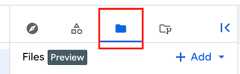
A folder is the basic container for organizing code assets, similar to astandard file system folder. You can create and organize subfolders within aparent folder, and you can move code assets into and out of folders. When yougrant permissions on a folder, the permissions propagate to all of the foldersand files contained by that folder.
You can only use folders to organize single file code assets, such as notebooks,saved queries, data canvases, and data preparation files.
Folder types
BigQuery supports the following types of folders:
User folders: Each user has a personal root folder, displayed asUser (user email address). Your user folder contains all of the codeassets that you create in the given project andlocation. You can create subfolders in your userfolder to organize these code assets. Files and folders in your user folderare accessible only to you unless you choose to share them with other users.
Team folders: A team folder is designed for team collaboration, similar toa shared drive in Google Drive. You can use team folders to organize codeassets that belong to a particular team. Only users who have ownerpermissions on the root team folder can grant permissions to enable otherusers to use the team folder.
Folder code regions
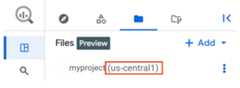
You can have folders and code assets in different code regions. Forexample, you could havefolderA and the code assets that it contains in theus-west1 region, andfolderB and the code assets that it contains in theus-central1 region. The region that you are viewing is displayedin theFiles pane:
IAM policy inheritance
IAM access for file and folder resources uses ahierarchical structure. This hierarchy ensures that access policies areinherited from parent folders to their contents.
When an IAM policy is set on a folder, the permissions grantedby that policy also apply to all the files and nested subfolders in thefolder's subtree. This has the following consequences:
- Permissions are inherited through the folder hierarchy. When a user isgranted a specific role on a high-level folder, they possess the permissionsincluded in that role for all the resources contained in that folder and itssubfolders.
- The permissions that a user has on a resource consist of the policies setdirectly on that resource and all the policies inherited from every folder inits path up to the root.
As a result, you don't need project-level permissions to perform actions onresources located deep in a folder structure. You only need the properpermission on any folder in the path to that resource. For example, if youwant to create a file in a subfolder, you need the necessary permissions oneither the specific subfolder or any of its parent folders, which includes thetop-level folder.
The following are best practices for applying IAM policies tofiles and folders:
- Apply IAM policies to the highest folder in the hierarchywhere the permissions are uniformly needed. For example, if a team needsaccess to all the data in their team's directory, grant the necessary roles atthe level of the team folder instead of at the level of individual projectsubfolders.
- Always grant the minimum set of permissions required for users or servicesto perform their tasks. Avoid granting broad roles where you can use morespecific folder-level roles and permissions.
IAM roles granted on resource creation
When you create a folder, the following roles are granted automatically:
- Users who create folders in their user root node automatically receive theDataform Admin role(
roles/dataform.admin) on those folders. - The creator of a root team folder automatically receives theDataform Admin role(
roles/dataform.admin) on that team folder.
You canuse the Config API to grant a specific role upon resource creation.
You don't automatically receive any roles when you create new files or folderswithin a team folder's subtree.
Busy resources
A user folder or team folder is "busy" if it's actively involved in amove operation, either as the object being moved or the destination of themove. The system restricts busy resources from the following actions to ensuredata integrity during the move:
- Being the object of another move operation.
- Being the destination of another move operation.
- Being an ancestor of a move object.
- Being the object of a delete operation.
Limitations
BigQuery folders have the following limitations:
- You can only nest folders up to 5 levels deep.
- Having a very large number of folders (hundreds of thousands) slowsperformance when working with folders. For example, when loading thefile explorer or expanding a folder.
- You can'tmove a folderthat contains more than 100 files or folders.
Locations
BigQuery folders are supported in allDataform locations.
What's next
- Create and manage folders
- Create notebooks
- Create saved queries
- Create data canvases
- Create data preparations
Except as otherwise noted, the content of this page is licensed under theCreative Commons Attribution 4.0 License, and code samples are licensed under theApache 2.0 License. For details, see theGoogle Developers Site Policies. Java is a registered trademark of Oracle and/or its affiliates.
Last updated 2025-12-15 UTC.