

Introduction to clustered tables
Clustered tables in BigQuery are tables that have a user-defined columnsort order usingclustered columns. Clustered tables can improve queryperformance and reduce query costs.
In BigQuery, aclustered column is a user-defined tableproperty that sortsstorage blocksbased on the values in the clustered columns. The storage blocks are adaptivelysized based on the size of the table. Colocation occurs at the level of the storageblocks, and not at the level of individual rows; for more information on colocationin this context, seeClustering.
A clustered table maintains the sort properties in the context of each operation that modifies it. Queries that filter or aggregate by the clustered columns only scan the relevant blocks based on the clustered columns, instead of the entire table or table partition. As a result, BigQuery might not be able to accurately estimate the bytes to be processed by the query or the query costs, but it attempts toreduce the total bytes at execution.
When you cluster a table using multiple columns, the column order determineswhich columns take precedence when BigQuery sorts and groups thedata into storage blocks, as seen in the following example. Table 1 shows thelogical storage block layout of an unclustered table. In comparison, table 2 isonly clustered by theCountry column, whereas table 3 is clustered by multiplecolumns,Country andStatus.
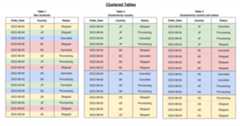
When you query a clustered table, you don't receive an accurate query costestimate before query execution because the number of storage blocks to bescanned is not known before query execution. The final cost is determined afterquery execution is complete and is based on the specific storage blocks thatwere scanned.
When to use clustering
Clustering addresses how a table is stored so it's generally a good firstoption for improving query performance. You should therefore always considerclustering given the following advantages it provides:
- Unpartitioned tables larger than 64 MB are likely to benefit fromclustering. Similarly, table partitions larger than 64 MB are also likelyto benefit from clustering. Clustering smaller tables or partitions ispossible, but the performance improvement is usually negligible.
- If your queries commonly filter on particular columns, clusteringaccelerates queries because the query only scans the blocks that match thefilter.
- If your queries filter on columns that have many distinct values(high cardinality), clustering accelerates these queries by providingBigQuery with detailed metadata for where to get input data.
- Clustering enables your table's underlying storage blocks to be adaptivelysized based on the size of the table.
You might considerpartitioning your tablein addition to clustering. In this approach, you first segment data intopartitions, and then you cluster the data within each partition by theclustering columns. Consider this approach in the following circumstances:
- You need a strict query cost estimate before you run a query. The costof queries over clustered tables can only be determined after the query isrun.Partitioning provides granular query cost estimates before you run a query.
- Partitioning your table results in an average partition size of atleast 10 GB per partition. Creating many small partitions increases thetable's metadata, and can affect metadata access times when querying thetable.
- You need to continually update your table but still want totake advantage of long-term storage pricing.Partitioning enables each partition to be considered separately foreligibility for long term pricing. If your table is not partitioned, thenyour entire table must not be edited for 90 consecutive days to beconsidered for long term pricing.
For more information, seeCombine clustered and partitioned tables.
Cluster column types and ordering
This section describes column types and how column order works in tableclustering.
Cluster column types
Cluster columns must be top-level, non-repeated columns that are one of thefollowing types:
BIGNUMERICBOOLDATEDATETIMEGEOGRAPHYINT64NUMERICRANGESTRINGTIMESTAMP
For more information about data types, seeGoogleSQL data types.
Cluster column ordering
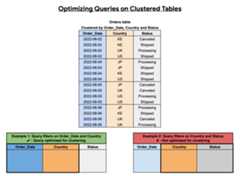
The order of clustered columns affects query performance. In the following example, theOrders table is clustered using a column sortorder ofOrder_Date,Country, andStatus. The first clustered column inthis example isOrder_Date, so a query that filters onOrder_Date andCountry is optimized for clustering, whereas a query that filters on onlyCountry andStatus is not optimized.
Block pruning
Clustered tables can help you to reduce query costs by pruning data so it's notprocessed by the query. This process is called block pruning.BigQuery sorts the data in a clustered table based on the valuesin the clustering columns and organizes them into blocks.
When you run a query against a clustered table, and the query includes a filteron the clustered columns, BigQuery uses the filter expression andthe block metadata to prune the blocks scanned by the query. This allowsBigQuery to scan only the relevant blocks.
When a block is pruned, it is not scanned. Only the scanned blocks are used tocalculate the bytes of data processed by the query. The number of bytesprocessed by a query against a clustered table equals the sum of the bytes readin each column referenced by the query in the scanned blocks.
If a clustered table is referenced multiple times in a query that uses severalfilters, BigQuery charges for scanning the columns in theappropriate blocks in each of the respective filters.For an example of how block pruning works, seeExample.
Combine clustered and partitioned tables
You can combine table clustering withtable partitioningto achieve finely-grained sorting for further query optimization.
In a partitioned table, data is stored in physical blocks, each of which holdsone partition of data. Each partitioned table maintains various metadata aboutthe sort properties across all operations that modify it. The metadata letsBigQuery more accurately estimate a query cost before the queryis run. However, partitioning requires BigQuery to maintain moremetadata than with an unpartitioned table. As the number of partitions increases, theamount of metadata to maintain increases.
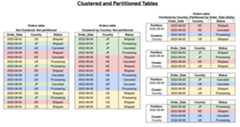
When you create a table that is clustered and partitioned, you can achieve morefinely grained sorting, as the following diagram shows:
Example
You have a clustered table namedClusteredSalesData. The table is partitionedby thetimestamp column, and it is clustered by thecustomer_id column. Thedata is organized into the following set of blocks:
| Partition identifier | Block ID | Minimum value for customer_id in the block | Maximum value for customer_id in the block |
|---|---|---|---|
| 20160501 | B1 | 10000 | 19999 |
| 20160501 | B2 | 20000 | 24999 |
| 20160502 | B3 | 15000 | 17999 |
| 20160501 | B4 | 22000 | 27999 |
You run the following query against the table. The query contains a filter onthecustomer_id column.
SELECTSUM(totalSale)FROM`mydataset.ClusteredSalesData`WHEREcustomer_idBETWEEN20000AND23000ANDDATE(timestamp)="2016-05-01"
The preceding query involves the following steps:
- Scans the
timestamp,customer_id, andtotalSalecolumns inblocks B2 and B4. - Prunes the B3 block because of the
DATE(timestamp) = "2016-05-01"filter predicate on thetimestamppartitioning column. - Prunes the B1 block because of the
customer_id BETWEEN 20000 AND 23000filter predicate on thecustomer_idclustering column.
Automatic reclustering
As data is added to a clustered table, the new data is organized into blocks,which might create new storage blocks or update existing blocks. Blockoptimization is required for optimal query and storage performance because newdata might not be grouped with existing data that has the same cluster values.
To maintain the performance characteristics of a clustered table,BigQuery performs automatic reclustering in the background. Forpartitioned tables, clustering is maintained for data within the scope of eachpartition.
Note: Automatic reclustering has no effect on query capacity.Limitations
- Only GoogleSQL is supported for querying clusteredtables and for writing query results to clustered tables.
- You can only specify up to four clustering columns. If you needadditional columns, consider combining clustering with partitioning.
- When using
STRINGtype columns for clustering, BigQueryuses only the first 1,024 characters to cluster the data. The values in thecolumns can themselves be longer than 1,024 characters. - If you alter an existing non-clustered table to be clustered, the existing datais not automatically clustered. Only new data that's stored using theclustered columns is subject to automatic reclustering. For moreinformation about reclustering existing data using an
UPDATEstatement,seeModify clustering specification.
Clustered table quotas and limits
BigQuery restricts the use of shared Google Cloud resources withquotas and limits, including limitations on certain tableoperations or the number of jobs run within a day.
When you use the clustered table feature with a partitioned table, you aresubject to thelimits on partitioned tables.
Quotas and limits also apply to the different types of jobs that you can runagainst clustered tables. For information about the job quotas that apply toyour tables, seeJobs in "Quotas and Limits".
Clustered table pricing
When you create and use clustered tables in BigQuery, yourcharges are based on how much data is stored in the tables and on the queriesthat you run against the data. For more information, seeStorage pricing andQuery pricing.
Like other BigQuery table operations, clustered table operationstake advantage of BigQuery free operations such as batch load,table copy, automatic reclustering, and data export. These operations aresubject toBigQuery quotas and limits.For information about free operations, seeFree operations.
For a detailed clustered table pricing example, seeEstimate storage and query costs.
Table security
To control access to tables in BigQuery, seeControl access to resources with IAM.
What's next
- To learn how to create and use clustered tables, seeCreating and using clustered tables.
- For information about querying clustered tables, seeQuerying clustered tables.
Except as otherwise noted, the content of this page is licensed under theCreative Commons Attribution 4.0 License, and code samples are licensed under theApache 2.0 License. For details, see theGoogle Developers Site Policies. Java is a registered trademark of Oracle and/or its affiliates.
Last updated 2025-12-15 UTC.