

Stream table updates with change data capture
BigQuery change data capture (CDC) updates your BigQuerytables by processing and applying streamed changes to existing data. Thissynchronization is accomplished through upsert and delete row operations thatare streamed in real time by theBigQuery Storage Write API, which you should befamiliar with before proceeding.
Before you begin
Grant Identity and Access Management (IAM) roles that give users the necessary permissionsto perform each task in this document, and ensure that your workflow meets eachprerequisite.
Required permissions
To get the permission that you need to use the Storage Write API, ask your administrator to grant you theBigQuery Data Editor (roles/bigquery.dataEditor) IAM role. For more information about granting roles, seeManage access to projects, folders, and organizations.
This predefined role contains the bigquery.tables.updateData permission, which is required to use the Storage Write API.
You might also be able to get this permission withcustom roles or otherpredefined roles.
For more information about IAM roles and permissions inBigQuery, seeIntroduction to IAM.
Prerequisites
To use BigQuery CDC, your workflow must meet the followingconditions:
- You must use the Storage Write API in thedefault stream.
- You must use the protobuf format as the ingestion format. The ApacheArrow format isn't supported.
- You must declareprimary keysfor the destination table in BigQuery. Composite primary keyscontaining up to 16 columns are supported.
- Sufficient BigQuery compute resources must be available toperform the CDC row operations. Be aware that if CDC row modificationoperations fail, you might unintentionally retain data that you intended todelete. For more information, seeDeleted data considerations.
Specify changes to existing records
In BigQuery CDC, the pseudocolumn_CHANGE_TYPE indicates thetype of change to be processed for each row. To use CDC, set_CHANGE_TYPE whenyou stream row modifications using the Storage Write API. Thepseudocolumn_CHANGE_TYPE only accepts the valuesUPSERT andDELETE.A table is consideredCDC-enabled while the Storage Write API isstreaming row modifications to the table in this manner.
Example withUPSERT andDELETE values
Consider the following table in BigQuery:
| ID | Name | Salary |
|---|---|---|
| 100 | Charlie | 2000 |
| 101 | Tal | 3000 |
| 102 | Lee | 5000 |
The following row modifications are streamed by theStorage Write API:
| ID | Name | Salary | _CHANGE_TYPE |
|---|---|---|---|
| 100 | DELETE | ||
| 101 | Tal | 8000 | UPSERT |
| 105 | Izumi | 6000 | UPSERT |
The updated table is now the following:
| ID | Name | Salary |
|---|---|---|
| 101 | Tal | 8000 |
| 102 | Lee | 5000 |
| 105 | Izumi | 6000 |
Manage table staleness
By default, every time you run a query, BigQuery returns the mostup-to-date results. To provide the freshest results when querying a CDC-enabledtable, BigQuery must apply each streamed row modification up tothe query start time, so that the most up-to-date version of the table is beingqueried. Applying these row modifications at query run time increases querylatency and cost. However, if you don't require fully up-to-date query results,you can reduce cost and latency on your queries by setting themax_stalenessoption on your table. When this option is set, BigQuery appliesrow modifications at least once within the interval defined by themax_staleness value, letting you run queries without waiting for updates to beapplied, at the cost of some data staleness.
This behavior is especially useful for dashboards and reports for which datafreshness isn't essential. It is also helpful for cost management by giving youmore control over how frequently BigQuery applies rowmodifications.
Query tables with themax_staleness option set
When you query a table with themax_staleness option set,BigQuery returns the result based on the value ofmax_stalenessand the time at which the last apply job occurred, which is represented bythe table'supsert_stream_apply_watermark timestamp.
Consider the following example, in which a table has themax_staleness optionset to 10 minutes, and the most recent apply job occurred at T20:
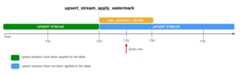
If you query the table at T25, then the current version of the table is 5minutes stale, which is less than themax_staleness interval of 10 minutes. Inthis case, BigQuery returns the version of the table at T20,meaning the data returned is also 5 minutes stale.
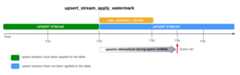
When you set themax_staleness option on your table, BigQueryapplies pending row modifications at least once within themax_stalenessinterval. In some cases, however, BigQuery might not complete theprocess of applying these pending row modifications within the interval.
For example, if you query the table at T35, and the process of applying pendingrow modifications has not completed, then the current version of the table is 15minutes stale, which is greater than themax_staleness interval of 10 minutes.In this case, at query run time, BigQuery applies all rowmodifications between T20 and T35 for the current query, meaning the querieddata is completely up to date, at the cost of some additional query latency.This is considered aruntime merge job.
Recommended tablemax_staleness value
A table'smax_staleness value should generally be the higher of the followingtwo values:
- The maximum tolerable data staleness for your workflow.
- Twice the maximum time it takes to apply upserted changes into yourtable, plus some additional buffer.
To calculate the time it takes to apply upserted changes to an existing table,use the following SQL query to determine the 95th percentileduration of background apply jobs, plus a seven-minute buffer to allow for theBigQuery write-optimized storage (streaming buffer) conversion.
SELECTproject_id,destination_table.dataset_id,destination_table.table_id,APPROX_QUANTILES((TIMESTAMP_DIFF(end_time,creation_time,MILLISECOND)/1000),100)[OFFSET(95)]ASp95_background_apply_duration_in_seconds,CEILING(APPROX_QUANTILES((TIMESTAMP_DIFF(end_time,creation_time,MILLISECOND)/1000),100)[OFFSET(95)]*2/60)+7ASrecommended_max_staleness_with_buffer_in_minutesFROM`region-REGION`.INFORMATION_SCHEMA.JOBSASjobWHEREproject_id='PROJECT_ID'ANDDATE(creation_time)BETWEENDATE_SUB(CURRENT_DATE(),INTERVAL7DAY)ANDCURRENT_DATE()ANDjob_idLIKE"%cdc_background%"GROUPBY1,2,3;
Replace the following:
REGION: theregion name where your project is located. Forexample,us.PROJECT_ID: the ID of the project containingthe BigQuery tables that are being modified byBigQuery CDC.
The duration of background apply jobs is affected by several factors includingthe number and complexity of CDC operations issued within the stalenessinterval, the table size, and BigQuery resource availability.For more information about resource availability, seeSize and monitor BACKGROUND reservations.
Create a table with themax_staleness option
To create a table with themax_staleness option, use theCREATE TABLE statement.The following example creates the tableemployees with amax_staleness limitof 10 minutes:
CREATETABLEemployees(idINT64PRIMARYKEYNOTENFORCED,nameSTRING)CLUSTERBYidOPTIONS(max_staleness=INTERVAL10MINUTE);
Modify themax_staleness option for an existing table
To add or modify amax_staleness limit in an existing table, use theALTER TABLE statement.The following example changes themax_staleness limit of theemployees tableto 15 minutes:
ALTERTABLEemployeesSETOPTIONS(max_staleness=INTERVAL15MINUTE);
Determine the currentmax_staleness value of a table
To determine the currentmax_staleness value of a table, query theINFORMATION_SCHEMA.TABLE_OPTIONS view.The following example checks the currentmax_staleness value of the tablemytable:
SELECToption_name,option_valueFROMDATASET_NAME.INFORMATION_SCHEMA.TABLE_OPTIONSWHEREoption_name='max_staleness'ANDtable_name='TABLE_NAME';
Replace the following:
DATASET_NAME: the name of the dataset in whichthe CDC-enabled table resides.TABLE_NAME: the name of the CDC-enabled table.
The results show that themax_staleness value is 10 minutes:
+---------------------+--------------+| Row | option_name | option_value |+---------------------+--------------+| 1 | max_staleness | 0-0 0 0:10:0 |+---------------------+--------------+
Monitor table upsert operation progress
To monitor the state of a table and to check when row modifications werelast applied, query theINFORMATION_SCHEMA.TABLES viewto get theupsert_stream_apply_watermark timestamp.
The following example checks theupsert_stream_apply_watermark value ofthe tablemytable:
SELECTupsert_stream_apply_watermarkFROMDATASET_NAME.INFORMATION_SCHEMA.TABLESWHEREtable_name='TABLE_NAME';
Replace the following:
DATASET_NAME: the name of the dataset in whichthe CDC-enabled table resides.TABLE_NAME: the name of the CDC-enabled table.
The result is similar to the following:
[{ "upsert_stream_apply_watermark": "2022-09-15T04:17:19.909Z"}]Upsert operations are performed by thebigquery-adminbot@system.gserviceaccount.comservice account and appear within the job history of the project containing theCDC-enabled table.
Manage custom ordering
When streaming upserts to BigQuery, the default behavior ofordering records with identical primary keys is determined by theBigQuery system time at which the record was ingested intoBigQuery. In other words, the record most recently ingested withthe latest timestamp takes precedence over the record previously ingested withan older timestamp. For certain use cases, such as those where very frequentupserts can occur to the same primary key in a very short time window, or wherethe upsert order is not guaranteed, this might not be sufficient. For thesescenarios, a user-supplied ordering key might be necessary.
To configure user-supplied ordering keys, the pseudocolumn_CHANGE_SEQUENCE_NUMBER is used to indicate the order in whichBigQuery should apply records, based on the larger_CHANGE_SEQUENCE_NUMBER between two matching records with the same primarykey. The pseudocolumn_CHANGE_SEQUENCE_NUMBER is an optional column and onlyaccepts values in a fixed formatSTRING.
_CHANGE_SEQUENCE_NUMBER format
The pseudocolumn_CHANGE_SEQUENCE_NUMBER only acceptsSTRING values,written in a fixed format. This fixed format usesSTRING values written inhexadecimal, separated into sections by a forward slash/. Each section can beexpressed in at most 16 hexadecimal characters, and up to four sections areallowed per_CHANGE_SEQUENCE_NUMBER. The allowable range of the_CHANGE_SEQUENCE_NUMBER supports values between0/0/0/0 andFFFFFFFFFFFFFFFF/FFFFFFFFFFFFFFFF/FFFFFFFFFFFFFFFF/FFFFFFFFFFFFFFFF._CHANGE_SEQUENCE_NUMBER values support both uppercase and lowercasecharacters.
Expressing basic ordering keys can be done by using a single section. Forexample, to order keys solely based on a record's processing timestamp from anapplication server, you could use one section:'2024-04-30 11:19:44 UTC',expressed as hexadecimal by converting the timestamp to the milliseconds fromEpoch,'18F2EBB6480' in this case. The logic to convert data into hexadecimalis the responsibility of the client issuing the write to BigQueryusing the Storage Write API.
Supporting multiple sections lets you combine several processing-logic valuesinto one key for more complex use cases. For example, to order keys based on arecord's processing timestamp from an application server, a log sequencenumber, and the record's status, you could use three sections:'2024-04-30 11:19:44 UTC' / '123' / 'complete', each expressed as hexadecimal.The ordering of sections is an important consideration for ranking yourprocessing-logic. BigQuery compares_CHANGE_SEQUENCE_NUMBERvalues by comparing the first section, then comparing the next section only ifthe previous sections were equal.
BigQuery uses the_CHANGE_SEQUENCE_NUMBER to perform orderingby comparing two or more_CHANGE_SEQUENCE_NUMBER fields as unsigned numericvalues.
Consider the following_CHANGE_SEQUENCE_NUMBER comparison examples andtheir precedence results:
Example 1:
- Record #1:
_CHANGE_SEQUENCE_NUMBER= '77' - Record #2:
_CHANGE_SEQUENCE_NUMBER= '7B'
Result: Record #2 is considered the latest record because '7B' > '77'(i.e. '123' > '119')
- Record #1:
Example 2:
- Record #1:
_CHANGE_SEQUENCE_NUMBER= 'FFF/B' - Record #2:
_CHANGE_SEQUENCE_NUMBER= 'FFF/ABC'
Result: Record #2 is considered the latest record because 'FFF/ABC' > 'FFF/B'(i.e. '4095/2748' > '4095/11')
- Record #1:
Example 3:
- Record #1:
_CHANGE_SEQUENCE_NUMBER= 'BA/FFFFFFFF' - Record #2:
_CHANGE_SEQUENCE_NUMBER= 'ABC'
Result: Record #2 is considered the latest record because 'ABC' > 'BA/FFFFFFFF'(i.e. '2748' > '186/4294967295')
- Record #1:
Example 4:
- Record #1:
_CHANGE_SEQUENCE_NUMBER= 'FFF/ABC' - Record #2:
_CHANGE_SEQUENCE_NUMBER= 'ABC'
Result: Record #1 is considered the latest record because 'FFF/ABC' > 'ABC'(i.e. '4095/2748' > '2748')
- Record #1:
If two_CHANGE_SEQUENCE_NUMBER values are identical, then the record with thelatest BigQuery system ingestion time has precedence overpreviously ingested records.
When custom ordering is used for a table, the_CHANGE_SEQUENCE_NUMBER valueshould always be supplied. Any write requests that don't specify the_CHANGE_SEQUENCE_NUMBER value, leading to a mix of rows with and without_CHANGE_SEQUENCE_NUMBER values, result in unpredictable ordering.
Configure a BigQuery reservation for use with CDC
You can useBigQuery reservationsto allocate dedicated BigQuery compute resources for CDC rowmodification operations. Reservations let you set a cap on the cost ofperforming these operations. This approach is particularly useful for workflowswith frequent CDC operations against large tables, which otherwise would havehigh on-demand costs due to the large number of bytes processed when performingeach operation.
BigQuery CDC jobs that apply pending row modifications withinthemax_staleness interval are considered background jobs and use theBACKGROUND assignment type,rather than theQUERY assignment type.In contrast, queries outside of themax_staleness interval that require rowmodifications to be applied at query run time use theQUERY assignment type. Tables without amax_staleness setting or tables withmax_staleness set to0 also use theQUERY assignment type.BigQuery CDC background jobs performed without aBACKGROUNDassignment useon-demand pricing.This consideration is important when designing your workload managementstrategy for BigQuery CDC.
To configure a BigQuery reservation for use with CDC, start byconfiguring a reservationin the region where your BigQuerytables are located. For guidance on the size of your reservation, seeSize and monitorBACKGROUND reservations.Once you have created a reservation,assign the BigQueryproject to the reservation, and set thejob_type option toBACKGROUND byrunning the followingCREATE ASSIGNMENT statement:
CREATEASSIGNMENT`ADMIN_PROJECT_ID.region-REGION.RESERVATION_NAME.ASSIGNMENT_ID`OPTIONS(assignee='projects/PROJECT_ID',job_type='BACKGROUND');
Replace the following:
ADMIN_PROJECT_ID: the ID of theadministration projectthat owns the reservation.REGION: theregion name where your project is located. Forexample,us.RESERVATION_NAME: the name of the reservation.ASSIGNMENT_ID: the ID of the assignment. The ID mustbe unique to the project and location, start and end with a lowercase letteror a number, and contain only lowercase letters, numbers, and dashes.PROJECT_ID: the ID of the project containing theBigQuery tables that are being modified byBigQuery CDC. This project is assigned to the reservation.
Size and monitorBACKGROUND reservations
Reservations determine the amount of compute resources available to performBigQuery compute operations. Undersizing a reservation canincrease the processing time of CDC row modification operations. To size areservation accurately, monitor historical slot consumption for the project thatperforms the CDC operations by querying theINFORMATION_SCHEMA.JOBS_TIMELINE view:
SELECTperiod_start,SUM(period_slot_ms)/(1000*60)ASslots_usedFROMregion-REGION.INFORMATION_SCHEMA.JOBS_TIMELINE_BY_PROJECTWHEREDATE(job_creation_time)BETWEENDATE_SUB(CURRENT_DATE(),INTERVAL7DAY)ANDCURRENT_DATE()ANDjob_idLIKE'%cdc_background%'GROUPBYperiod_startORDERBYperiod_startDESC;
ReplaceREGION with theregion name where your project is located. Forexample,us.
Deleted data considerations
- BigQuery CDC operations use BigQuerycompute resources. If the CDC operations are configured to useon-demand billing, CDC operations areperformed regularly using internal BigQuery resources. If theCDC operations are configured with a
BACKGROUNDreservation, CDC operationsare instead subject to the configured reservation's resource availability. Ifthere are not enough resources available within the configured reservation,processing CDC operations, including deletion, might take longer thananticipated. - A CDC
DELETEoperation is considered to be applied only when theupsert_stream_apply_watermarktimestamp has passed the timestamp at whichthe Storage Write API streamed the operation.For more information on theupsert_stream_apply_watermarktimestamp,seeMonitor table upsert operation progress. - To apply CDC
DELETEoperations that arrive out of order, BigQuerymaintains a delete retention window of two days. TableDELETEoperations arestored for this period before the standardGoogle Cloud data deletion processbegins.DELETEoperations within the delete retention window use standardBigQuery storage pricing.
Limitations
- BigQuery CDC does not perform key enforcement, so it'sessential that your primary keys are unique.
- Primary keys cannot exceed 16 columns.
- CDC-enabled tables cannot have more than 2,000 top-level columns defined bythe table's schema.
- CDC-enabled tables don't support the following:
- Mutatingdata manipulation language (DML)statements such as
DELETE,UPDATE, andMERGE - Queryingwildcard tables
- Search indexes
- Mutatingdata manipulation language (DML)statements such as
- CDC-enabled tables that perform runtime merge jobs because the table's
max_stalenessvalue is too low cannot support the following: - BigQueryexportoperations on CDC-enabled tables don't export recently streamed rowmodifications that have yet to be applied by a background job. To export thefull table, use an
EXPORT DATAstatement. - If your query triggers a runtime merge on a partitioned table, then the entiretable is scanned whether or not the query is restricted to a subset of thepartitions.
- If you are using theStandard edition,
BACKGROUNDreservations are not available, so applying pending rowmodifications uses theon-demand pricing model. However, youcan query CDC-enabled tables regardless of your edition. - Pseudocolumns
_CHANGE_TYPEand_CHANGE_SEQUENCE_NUMBERare not queryablecolumns when performing a table read. - Mixing rows that have
UPSERTorDELETEvalues for_CHANGE_TYPEwith rowsthat haveINSERTor unspecified values for_CHANGE_TYPEin the sameconnection isn't supported and results in the following validation error:The given value is not a valid CHANGE_TYPE.
BigQuery CDC pricing
BigQuery CDC uses the Storage Write API for dataingestion, BigQuery storage for data storage, andBigQuery compute for row modification operations, all of whichincur costs. For pricing information, seeBigQuery pricing.
Estimate BigQuery CDC costs
In addition togeneral BigQuery cost estimation best practices,estimating the costs of BigQuery CDC might be important forworkflows that have large amounts of data, a lowmax_staleness configuration, or frequently changingdata.
BigQuery data ingestion pricingandBigQuery storage pricing aredirectly calculated by the amount of data that you ingest and store, includingpseudocolumns. However,BigQuery compute pricingcan be harder to estimate, as it relates to the consumption of compute resourcesthat are used to run BigQuery CDC jobs.
BigQuery CDC jobs are split into three categories:
- Background apply jobs: jobs that run in the background at regularintervals that are defined by the table's
max_stalenessvalue. These jobsapply recently streamed row modifications into the CDC-enabled table. - Query jobs: GoogleSQL queries that run within the
max_stalenesswindow and only read from the CDC baseline table. - Runtime merge jobs: jobs that are triggered by ad hoc GoogleSQLqueries that run outside the
max_stalenesswindow. These jobs must performan on-the-fly merge of the CDC baseline table and the recently streamed rowmodifications at query runtime.
Only query jobs take advantage ofBigQuery partitioning.Background apply jobs and runtime merge jobs can't use partitioning because,when applying recently streamed row modifications, there is no guarantee towhich table partition the recently streamed upserts are applied to. In otherwords, the full baseline table is read during background apply jobs and runtimemerge jobs. For the same reason, only query jobs can benefit from filters onBigQuery clustering columns. Understanding the amount of data that is being read to perform CDCoperations is helpful in estimating the total cost.
If the amount of data being read from the table baseline is high, consider usingthe BigQuerycapacity pricing model,which is not based on the amount of processed data.
BigQuery CDC cost best practices
In addition togeneral BigQuery cost best practices,use the following techniques to optimize the costs of BigQueryCDC operations:
- Unless necessary, avoid configuring a table's
max_stalenessoption with avery low value. Themax_stalenessvalue can increase the occurrence ofbackground apply jobs and runtime merge jobs, which are more expensive andslower than query jobs. For detailed guidance, seeRecommended tablemax_stalenessvalue. - Consider configuring aBigQuery reservation for use with CDC tables.Otherwise background apply jobs and runtime merge jobs use on-demand pricing,which can be more costly due to more data processing. For more details, learnaboutBigQuery reservations andfollow the guidance onhow to size and monitor a
BACKGROUNDreservation foruse with BigQuery CDC.
What's next
- Learn how toimplement the Storage Write API default stream.
- Learn aboutbest practices for the Storage Write API.
- Learn how touse Datastream to replicate transactional databases to BigQuerywith BigQuery CDC.
Except as otherwise noted, the content of this page is licensed under theCreative Commons Attribution 4.0 License, and code samples are licensed under theApache 2.0 License. For details, see theGoogle Developers Site Policies. Java is a registered trademark of Oracle and/or its affiliates.
Last updated 2025-12-15 UTC.