

Authorized datasets
This document describes how to useauthorized datasets inBigQuery.An authorized dataset lets you authorize all of the views in a specifieddataset to access the data in a second dataset.With an authorizeddataset, you don't need to configure individualauthorized views.
Overview
Aview in BigQuery is a virtualtable defined by a SQL query. For example, a view's querymight return only a subset of the columns of a table, excluding columnsthat contain personal identifiable information (PII). To query a view, a userneeds to haveaccess to the resources that are accessed by the view's query.
Authorized views
If you want to let users query a view, without giving them direct access to theresources referenced by the view, you can use anauthorized view. When you create anauthorized view, you can share either a logical view or a materializedview. When you authorize a materialized view, it's referred to as anauthorized materialized view.
An authorized view lets you, for example, share more limited data in a view withspecified groups or users (principals), without giving the principalsaccess to all of the underlying data. Principals can view the data you share andrun queries on it, but they can't access the source dataset directly. Instead,the authorized view has access to the source data.
Authorized datasets
If you want to give acollection of views access to a dataset, without havingto authorize each individual view, you can group the views together into adataset, and then give the dataset that contains the views access to the datasetthat contains the data. You can then give principals access to the dataset withthe group of views, or to individual views in the dataset, as needed.
A dataset that has access to another dataset is called anauthorized dataset.The dataset that authorizes another dataset to access its data is calledtheshared dataset.
Note: Because all current and future views in an authorized dataset have access to the tables in the shared dataset, BigQuery requires additional permissions to create or update the views in an authorized dataset, beyond the permissions that are required to create or update views in a standard dataset. For more information, seeCreate or update a view in an authorized dataset.Required permissions and roles
To authorize a dataset, or to revoke a dataset's authorization, you must havethe followingIdentity and Access Management (IAM) permissions,which let you update the access control list of the dataset you are sharing.
After a dataset is authorized, you can create or update views in the authorizeddataset. For more information and required permissions, seeCreate or update a view in an authorized dataset.
| Permission | Resource |
|---|---|
bigquery.datasets.get | The dataset you are sharing. |
bigquery.datasets.update | The dataset you are sharing. |
The following predefinedIAM rolesprovide the required permissions.
| Role | Description |
|---|---|
bigquery.dataOwner | BigQuery Data Owner |
bigquery.admin | BigQuery Admin |
Quotas and limits
Authorized datasets are subject to dataset limits. For more information,seeDataset limits.
A dataset's access control list can have up to 2,500 total authorized resources, includingauthorized views,authorized datasets, andauthorized functions. If you exceed this limit due to a large number of authorized views, consider grouping the views into authorized datasets. As a best practice, group related views into authorized datasets when you design new BigQuery architectures, especially multi-tenant architectures.
Authorize a dataset
You can authorize a dataset's current and future views to access another datasetby adding the dataset you want to authorize to the access list of the datasetyou want to share, as follows:
Console
In the Google Cloud console, go to theBigQuery page.
In the left pane, clickExplorer:

If you don't see the left pane, clickExpand left pane to open the pane.
In theExplorer pane, expand your project, clickDatasets, andthen click a dataset.
In the details pane that appears, clickSharing and select theAuthorize Datasets option.
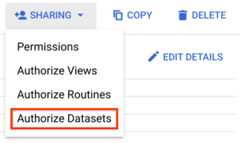
In theAuthorized dataset pane that appears, enter theDataset IDof the dataset that you want to authorize, in the following format:
PROJECT.AUTHORIZED_DATASETFor example:
myProject.myDatasetClickAdd Authorization and then clickClose.
bq
Open the Cloud Shell:
Write the existing metadata (including the access control list) for thedataset you want to share into aJSON file by using the
bq showcommand.bqshow--format=prettyjsonPROJECT:SHARED_DATASET>FILE_PATHUse a text editor to add the dataset that you want to authorizeinto the existing
accesssection of the JSON file that was created atFILE_PATH.For example:
"access":[...{"dataset":{"dataset":{"project_id":"PROJECT","dataset_id":"AUTHORIZED_DATASET"},"target_types":"VIEWS"}}]
Update the shared dataset by using the
bq updatecommand. For example:bqupdate--sourceFILE_PATHPROJECT:SHARED_DATASET
To verify that the authorized dataset has been added, enter the
bq showcommand again. For example:bqshow--format=prettyjsonPROJECT:SHARED_DATASET
API
Get the current metadata for the dataset you want to share by calling the
datasets.getmethod, as follows:GEThttps://bigquery.googleapis.com/bigquery/v2/projects/PROJECT/datasets/SHARED_DATASET
The response body returns a
Datasetresource that contains JSON metadata for the dataset.Add the dataset that you want authorize into the
accesssection of the JSON metadata that was returned in theDatasetresource asfollows:"access":[...{"dataset":{"dataset":{"project_id":"PROJECT","dataset_id":"AUTHORIZED_DATASET"},"target_types":"VIEWS"}}]
Use the
datasets.updatemethod to update the dataset with the added authorization:PUThttps://bigquery.googleapis.com/bigquery/v2/projects/PROJECT/datasets/SHARED_DATASET
Include the updated
Datasetresource in the request body.You can verify that the authorized dataset has been added by calling the
datasets.getmethod again.
Revoke a dataset's authorization
When you delete a dataset authorized to access another source dataset, it cantake up to 24 hours for the change to fully reflect in the source dataset'saccess control lists (ACLs). During thistime:
- You won't be able to access the source data through the deleted dataset.
- The deleted dataset might still appear in the source dataset's ACL and counttowards any authorized dataset limits. This could prevent you from creatingnew authorized datasets until the ACL is updated.
To revoke the access granted to the views in an authorized dataset, remove theauthorized dataset from the shared dataset's access list, asfollows:
Console
In the Google Cloud console, go to theBigQuery page.
In the left pane, clickExplorer:
In theExplorer pane, expand your project, clickDatasets, andthen click a dataset.
In the details pane that appears, clickSharing and select theAuthorize Datasets option.
In theAuthorized dataset pane that appears, find the entry for theauthorized dataset in theCurrently authorized datasets section.
Click the delete icon next to the authorized dataset you want to remove,and then clickClose.
bq
Open the Cloud Shell:
Write the existing metadata (including the access control list) for theshared dataset into a JSON file by using the
bq showcommand.bqshow--format=prettyjsonPROJECT:SHARED_DATASET>FILE_PATHUse a text editor to remove the authorized dataset from the
accesssection of the JSON file that was created atFILE_PATH, asfollows:{"dataset":{"dataset":{"project_id":"PROJECT","dataset_id":"AUTHORIZED_DATASET"},"target_types":"VIEWS"}}
Update the shared dataset by using the
bq updatecommand. For example:bqupdate--sourceFILE_PATHPROJECT:SHARED_DATASET
To verify that the authorized dataset has been removed, enter the
bq showcommand again.For example:bqshow--format=prettyjsonPROJECT:SHARED_DATASET
API
Get the current metadata for the shared dataset by calling the
datasets.getmethod, as follows:GEThttps://bigquery.googleapis.com/bigquery/v2/projects/PROJECT/datasets/SHARED_DATASET
The response body returns a
Datasetresource that contains JSON metadata for the dataset.Remove the authorized dataset from the
accesssection of the JSON that was returned in theDatasetresource, forexample:{"dataset":{"dataset":{"project_id":"PROJECT","dataset_id":"AUTHORIZED_DATASET"},"target_types":"VIEWS"}}
Use the
datasets.updatemethod to update the dataset with the removed authorization:PUThttps://bigquery.googleapis.com/bigquery/v2/projects/PROJECT/datasets/SHARED_DATASET
Include the updated
Datasetresource in the request body.You can verify that the authorized dataset has been removed by calling the
datasets.getmethod again.
Create or update a view in an authorized dataset
To create or update a view that is in an authorized dataset,you must have the permissions for the shared dataset that are listed inRequired permissions and roles,in addition to the permissions that are required tocreate orupdate a view in astandard dataset.
The following table summarizes the necessaryIdentity and Access Management (IAM) permissionsto create or update a view that is in an authorized dataset:
| Permission | Resource |
|---|---|
bigquery.datasets.get | The dataset you are sharing. |
bigquery.tables.getData | Any tables or views from the shared dataset that are referencedin the new view you are creating or updating. |
bigquery.tables.create | The authorized dataset in which you are creating a view. |
bigquery.tables.update | The authorized dataset in which you are updating a view. |
You don't need any additional permissions todelete a view from anauthorized dataset.
Query a view in an authorized dataset
To query a view in an authorized dataset, a user needs to have access to theview, but access to the shared dataset is not required.
For more information, seeAuthorized views.
Authorized dataset example
The following example describes how to create and use an authorized dataset.
Assume you have two datasets, namedprivate_dataset andpublic_dataset.Theprivate_dataset dataset contains a table namedprivate_table. Thepublic_dataset dataset contains a view namedprivate_table_filtered. Theprivate_table_filtered view is based on a query that returns some, but notall, of the fields in theprivate_table table.
You can give a user access tothe data returned by theprivate_table_filtered view, but not all of the datain theprivate_table table, as follows:
Grant the
bigquery.dataViewerrole to the user for thepublic_datasetdataset. This role includes thebigquery.tables.getDatapermission, whichlets the user query the views in thepublic_datasetdataset.For information about how to grant a role to a user for a dataset, seeControlling access to datasets.The user now has permission to query views in the
public_dataset,but they still cannot access theprivate_tabletable inprivate_dataset. If the user tries to query theprivate_tabletabledirectly, or if they try to access theprivate_tabletable indirectly byquerying theprivate_table_filteredview,they get an error message similar to the following:Access Denied: TablePROJECT:private_dataset.private_table:User does not have permission to query tablePROJECT:private_dataset.private_table.In theBigQuery page of the Google Cloud console, open the
private_datasetdataset, clickSharing, and then selectAuthorize Datasets.In theAuthorized dataset pane that appears, enter
PROJECT.public_datasetin theDataset ID field,and then clickAdd Authorization.The
public_datasetdataset is added to the access control list of theprivate_datasetdataset, authorizing the views in thepublic_datasetdataset to query the data in theprivate_datasetdataset.The user can now query the
private_table_filteredview in thepublic_datasetdataset, which indirectly accesses theprivate_datasetdataset, without having any permissions to directly access data in theprivate_datasetdataset.
Limitations
- You can create authorized datasets in different regions,but BigQuery doesn't support cross-region queries. Therefore,we recommend that you create datasets in the same region.
What's next
For information about authorizing an individual view to access data in adataset, seeAuthorized views.
For information about authorizing a table function or a user-defined functionto access data in a dataset, seeAuthorized functions.
Except as otherwise noted, the content of this page is licensed under theCreative Commons Attribution 4.0 License, and code samples are licensed under theApache 2.0 License. For details, see theGoogle Developers Site Policies. Java is a registered trademark of Oracle and/or its affiliates.
Last updated 2025-12-15 UTC.