

Commercialize listings on Google Cloud Marketplace
As a BigQuery sharing publisher, you can use the BigQuery sharingintegration withGoogle Cloud Marketplace to create revenue bylisting your own data products on Cloud Marketplace. By using thepublisher-subscriber model, you can share data offerings with your customers atscale, without having to manage every transaction and subscription. You canconfigure aspects of the data product, such as the kind of data you provide (forexample, BigQuery datasets), the price of the subscription (paid, free,or trial), and the duration.
As a BigQuery sharing subscriber, you can use this integration todiscover and consume a wide range of Google and third-party data products andcommercial datasets.
Before continuing, you should be familiar withsharing data exchanges.
Before you begin
- Grant Identity and Access Management (IAM) rolesthat give users the necessary permissions to perform each task in thisdocument.
- Enable the Analytics Hub API.
Required roles
To get the permissions that you need to use Cloud Marketplace-integrated listings, ask your administrator to grant you the following IAM roles:
- Create and manage BigQuery sharing listings:
- Analytics Hub Admin (
roles/analyticshub.admin) - BigQuery Data Owner (
roles/bigquery.dataOwner) - Service Management Administrator (
roles/servicemanagement.admin)
- Analytics Hub Admin (
- Create and manage data product listings on Cloud Marketplace:Commerce Producer Admin (
roles/commerceproducer.admin) - Subscribe to paid BigQuery sharing listings on Cloud Marketplace:
- Billing Account Administrator (
roles/billing.admin) - Analytics Hub Viewer (
roles/analyticshub.viewer)
- Billing Account Administrator (
For more information about granting roles, seeManage access to projects, folders, and organizations.
You might also be able to get the required permissions throughcustom roles or otherpredefined roles.
Enable the Analytics Hub API
To enable the Analytics Hub API, select one of the followingoptions:
Console
Go to theAnalytics Hub API page and enable the Analytics Hub API foryour Google Cloud project.
gcloud
Run thegcloud services enable command:
gcloudservicesenableanalyticshub.googleapis.comAfter you enable the Analytics Hub API, you can access theSharing (Analytics Hub) page in theGoogle Cloud console.
Limitations
Cloud Marketplace-integrated listings have the following limitations:
- AllBigQuery sharing limitationsapply.
- BigQuery sharing publishers and subscribers must be located in a supportedCloud Marketplace Agency Jurisdiction.
- Cloud Marketplace-integrated listings are indexed inData Catalog (deprecated) andDataplex Universal Catalog, but youcan't specifically filter for its resource type.
- Billing usage metrics for Cloud Marketplace-integrated listingsaren't captured in provider usage metrics or in
INFORMATION_SCHEMAviews. - Data clean rooms and Pub/Sub topics aren't supported forCloud Marketplace integration.
Architecture and terminology
The following diagram shows the interaction between Cloud Marketplaceand BigQuery sharing for commercial listings:
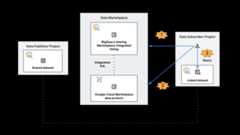
Data product on Cloud Marketplace
A Cloud Marketplace data product listing is created by selecting aBigQuery sharing listing, choosing a pricing model, and submittingthe product to Cloud Marketplace for review.
Cloud Marketplace-integrated listing on BigQuery sharing
A BigQuery sharing listing becomes aCloud Marketplace-integrated listing when theCloud Marketplace data product listing is approved and published,creating an integration link between sharing andCloud Marketplace and making the listing eligible for purchase.This type of BigQuery sharing listing supports shared datasets.
Linked resource
When subscribing to a Cloud Marketplace-integrated listing, a linkedresource is created in the BigQuery sharing subscriber project. Access tothe linked resource is managed by active Cloud Marketplace orders.Linked datasets are supported in Cloud Marketplace-integrated listings.
Create a Cloud Marketplace-integrated listing
To create a BigQuery sharing listing and publish it onCloud Marketplace, do the following:
In the Google Cloud console, go to theSharing (Analytics Hub) page.
Create a newsharing data exchange.Alternatively, choose an existing data exchange to retain existingsubscriptions.
Createlistings in the data exchange.Alternatively, choose existing listings to retain existing subscriptions.
Note: Both requesting access and Cloud Marketplace-integratedflows are supported on a single BigQuery sharing listing.This means that you can create a Cloud Marketplace-integratedlisting from an existing (offline) commercial listing, without anydisruptions to existing subscriptions.In the row of your data exchange, clickMore actions> List on Marketplace.You are redirected to the Cloud MarketplaceProducer Portal.
Follow the instructions on the Cloud MarketplaceProducer Portal to onboard your BigQuery sharinglisting as adata product.
Navigate back to theSharing (Analytics Hub) page. In the row ofyour data exchange, the phraseNot Published appears in theMarketplace column, indicating that your data product was created andsubmitted for approval. Clicking the phraseNot Published redirects youto the Cloud Marketplace Producer Portal where youcan check the status.
After approval, the wordPublished appears in theMarketplace column.Clicking the wordPublished redirects you to the listing inCloud Marketplace.
SeeOffer software on Google Cloud Marketplacefor additional requirements.
Update a Cloud Marketplace-integrated listing
Updating a Cloud Marketplace-integrated listing follows the sameprocess asupdating a standard listing in a data exchange. You might also need to updatethe data product listing in the Cloud MarketplaceProducer Portal, which might require another review and approval.
Manage subscriptions for a Cloud Marketplace-integrated listing
Commercial subscriptions to Cloud Marketplace-integrated listings aremanaged by Cloud Marketplace orders. You can still manually add andupdate BigQuery sharing subscribers by followingthe same process that you would with a standard listing,but the associated Cloud Marketplace transactions don't take place.
You can also manually revoke subscriptions by followingthe same process that you would use for a standard listingand entering your Marketplace Service ID to accept the warning notification.However, be aware that revoking commercial subscriptions might impact yourcustomers and violate theCloud Marketplace Terms of Service.Additionally, revoking subscriptions doesn't remove the listing fromBigQuery sharing or Cloud Marketplace.
Delete a Cloud Marketplace-integrated listing
Warning: Once a Cloud Marketplace-integrated listing is deleted, youcan't undo it. Deleting listings might impact your customers and violate theCloud Marketplace Terms of Service.To delete a listing from BigQuery sharing andCloud Marketplace, do the following:
- Revoke all commercial subscriptions for yourCloud Marketplace-integrated listing by followingthe same process that you would use for a data exchange.You can't delete Cloud Marketplace-integrated listings with activecommercial subscriptions.
- Follow the standard process todelete a data exchange.
- When you are prompted with a warning notification, enter your MarketplaceService ID to accept, and then clickConfirm.
Subscribe to a Cloud Marketplace-integrated listing
To subscribe to a BigQuery sharing listing onCloud Marketplace, do the following:
In the Google Cloud console, go to theSharing (Analytics Hub) page.
ClickSearch listings.
Search for the listing that you want to subscribe to.
Click the listing.
If your organization has already purchased the listing (theSubscribebutton and purchase date are visible), do the following:
- ClickSubscribe.
- Specify the project and linked dataset name.
- ClickSave.
If you don't have permission to subscribe to listings, clickRequest access and submit the request form.
If your organization hasn't purchased the listing (thePurchase via Marketplace button is visible), do the following:
- ClickPurchase via Marketplace.
- ClickSubscribe.
- In theOrder summary page, specify yoursubscription plan, purchase details, and accept the terms if you agreewith them.
- ClickSubscribe, and then clickGo to product page.
- Wait for a few minutes. After your order is activated, clickManage on BigQuery sharing (Analytics Hub). You are redirectedback toSharing (Analytics Hub).
- ClickSubscribe on the BigQuery sharing listing page.
- Specify the project and linked dataset name.
- ClickSave.
For some listings, to get a quote, you might have to contact the salesteam by submitting a form.
Any project with the same billing account can also subscribe to the listing.
Pricing
StandardBigQuery sharing pricingapplies. Additionally, theCloud Marketplace revenue sharing requirementapplies for Cloud Marketplace-integrated listings. For moreinformation about how BigQuery sharing subscribers are charged bypublishers for use of data products, seeManaging billing for Cloud Marketplace products.
What's next
- Learn more aboutCloud Marketplace.
- If you're a VPC Service Controls user, seeVPC Service Controls.
Except as otherwise noted, the content of this page is licensed under theCreative Commons Attribution 4.0 License, and code samples are licensed under theApache 2.0 License. For details, see theGoogle Developers Site Policies. Java is a registered trademark of Oracle and/or its affiliates.
Last updated 2025-12-15 UTC.