
NDB Asynchronous Operation
When optimizing an application's performance, consider its NDB use. For example, if an application reads a value that isn't in cache, that read takes a while. You might be able to speed up your application by performing Datastore actions in parallel with other things, or performing a few Datastore actions in parallel with each other.
The NDB Client Library provides many asynchronous ("async") functions. Each of these functions lets an application send a request to the Datastore. The function returns immediately, returning aFuture object. The application can do other things while the Datastore handles the request. After the Datastore handles the request, the application can get the results from theFuture object.
Introduction
Suppose that one of your application's request handlers needs to use NDB to write something, perhaps to record the request. It also needs to carry out some other NDB operations, perhaps to fetch some data.
classMyRequestHandler(webapp2.RequestHandler):defget(self):acct=Account.get_by_id(users.get_current_user().user_id())acct.view_counter+=1acct.put()# ...read something else from Datastore...self.response.out.write('Content of the page')By replacing the call toput() with a call to its async equivalentput_async(), the application can do other things right away instead of blocking onput().
classMyRequestHandler(webapp2.RequestHandler):defget(self):acct=Account.get_by_id(users.get_current_user().user_id())acct.view_counter+=1future=acct.put_async()# ...read something else from Datastore...self.response.out.write('Content of the page')future.get_result()This allows the other NDB functions and template rendering to happen while the Datastore writes the data. The application doesn't block on the Datastore until it gets data from the Datastore.
In this example, it's a little silly to callfuture.get_result: the application neveruses the result from NDB. That code is just in there to make sure that the request handler doesn't exit before the NDBput finishes; if the request handler exits too early, the put might never happen. As a convenience, you can decorate the request handler with@ndb.toplevel. This tells the handler not to exit until its asynchronous requests have finished. This in turn lets you send off the request and not worry about the result.
You can specify a wholeWSGIApplication asndb.toplevel. This makes sure that each of theWSGIApplication's handlers waits for all async requests before returning. (It does not "toplevel" all theWSGIApplication's handlers.)
app=ndb.toplevel(webapp2.WSGIApplication([('/',MyRequestHandler)]))Using atoplevel application is more convenient than all its handler functions. But if a handler method usesyield, that method still needs to be wrapped in another decorator,@ndb.synctasklet; otherwise, it will stop executing at theyield and not finish.
classMyRequestHandler(webapp2.RequestHandler):@ndb.topleveldefget(self):acct=Account.get_by_id(users.get_current_user().user_id())acct.view_counter+=1acct.put_async()# Ignoring the Future this returns# ...read something else from Datastore...self.response.out.write('Content of the page')Using Async APIs and Futures
Almost every synchronous NDB function has an_async counterpart. For example,put() hasput_async(). The async function's arguments are always the same as those of the synchronous version. The return value of an async method is always either aFuture or (for "multi" functions) a list ofFutures.
AFuture is an object that maintains state for an operation that has been initiated but may not yet have completed; all async APIs return one or moreFutures. You can call theFuture'sget_result() function to ask it for the result of its operation; the Future then blocks, if necessary, until the result is available, and then gives it to you.get_result() returns the value that would be returned by the synchronous version of the API.
Note:If you've used Futures in certain other programming languages, you might thinkyou can use a Future as a result directly. That doesn't work here.Those languages useimplicit futures; NDB uses explicit futures.Callget_result() to get an NDBFuture'sresult.
What if the operation raises an exception? That depends on when the exception occurs. If NDB notices a problem whenmaking a request (perhaps an argument of the wrong type), the_async() method raises an exception. But if the exception is detected by, say, the Datastore server, the_async() method returns aFuture, and the exception will be raised when your application calls itsget_result(). Don't worry too much about this, it all ends up behaving quite natural; perhaps the biggest difference is that if a traceback gets printed, you'll see some pieces of the low-level asynchronous machinery exposed.
For example, suppose you are writing a guestbook application. If the user is logged in, you want to present a page showing the most recent guestbook posts. This page should also show the user their nickname. The application needs two kinds of information: the logged-in user's account information and the contents of the guestbook posts. The "synchronous" version of this application might look like:
uid=users.get_current_user().user_id()acct=Account.get_by_id(uid)# I/O action 1qry=Guestbook.query().order(-Guestbook.post_date)recent_entries=qry.fetch(10)# I/O action 2# ...render HTML based on this data...self.response.out.write('<html><body>{}</body></html>'.format(''.join('<p>{}</p>'.format(entry.content)forentryinrecent_entries)))There are two independent I/O actions here: getting theAccount entity and fetching recentGuestbookentities. Using the synchronous API, these happen one after the other;we wait to receive the account information before fetching theguestbook entities. But the application doesn't need the accountinformation right away. We can take advantage of this and use async APIs:
uid=users.get_current_user().user_id()acct_future=Account.get_by_id_async(uid)# Start I/O action #1qry=Guestbook.query().order(-Guestbook.post_date)recent_entries_future=qry.fetch_async(10)# Start I/O action #2acct=acct_future.get_result()# Complete #1recent_entries=recent_entries_future.get_result()# Complete #2# ...render HTML based on this data...self.response.out.write('<html><body>{}</body></html>'.format(''.join('<p>{}</p>'.format(entry.content)forentryinrecent_entries)))This version of the code first creates twoFutures (acct_future andrecent_entries_future), and then waits for them. The server works on both requests in parallel. Each_async() function call creates a Future object and sends a request to the Datastore server. The server can start working on the request right away. The server responses may come back in any arbitrary order; the Future object link responses to their corresponding requests.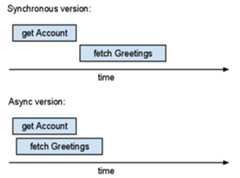
The total (real) time spent in the async version is roughly equal to the maximum time across the operations. The total time spent in the synchronous version exceeds the sum of the operation times. If you can run more operations in parallel, then async operations help more.
To see how long your application's queries take or how many I/O operations it does per request, consider usingAppstats. This tool can show charts similar to the drawing above based on instrumentation of a live app.
Using Tasklets
An NDBtasklet is a piece of code that might run concurrently with other code. If you write a tasklet, your application can use it much like it uses an async NDB function: it calls the tasklet, which returns aFuture; later, calling theFuture'sget_result() method gets the result.
Tasklets are a way to write concurrent functions without threads; tasklets are executed by an event loop and can suspend themselves blocking for I/O or some other operation using a yield statement. The notion of a blocking operation is abstracted into theFuture class, but a tasklet may alsoyield an RPC in order to wait for that RPC to complete. When the tasklet has a result, itraises anndb.Return exception; NDB then associates the result with the previously-yieldedFuture.
When you write an NDB tasklet, you useyield andraise in an unusual way. Thus, if you look for examples of how to use these, you probably will not find code like an NDB tasklet.
To turn a function into an NDB tasklet:
- decorate the function with
@ndb.tasklet, - replace all synchronous datastore calls with
yields of asynchronous datastore calls, - make the function "return" its return value with
raise ndb.Return(retval)(not necessary if the function doesn't return anything).
An application can use tasklets for finer control over asynchronous APIs. As an example, consider the following schema:
classAccount(ndb.Model):email=ndb.StringProperty()nickname=ndb.StringProperty()defnick(self):returnself.nicknameorself.email# Whichever is non-empty...classMessage(ndb.Model):text=ndb.StringProperty()when=ndb.DateTimeProperty(auto_now_add=True)author=ndb.KeyProperty(kind=Account)# references AccountWhen displaying a message, it makes sense to show the author's nickname. The "synchronous" way to fetch the data to show a list of messages might look like this:
qry=Message.query().order(-Message.when)formsginqry.fetch(20):acct=msg.author.get()self.response.out.write('<p>On{},{} wrote:'.format(msg.when,acct.nick()))self.response.out.write('<p>{}'.format(msg.text))Unfortunately, this approach is inefficient. If you looked at it inAppstats, you would see that the "Get" requests are in series. You might see the following "staircase" pattern.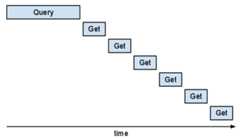
This part of the program would be faster if those "Gets" could overlap. You might rewrite the code to useget_async, but it is tricky to keep track of which async requests and messages belong together.
The application can define its own "async" function by making it a tasklet. This allows you to organize the code in a less confusing way.
Furthermore, instead of usingacct = key.get() oracct = key.get_async().get_result(),the function should useacct = yield key.get_async().Thisyield tells NDB that this is a good place to suspend thistasklet and let other tasklets run.
Decorating a generator function with@ndb.tasklet makes the function return aFuture instead of a generator object. Within the tasklet, anyyield of aFuture waits for and returns theFuture's result.
For example:
@ndb.taskletdefcallback(msg):acct=yieldmsg.author.get_async()raisendb.Return('On{},{} wrote:\n{}'.format(msg.when,acct.nick(),msg.text))qry=Message.query().order(-Message.when)outputs=qry.map(callback,limit=20)foroutputinoutputs:self.response.out.write('<p>{}</p>'.format(output))Take note that althoughget_async() returns aFuture, the tasklet framework causes theyield expression to return theFuture's result to variableacct.
Themap() callscallback() several times. But theyield ..._async() incallback() lets NDB's scheduler send off many async requests before waiting for any of them to finish.
If you look at this in Appstats, you might be surprised to see that these multiple Gets don't just overlap—they all go through in the same request. NDB implements an "autobatcher." The autobatcher bundles multiple requests up in a single batch RPC to the server; it does this in such a way that as long as there is more work to do (another callback may run) it collects keys. As soon as one of the results is needed, the autobatcher sends the batch RPC. Unlike most requests, queries are not "batched".
When a tasklet runs, it gets its default namespace from whatever the default was when the tasklet was spawned, or whatever the tasklet changed it to while running. In other words, the default namespace is not associated with or stored in theContext, and changing the default namespace in one tasklet does not affect the default namespace in other tasklets, except those spawned by it.
Tasklets, Parallel Queries, Parallel Yield
You can use tasklets so that multiple queries fetch records at the same time. For example, suppose your application has a page that displays the contents of a shopping cart and a list of special offers. The schema might look like this:
classAccount(ndb.Model):passclassInventoryItem(ndb.Model):name=ndb.StringProperty()classCartItem(ndb.Model):account=ndb.KeyProperty(kind=Account)inventory=ndb.KeyProperty(kind=InventoryItem)quantity=ndb.IntegerProperty()classSpecialOffer(ndb.Model):inventory=ndb.KeyProperty(kind=InventoryItem)A "synchronous" function that gets shopping cart items and special offers might look like the following:
defget_cart_plus_offers(acct):cart=CartItem.query(CartItem.account==acct.key).fetch()offers=SpecialOffer.query().fetch(10)ndb.get_multi([item.inventoryforitemincart]+[offer.inventoryforofferinoffers])returncart,offersThis example uses queries to fetch lists of cart items and offers; it then fetches details about the inventory items withget_multi(). (This function doesn't use the return value ofget_multi() directly. It callsget_multi() to fetch all the inventory details into the cache so that they can be read quickly later.)get_multi combines many Gets into one request. But the query fetches happen one after the other. To make those fetches happen at the same time, overlap the two queries:
defget_cart_plus_offers_async(acct):cart_future=CartItem.query(CartItem.account==acct.key).fetch_async()offers_future=SpecialOffer.query().fetch_async(10)cart=cart_future.get_result()offers=offers_future.get_result()ndb.get_multi([item.inventoryforitemincart]+[offer.inventoryforofferinoffers])returncart,offersTheget_multi() call is still separate: it depends on the query results, so you can't combine it with the queries.
Suppose this application sometimes needs the cart, sometimes the offers, and sometimes both. You want to organize your code so that there's a function to get the cart and a function to get the offers. If your application calls these functions together, ideally their queries could "overlap." To do this, make these functions tasklets:
@ndb.taskletdefget_cart_tasklet(acct):cart=yieldCartItem.query(CartItem.account==acct.key).fetch_async()yieldndb.get_multi_async([item.inventoryforitemincart])raisendb.Return(cart)@ndb.taskletdefget_offers_tasklet(acct):offers=yieldSpecialOffer.query().fetch_async(10)yieldndb.get_multi_async([offer.inventoryforofferinoffers])raisendb.Return(offers)@ndb.taskletdefget_cart_plus_offers_tasklet(acct):cart,offers=yieldget_cart_tasklet(acct),get_offers_tasklet(acct)raisendb.Return((cart,offers))Thatyield x, y is important but easy to overlook. If that were two separateyield statements, they would happen in series. Butyielding a tuple of tasklets is aparallel yield: the tasklets can run in parallel and theyield waits for all of them to finish and returns the results. (In some programming languages, this is known as abarrier.)
If you turn one piece of code into a tasklet, you will probably want to do more soon. If you notice "synchronous" code that could run in parallel with a tasklet, it's probably a good idea to make it a tasklet, too. Then you can parallelize it with a parallelyield.
If you write a request function (a webapp2 requestfunction, a Django view function, etc.) to be a tasklet,it won't do what you want: it yields but then stopsrunning. In this situation, you want to decorate the function with@ndb.synctasklet.@ndb.synctasklet is like@ndb.tasklet butaltered to callget_result() on the tasklet.This turns your tasklet into a functionthat returns its result in the usual way.
Query Iterators in Tasklets
To iterate over query results in a tasklet, use the following pattern:
qry=Model.query()qit=qry.iter()while(yieldqit.has_next_async()):entity=qit.next()# Do something with entityifis_the_entity_i_want(entity):raisendb.Return(entity)This is the tasklet-friendly equivalent of the following:
# DO NOT DO THIS IN A TASKLETqry=Model.query()forentityinqry:# Do something with entityifis_the_entity_i_want(entity):raisendb.Return(entity)The three bold lines in the first version are the tasklet-friendly equivalent of the single bold line in the second version. Tasklets can only be suspended at ayield keyword. Theyield-less for loop doesn't let other tasklets run.
You might wonder why this code uses a query iterator at all instead of fetching all the entities usingqry.fetch_async(). The application might have so many entities that they don't fit in RAM. Perhaps you're looking for an entity and can stop iterating once you find it; but you can't express your search criteria with just the query language. You might use an iterator to load entities to check, then break out of the loop when you find what you want.
Async Urlfetch with NDB
An NDBContext has an asynchronousurlfetch() function that parallelizes nicely with NDB tasklets, for example:
@ndb.taskletdefget_google():context=ndb.get_context()result=yieldcontext.urlfetch("http://www.google.com/")ifresult.status_code==200:raisendb.Return(result.content)The URL Fetch service has its ownasynchronous request API. It's fine, but not always easyto use with NDB tasklets.
Using Asynchronous Transactions
Transactions may also be done asynchronously. You can pass an existing functiontondb.transaction_async(), or use the@ndb.transactional_async decorator.Like the other async functions, this will return an NDBFuture:
@ndb.transactional_asyncdefupdate_counter(counter_key):counter=counter_key.get()counter.value+=1counter.put()Transactions also work with tasklets. For example, we could change ourupdate_counter code toyield while waiting on blockingRPCs:
@ndb.transactional_taskletdefupdate_counter(counter_key):counter=yieldcounter_key.get_async()counter.value+=1yieldcounter.put_async()Using Future.wait_any()
Sometimes you want to make multiple asynchronous requests and return whenever the first one completes. You can do this using thendb.Future.wait_any() class method:
defget_first_ready():urls=["http://www.google.com/","http://www.blogspot.com/"]context=ndb.get_context()futures=[context.urlfetch(url)forurlinurls]first_future=ndb.Future.wait_any(futures)returnfirst_future.get_result().contentUnfortunately, there is no convenient way to turn this into a tasklet;a parallelyield waits for allFutures tocomplete—including those you don't want to wait for.
Except as otherwise noted, the content of this page is licensed under theCreative Commons Attribution 4.0 License, and code samples are licensed under theApache 2.0 License. For details, see theGoogle Developers Site Policies. Java is a registered trademark of Oracle and/or its affiliates.
Last updated 2025-12-15 UTC.