

Apigee known issues
This pageapplies toApigee andApigee hybrid.
View Apigee Edge documentation.
Select one or more of the following to filter this page:
This section lists known issues for Apigee components. For a list of bugs, new features, and other release information, see therelease notes.
| Issue ID | Affects | Status | Description | ||||||||||||||||||||||
|---|---|---|---|---|---|---|---|---|---|---|---|---|---|---|---|---|---|---|---|---|---|---|---|---|---|
| 458417250 | Apigee 1-16-0-apigee-4 | OPEN | Message Processor returns 500 error with"Duplicate Header "authorization"".When multiple authorization headers are present in a request, the Apigee ingress gateway doesn't concatenate them into a single header. This results in the Message Processor returning a Workaround: If multiple authorization headers are present in the request, concatenate them into a single header. For example: curl -s https://my-hostname.net/mocktarget/echo \ -H 'authorization: a, b' | ||||||||||||||||||||||
| 460431753 | Apigee, Apigee hybrid | OPEN | Apigee Model Armor policies are not supported with WebSockets. Apigee Model Armor policies, including SanitizeUserPrompt and SanitizeModelResponse, currently do not function as expected when used in API proxies handling WebSocket connections. See WebSockets with Apigee for more information on WebSocket configuration. | ||||||||||||||||||||||
| 433759657 | Apigee | FIXED in 1-16-0-apigee-3 or later | Following the upgrade to1-16-0-apigee-3, some Apigee organizations may encounter {"fault":{"faultstring":"Failed to execute JavaCallout. org/apache/commons/lang/StringUtils","detail":{"errorcode":"steps.javacallout.ExecutionError"}}} This error occurs when a Java Callout policy incorrectly depends on libraries intended for Apigee's internal use instead of providing its own dependencies. Action required: To prevent this issue, developers must ensure that all Java Callouts are self-contained and utilize their own dedicated libraries, avoiding any reliance on Apigee's internal class path. In the API proxy that utilizes the Apache Commons JAR library, import the Apache Commons JAR file to include as a resource for the proxy. For more information, seeJava resource guidelines. | ||||||||||||||||||||||
| 451841788 | hybrid 1.14.3 and hybrid 1.15.1 | FIXED | Apigee hybrid requires themintTaskScheduler.serviceAccountPath property even when Monetization is not enabled. Upgrading the Error: UPGRADE FAILED: execution error at (apigee-org/templates/mint-task-scheduler-gsa-secret.yaml:12:63): mintTaskScheduler.serviceAccountPath is required! Workaround: Remove the You can optionally move the files to a separate location outside of the Helm chart directory. Alternatively you can download them again if you want to enable Monetization in the future, following the instructions inStep 2: Download the Apigee Helm charts. For example, from the
| ||||||||||||||||||||||
| 451375397 | hybrid 1.14.3 | FIXED in hybrid 1.15.1 | The Error response from daemon: No such image: gcr.io/apigee-release/hybrid/apigee-stackdriver-logging-agent:latest Workaround: Edit the docker tag "${source}/$i" "${dest}/$i:${TAG}"To: docker tag "${source}/$i:${TAG}" "${dest}/$i:${TAG}" | ||||||||||||||||||||||
| 405936071 | hybrid 1.15.0 | FIXED in hybrid 1.15.1 | When Workaround: Patch
| ||||||||||||||||||||||
| 419856132 | hybrid 1.14.2 and newer | OPEN | Ifgateway.networking.k8s.io/v1 is installed in your cluster,apigee-ingressgateway-manager may fail to upgrade.Note:gateway.networking.k8s.io/v1 is usually installed in clusters running on Google Distributed Cloud (software only) on bare metal v1.32 or later.For a workaround, follow the steps inKnown issue 416634326. | ||||||||||||||||||||||
| 378686709 | Apigee Apigee hybrid | FIXED in Apigee (support call required) FIXED in hybrid 1.14.3 and hybrid 1.15.1 (procedure required) | The use of wildcards ( Proxy-1: /a/v1/bProxy-2: /a/*/c In this case, calls to the explicit base path will resolve successfully, but calls to the Fixed: This issue is fixed in Apigee and in hybrid 1.14.3 and later. However, the fix is not enabled by default. If you wish to enable the use of wildcards in basepaths:
Procedure: To enable use of wildcards (
| ||||||||||||||||||||||
| 382565315 | hybrid 1.13.0, hybrid 1.13.1, hybrid 1.13.2, hybrid 1.14.0 | FIXED in hybrid 1.13.3 and hybrid 1.14.1 | LogTimer usage in SecurityPolicy can cause a memory leak. In some circumstances, Apigee hybrid's logger threads could consume all available memory. For example, frequent log entries documenting permissions errors associated with the Javacallout could cause OOM. Note: Apigee recommends that you upgrade to the latest patch release of hybrid v1.13 or v1.14, for exampleversion 1.13.3 orversion 1.14.2. | ||||||||||||||||||||||
| 421190799 | Apigee | OPEN | The Apigee Extension Processor does not support more than 100kb of data processing as part of request and response body events. | ||||||||||||||||||||||
| 432315283 | Apigee | OPEN | When updating a keystore or truststore without creating a new keystore or truststore, runtime updates may fail and cause the following intermittent error: {"fault":{"faultstring":"SSL Handshake failed sun.security.provider.certpath.SunCertPathBuilderException: unable to find valid certification path to requested target","detail":{"errorcode":"messaging.adaptors.http.flow.SslHandshakeFailed"}}}The error is intermittent because the keystore or truststore update may fail on one runtime pod but succeed on other pods. To avoid this issue, update the keystore or truststore by creating a new keystore or truststore. Repoint your reference to the new keystore or truststore, as described in When a cert expires. | ||||||||||||||||||||||
| 412740465 | hybrid 1.14.0 and later | FIXED in hybrid 1.14.3 and hybrid 1.15.1 | Starting with Apigee hybridversion 1.14.0, automatic addition of Zipkin trace headers ( | ||||||||||||||||||||||
N/A | Apigee hybrid | OPEN | Configuring non-API proxy forwarding usinghttpProxy without also settingenvs.httpProxy will not apply the proxy configuration to Apigee Runtime's external calls to services like Pub/Sub or other Google Cloud APIs. If you only specify | ||||||||||||||||||||||
| 416634326 | hybrid 1.14.2 and later | FIXED in hybrid 1.14.3 and hybrid 1.15.1 | Presence of During Apigee Hybrid upgrade from older versions to 1.14.2 or later, presence of existing Workaround: The
Afer each of the above options, you will need to restart your Delete CRDs
Update clusterrole
After you have completed the above options, you will need to restart your
| ||||||||||||||||||||||
| 414499328 | hybrid 1.14.1 | FIXED in hybrid 1.14.3 and hybrid 1.15.0 |
This issue has been seen on OpenShift installations. Workaround: Modify the
| ||||||||||||||||||||||
| 402739748 | Apigee | OPEN | APIproducts are limited to 50 paths. If you add additional paths, an error message is displayed: Workaround: Use wildcard patterns to combine resource paths and operations as described in Configuring resource paths. Workaround: Create multiple API Products. This workaround has been verified and is viable for those who add a lot of API Proxies to an API Product. The App that is associated with your API Products would need to be updated to include the new one, but credentials and client-side request details have been proven to not need changing. | ||||||||||||||||||||||
| 291294211 | Apigee | OPEN | Error using Custom Reports and Stats APIs when selecting by fee type for installations using Monetization. Workaround: Fetch all fee types on the client side before filtering. | ||||||||||||||||||||||
| 391140293 | Apigee Apigee hybrid | FIXED | Scaling of Istio ingress pods can cause a Scaling of the Istio ingress pods can occasionally cause a Workaround: Manually scale the Istio ingress pods. | ||||||||||||||||||||||
| 368155212 | hybrid 1.14.0 hybrid 1.14.1 | FIXED in hybrid 1.14.2 | ESS andnon-ESS Cassandra credential rotation does not work in organizations with Enhanced Proxy Limits. Runtime traffic is not affected. | ||||||||||||||||||||||
| 401624396 | hybrid 1.13.x hybrid 1.14.x | OPEN | The Apigee restore job fails while restoringGCP orHYBRID Cloud Providers backups taken from a multi-region setup. This issue does not affectCSI restore. Backups taken from the multi-region setup using | ||||||||||||||||||||||
| 401746333 | Apigee hybrid 1.12.4 hybrid 1.13.3 hybrid 1.14.1 | FIXED | TheNimbus JOSE + JWT library may cause a If you have a Apigee hybrid-enabled organization with a JavaCallout policy that uses the Nimbus JOSE + JWT library, do not upgrade to hybrid 1.12.4, hybrid 1.13.3, hybrid 1.14.1. | ||||||||||||||||||||||
| 397693324 | hybrid 1.14.0 hybrid 1.14.1 | FIXED in hybrid 1.14.2 | ESS andnon-ESS Multi-region Cassandra credential rotation will fail in every region except the first. Runtime traffic is not affected. Follow the providedworkaround to resolve this issue. | ||||||||||||||||||||||
| 391861216 | hybrid 1.13.x hybrid 1.14.x | FIXED in hybrid 1.13.3 and hybrid 1.14.1 | Restarting Cassandra pods on a Hybrid cluster that has been restored using theGCP orHYBRID Cloud Providers will cause the pods to go into the CrashLoopBackoff state. This issue does not affectCSI restore.Cassandra pods will be restarted after applying Cassandra overrides changes, such when re-enabling backup, which will trigger this issue. The logs of a Cassandra pod in the CrashLoopBackoff state will show the following error: Follow the providedworkaround to resolve this issue. | ||||||||||||||||||||||
| 388608440 | hybrid 1.11.x hybrid 1.12.x | FIXED in hybrid 1.12.4 and later | The Apigee backup job doesn't clean up the Cassandra intermediate snapshots. In some rare cases, the Apigee backup job doesn't clean up the Cassandra intermediate snapshots it creates while taking backups using | ||||||||||||||||||||||
| 392135466 | hybrid 1.14.0 | OPEN | Proxy chaining with mTLS is not supported when usingEnhanced per-environment proxy limits | ||||||||||||||||||||||
| 383334511 | Apigee | OPEN | KVM entry created with unexpected name When a KeyValueMapOperations policy is used with | ||||||||||||||||||||||
384937220 | hybrid 1.14.0 | FIXED | Helm release creation may fail when there are multiple virtual hosts.Note: This has been fixed in version 1.14.2. Apigee recommends that youupgrade to version 1.14.2 or newer. When there are multiple virtual hosts, the Helm release creation may fail due to conflicting kubectl annotate ar apigee-ingressgateway-internal-chaining-PROJECT_ID_SUFFIX -nAPIGEE_NAMESPACE meta.helm.sh/release-name=NEW_ENV_GROUP_NAME --overwritewhere:
| ||||||||||||||||||||||
N/A | Apigee hybrid | OPEN | Invalid service account can send the UpdateControlPlaneAccess api into a retry loop. If a user provides an invalid service account to the UpdateControlPlaneAccess api, the operation goes on a retry loop effectively locking the organization from invoking the API until the operation times out. | ||||||||||||||||||||||
| 373722434 | hybrid 1.13.x | FIXED starting in hybrid 1.13.2 and later | The Apigee backup job is unable to upload to Cloud Storage buckets with retention policies. When using the Workaround: Disable retention policies on the Cloud Storage bucket. | ||||||||||||||||||||||
341099433 | Apigee hybrid | OPEN | Theapigee-logger component does not supportWorkload Identity Federation.
| ||||||||||||||||||||||
N/A | Apigee hybrid | OPEN | Distributed trace in Apigee hybrid is not supported for orgs usingdata residency. | ||||||||||||||||||||||
N/A | Apigee | OPEN | Apigee does not support key re-encryption, which means even after rotation, the old key version will still be used and you cannot change the CMEK key after org creation. | ||||||||||||||||||||||
270574696 | Apigee | FIXED | Apigee does not support Cloud External Key Manager. | ||||||||||||||||||||||
268104619 | Apigee Apigee hybrid | OPEN | In the OASValidation policy, when you specify an array type in header, the MP will throw an error, even if the input is valid. | ||||||||||||||||||||||
364872027 | Apigee Apigee hybrid | FIXED | PEM parsing error in JWT/JWS policies due to non-standard format For Apigee and Apigee hybrid versions 1.13 and higher, any deviations in the required PEM format of keys used inApigee JWS or JWT policies may result in a parsing error. For example, placing any character other an a newline ( To prevent this error, make sure that no characters other than a newline, such as trailing spaces or slashes, immediately precede the post-encapsulation boundary. For more information about the encoding used for public or private keys, seeIETF RFC 7468. | ||||||||||||||||||||||
310191899 | Apigee Apigee hybrid | OPEN | Timeouts when deploying API proxies and shared flows The following endpoints may experience timeouts when used with a high volume of queries per second (QPS):
To reduce the likelihood of timeouts, we recommend setting a target of 1 QPS when using these endpoints or checking the status of a deployment before attempting another deployment. | ||||||||||||||||||||||
329304975 | Apigee | FIXED | Limit on number of basepaths per environment Apigee is enforcing a temporary limit of 1000 basepaths per environment to avoid potential failures when deploying API proxy revisions. While this limit is in place, you can deploy up to 1000 API proxy revisions (each containing a single basepath) per environment. If your API proxies or revisions contain more than one basepath, the total number of basepaths per environment must not exceed 1000. | ||||||||||||||||||||||
333791378 | hybrid 1.12.0 | OPEN | Cassandra backup and restore features not supported by Helm migration tool For the steps required to install a patch for the workaround, see Troubleshooting. | ||||||||||||||||||||||
310384001 | hybrid 1.11.0 | OPEN | Cert validation failures may return a 502 instead of a 503 error response when users add the tag<Enforce>true</Enforce> in the target<SSLInfo> block for default validation of TLS target endpoint certificates. | ||||||||||||||||||||||
289583112 | Apigee | OPEN | OASValidation policy does not work with global security requirements in OpenAPI specifications If the OASValidation policy specifies an <OASResource> with security requirements set at aglobal level, the security requirements are not enforced. Workaround: To ensure enforcement, all security requirements must be set at theoperation level in the OpenAPI specification passed in the | ||||||||||||||||||||||
205666368 | Apigee hybrid 1.10.2 hybrid 1.10.3 | FIXED in Apigee 1-10-0-apigee-6 and Hybrid 1.10.3-hotfix.1 | Apigee hybrid does not validate the target certificate by default. SeeAbout setting TLS options in a target endpoint or target server. | ||||||||||||||||||||||
295929616 | hybrid 1.10.0 and later | FIXED in hybrid 1.10.3 | Installing Apigee hybrid 1.10 on OpenShift (OSE) can fail with out-of-memory errors. Installing or upgrading to Apigee hybrid 1.10.0 through 1.10.2 could fail on OSE due to out-of-memory issues. Fixed in Apigee hybrid version 1.10.3. | ||||||||||||||||||||||
292118812 | hybrid 1.10.1 | FIXED | apigee-udca may not honor the http proxy settings.If the firewall forces all traffic through a forward-proxy, | ||||||||||||||||||||||
292558790 | Apigee hybrid 1.8.0 and later | OPEN | OASValidation policy fails withUnable to parse JSON error.
| ||||||||||||||||||||||
297012500 | Apigee hybrid 1.8.0 and later | OPEN | Deployment Issues with OAS Validation while using circular reference.
Workaround: Use an OpenAPI specification yaml without circular references. | ||||||||||||||||||||||
289254725 | Apigee Apigee 1-10-0-apigee-3 hybrid 1.8.8 hybrid 1.9.3 | FIXED in Apigee 1-10-0-apigee-5 FIXED in hybrid | Proxy deployments that include the OASValidation policy may fail. Proxy deployments that include the OASValidation policy may fail if:
| ||||||||||||||||||||||
284500460 | Apigee Apigee 1-10-0-apigee-1 | FIXED | Increase in latency for Message Logging policy when used with Cloud Logging. To avoid increasing latency in responses to the client, the Message Logging policy should be attached to thePostClientFlow. For more information on using policies in PostClientFlows, see Controlling API proxies with flows. | ||||||||||||||||||||||
282997216 | hybrid 1.8.0 and later hybrid 1.9.0 and later | OPEN | Special characters not allowed in Cassandra Jolokia password Use only alphanumeric characters for the Cassandra Jolokia password. Using special characters (including but not limited to "!", "@", "#", "$", "%", "^", "&", & "*") can cause Cassandra startup to fail. | ||||||||||||||||||||||
270371160 | hybrid 1.9.0 and later | FIXED | Apigee Ingress gateway supports TLS1.2+ protocol/ciphers only Apigee Ingress gateway only supports TLS1.2+, and not earlier versions of TLS. | ||||||||||||||||||||||
269139342 | hybrid 1.7.0 and later | FIXED | apigeectl getOrg does not followHTTP_PROXY settings inoverrides.yamlApigee organization validation does not follow HTTP Forward proxy rules set in | ||||||||||||||||||||||
266452840 | Apigee hybrid 1.7.0 and later hybrid 1.8.0 and later hybrid 1.9.0 and later | FIXED | Web sockets not working with Anthos Service Mesh 1.15.3 in Apigee X and Apigee Hybrid In certain circumstances, web sockets are not working for Apigee X and Apigee Hybrid when using Anthos Service Mesh | ||||||||||||||||||||||
287922301 | Apigee | OPEN | Inaccuracies in Monetization rates around volume-band thresholds Due to current design, inaccurate monetization rates may be assessed for transactions that occur near a volume-band threshold. This manifests as too many transactions being assessed at the pre-threshold rate, and is more likely to occur when many transactions for a given developer and rate plan combination occur within a 30 second window. This means that monetization reporting will over-report charges with decreasing banded rates, and under-report charges when increasing banded rates. This issue occurs in Apigee X and Apigee Hybrid and has no known workaround. Resolution has begun and will be available in a future release. | ||||||||||||||||||||||
242213234 | Apigee | FIXED | API product fails to load with a "no connections available" error This error might be returned when attempting to load API products: "Products were not loaded successfully. Error: no connections available from the Apigee connect agent(s)." The problem occurs after enabling VPC service control in the Google Cloud project and adding Workaround: Manually create an egress rule, such as the following: -egressTo: operations: -serviceName: "iamcredentials.googleapis.com" methodSelectors: -method: resources: -projects/608305225983 egressFrom: identityType: ANY_IDENTITY | ||||||||||||||||||||||
247540503 | hybrid 1.7.0 and later hybrid 1.8.0 and later | FIXED | A race condition with encryption key lookup can cause KVM lookup failures. In certain circumstances at very high throughput a race condition with encryption key lookup can cause KVM lookup failures. | ||||||||||||||||||||||
258699204 | hybrid 1.8.0 and later | FIXED | The default memory requests and limits for metrics pods have inadvertently changed in 1.8.x. If you see problems with the apigee-telemetry-app or apigee-telemetry-proxy pods not running, change the
Apply the changes with apigeectl apply --telemetry -foverrides.yaml | ||||||||||||||||||||||
260324159 | Apigee 1-9-0-apigee-16 | FIXED | API proxy and shared flow deployments taking up to 30 minutes. API proxies and shared flows could take around 20 to 30 minutes to deploy in the runtime plane in certain circumstances due to a 'socket closed' error in synchronizer. | ||||||||||||||||||||||
214447386 | All | OPEN | The message "config not modified" is displayed in Apigee APIData Access audit logs as anError.This is expected to occur every minute and does not affect your billing cost. | ||||||||||||||||||||||
260772383 | hybrid 1.8.0 and later | OPEN | Socket bind error on the AKS platform If installing hybrid on AKS, you may see this error: ingressGateways: See Configure the hybrid runtime. See also Use an internal load balancer with AKS. | ||||||||||||||||||||||
241786534 | hybrid 1.8.0 and later | FIXED | MART sometimes unable to connect to FluentD. When using Org-scoped UDCA, MART is sometimes unable to connect to FluentD. Org-scoped UDCA is the default in Apigee hybrid version 1.8. See | ||||||||||||||||||||||
| N/A | hybrid 1.6.0 and later | OPEN | apigee-logger not working on Anthos BareMetal with CentOS or RHEL.After migration of | ||||||||||||||||||||||
| 207762842 | hybrid 1.5.0 and later | FIXED | Logs not shipped to Cloud Logging by apigee-logger. Current | ||||||||||||||||||||||
| 191291501, 191000617 | Apigee | FIXED | Changing the email address of a developer entity will fail in the UI. | ||||||||||||||||||||||
| 191002224 | hybrid 1.5.0 and later | FIXED | Changing an email address fails while using thePUT /organizations/{org_name}/developers/{developer_email} API. | ||||||||||||||||||||||
| 184555974 | hybrid 1.5.0 and later | FIXED | The apigee-logger Fluentd can't parse logs in the OpenShift cluster. | ||||||||||||||||||||||
| N/A | Archive deployments | OPEN | Managing and debugging Apigee archive deployments in the UI is not supported In the Apigee UI, youcannot view, confirm deployment status, or manage your archive deployments, as described Deploying an API proxy, or use the Debug UI as described in Using Debug. As a workaround, you can use gcloud or the API to List all archive deployments in an environment and use the Debug API. | ||||||||||||||||||||||
| N/A | Archive deployments | OPEN | Rolling back an archive deployment is not supported Rolling back an archive deployment is not currently supported. To remove a version of an archive deployment you need to either redeploy a previous version of an archive or delete the environment. | ||||||||||||||||||||||
421402073 | Apigee in VS Code | OPEN | Google Authentication in policies is not supported in Apigee in Visual Studio Code (VS Code) Google authentication in ServiceCallout and ExternalCallout policies, as described in Using Google Authentication, is not supported in Apigee in VS Code. | ||||||||||||||||||||||
| 422757662 | Apigee 1-15-0-apigee-5 hybrid 1.15.0 | OPEN | x-b3 headers not available when DistributedTrace is disabled In the Apigee 1-15-0-apigee-5 and hybrid 1.15.0 releases, Apigee stopped sending x-b3 headers when Distributed Trace is disabled. This will guard against future changes to this behavior. | ||||||||||||||||||||||
| 146222881 | hybrid 1.3.0 and later | FIXED | Invalid HTTP Header error Invalid HTTP Header error: The Istio ingress switches all incoming target responses to the HTTP2 protocol. Because the hybrid message processor only supports HTTP1, you may see the following error when an API proxy is called:
If you see this error, you can take either of the following actions to correct the problem:
| ||||||||||||||||||||||
420985360 | Integrated portal | OPEN | SmartDocs
| ||||||||||||||||||||||
| N/A | Integrated portal | OPEN | Portal admin
| ||||||||||||||||||||||
| N/A | Integrated portal | OPEN | Portal features Search will be integrated into the integrated portal in a future release. | ||||||||||||||||||||||
| N/A | Integrated portal | OPEN | SAML identity provider Single logout (SLO) with the SAML identity provider is not supported for custom domains. To enable a custom domain with a SAML identity provider, leave the Sign-out URL field blank when you configure SAML settings. | ||||||||||||||||||||||
| 191815997 | hybrid 1.6.0 and later | FIXED | If a hybrid customer configures a forward proxy for the API proxy, Google token will not work unless it has direct access to*.googleapis.com. | ||||||||||||||||||||||
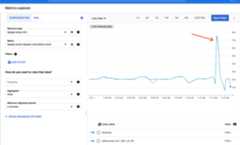
| N/A | Apigee | FIXED in Apigee 1-12-0-apigee-2 and hybrid 1.12.0 | API Monitoring and Cloud Monitoring show abnormal spikes
Affected Metrics:
New metrics You can use the new metrics to avoid this issue. Note: These metrics are currently available for Apigee and Apigee hybrid v1.12 and above. For Apigee hybrid v1.10 and v1.11, use theoriginal metrics.
For Apigee hybrid, see:Metrics collection overview andView metrics. | ||||||||||||||||||||||
| 203778087 | hybrid 1.5.3 and later | OPEN | apigee-stackdriver-logging-agent currently runs as root.Workaround: Disable the logging agent on hybrid. | ||||||||||||||||||||||
| 205629443 | Apigee | FIXED | If ServiceCallout is fire and forget (no<Response> tag), a race condition can occur if there is another policy that occurs after it.Workaround: To maintain the fire and forget behavior:
| ||||||||||||||||||||||
| 207719377 | Apigee | FIXED in Apigee 1-11-0-apigee-1 | If there is more than one SpikeArrest policy in a bundle,502 errors will occur.Workaround: Avoid using more than one SpikeArrest policy in the proxy to prevent the issue. | ||||||||||||||||||||||
| 209097822 | hybrid 1.5.0 and later Apigee | FIXED | Dynamic updates to rate in spike arrest may not reflect immediately For a particular key, if there is continuous traffic, the key may not be rate limited at the updated rate. If there is five minutes of no traffic for a particular key, the rate will be reflected. Workaround: Redeploy the proxy with a new reference variable if the rate has to take effect immediately. Or use two conditional spike arrests with different flow variables to adjust the rate. | ||||||||||||||||||||||
| 221305498 | Apigee | OPEN | API Monitoring may display fault code of '(not set)'. API Monitoring of Configurable API Proxies may display a fault code of '(not set)' for responses with a non-2xx status from the target. | ||||||||||||||||||||||
| 246774745 | Apigee | FIXED | Value ofio.timeout.millis is not honored when used with multiple dynamic targets.If a proxy sets two or more | ||||||||||||||||||||||
| 245664917 | hybrid 1.8.x | FIXED | Apigee hybrid upgrade error can be ignored During upgrade to Apigee hybrid 1.8.x, after running | ||||||||||||||||||||||
| 300660653 | Apigee | FIXED | An error should be, but is not, returned when deploying proxies with the same path to multiple environments that are attached to the same instance and environment group Deploying proxies with the same path to multiple environments that are attached to the same instance and environment group is not allowed and should return a warning message about a base path conflict. Instead, no error is shown and the deployments appear to succeed. | ||||||||||||||||||||||
| 301458133 | Apigee | FIXED | Some proxy deployment attempts return an error that the revision is immutable When attempting to save a previously deployed proxy, the deployment might fail with an error stating that the revision is immutable. | ||||||||||||||||||||||
| 301845257 | Apigee | FIXED | Attempting to deploy more than 800 proxies to an environment group fails with an error. The limit on which an error is returned is lower than 800 when the basepaths are longer than 15 characters. | ||||||||||||||||||||||
| 315820718 | Apigee | FIXED | WithgRPC proxy requests, gRPC trailers are removed from the response When a call is made to a gRPC Target Server, the only trailer that's returned is the "grpc-status" trailer. All other trailers are removed from the response. | ||||||||||||||||||||||
| 341157011 | Apigee | FIXED | Specs generated with Gemini Code Assist in Cloud Code that also include non-ASCII UTF-8 characters are not parsed correctly when uploaded to API hub. As a result API hub won't extract operations, definitions, and other metadata correctly. | ||||||||||||||||||||||
| 338285095 | Apigee | FIXED | Apps associated with an AppGroup do not appear in the Apps list in theApigee UI in Cloud console. As a result, users cannot access the app's App Detail page in the console. Using search in the console with a partial app name or API key search for the app is not supported until this issue is resolved. Apigee hybrid organizations are not impacted by this problem, as they use the Classic UI to view the app details. Partial workaround: A list of all apps is available using the APIs. Seeorganizations.apps.list. | ||||||||||||||||||||||
| 355714868 | Monetization Apigee hybrid | OPEN | Recurring, setup, and top-up fee data not captured or billedfor hybrid organizations For hybrid organizations with monetization, the recurring (RECURRING_FEE), setup fee (SETUP_FEE) and top-up fee (TOPUP_FEE) data is not captured or billed for post-paid billing. For pre-paid billing, the wallet deduction occurs for these fees but is not reported. | ||||||||||||||||||||||
| 438850078 | Apigee | OPEN | An infinite recursion occurs within the OASValidation policy when a backend response contains a discriminator type that is the same as the parent schema. This problem can lead to a | ||||||||||||||||||||||
| 449012244 | Apigee | OPEN | Use separate target endpoint definitions for SSE (server sent-event) targets. Mixing SSE and non-SSE target endpoints together might result in inconsistent behavior such as empty | ||||||||||||||||||||||
| 445936920 | Apigee 1-16-0-apigee-2 and later | OPEN | Previously undetected DNS configuration problems might now cause DNS errors. Apigee removed the automatic DNS fallback functionality that was in 1-16-0-apigee-2. This removal eliminates the platform's resiliency to DNS misconfigurations and might now result in DNS errors. Find related errors by checking the runtime logs for DNS resolution errors. | ||||||||||||||||||||||
| 383372330 | Apigee Emulator versions 1.13.0 up to but not including 1.15.1 | FIXED in Apigee Emulator versions 1.15.1 and later | All proxy deployments fail locally with error messages including 06/13/20256:45PMEMULATORINFODeployingenvironmenttestenv,toContainerapigee-1.14.2(1.14.2)06/13/20256:45PMEMULATORERRORErrorparsingdeploymentreportasJSON06/13/20256:45PMEMULATORERRORnull06/13/20256:45PMEMULATORERROREnvironmenttestenvdeployment,toContainerapigee-1.14.2(1.14.2)failedwithError:50006/13/20256:45PMEMULATORERRORDeploytoContainerapigee-1.14.2(1.14.2),failedwithError:Environmenttestenvdeployment,toContainerapigee-1.14.2(1.14.2)failedwithError:500 |
Except as otherwise noted, the content of this page is licensed under theCreative Commons Attribution 4.0 License, and code samples are licensed under theApache 2.0 License. For details, see theGoogle Developers Site Policies. Java is a registered trademark of Oracle and/or its affiliates.
Last updated 2025-12-17 UTC.