

Creating an API proxy from an OpenAPI Specification
This pageapplies toApigee andApigee hybrid.
View Apigee Edge documentation.

What you'll learn
In this tutorial, you'll learn to:
- Create an Apigee API proxy from an OpenAPI Specification.
- Call the API proxy using cURL.
- Add a policy to a conditional flow.
- Test the policy invocation using cURL.
You'll learn how to create an Apigee API proxy from an OpenAPI Specification using the Apigee UI. When you call the API proxy with an HTTP client, such as cURL, the API proxy sends the request to the Apigee mock target service.
About the Open API Initiative

"The Open API Initiative (OAI) is focused on creating, evolving and promoting a vendor neutral API Description Format based on the Swagger Specification." For more information about the Open API Initiative, seeThe OpenAPI Specification.
AnOpenAPI Specification uses a standard format to describe a RESTful API. Written in either JSON or YAML format, an OpenAPI Specification is machine readable, but is also easy for humans to read and understand. The specification describes such elements of an API as its base path, paths and verbs, headers, query parameters, operations, content types, response descriptions, and more. In addition, an OpenAPI Specification is commonly used to generate API documentation.
About the Apigee mock target service
The Apigee mock target service used in this tutorial is hosted at Apigee and returns simple data. It requires no API key or access token. In fact, you can access it in a web browser. Try it out by clicking the following:
The target service returns the greetingHello, guest!
For information about the full set of APIs the mock target service supports, seeApigee Sample APIs
What you'll need
- Before you begin, you must complete the steps inOverview and prerequisites.
- An OpenAPI Specification. In this tutorial, you'll use the
mocktarget.yamlOpenAPI Specification which describes Apigee's mock target service,http://mocktarget.apigee.net. For more information, see apigee/api-platform-samples. - cURL installed on your machine to make API calls from the command line; or a web browser.
Create the API proxy
To create the API proxy from an OpenAPI Specification:
In the Google Cloud console, go to theApigee> Proxy development> API proxies page.
- In theAPI Proxies pane, click+ Create.
- In theCreate a proxy pane, underProxy template> OpenAPI spec template, selectReverse proxy (Most common).
- Navigate to the following URL in your web browser:
https://raw.githubusercontent.com/apigee/api-platform-samples/master/default-proxies/helloworld/openapi/mocktarget3.0.yaml
- Right-click on the displayed code and selectSave As.
- ClickSave to save the
mocktarget3.0.yamlat the desired location. - In theOpenAPI specs field, click theBrowse button.
- Navigate to the
mocktarget3.0.yamlfile and clickOpen. - ClickNext.
- TheProxy details step of theCreate Proxy wizard automatically populates its fields with values extracted directly from the OpenAPI Specification.
- In theProxy details step, edit theDescription field as follows:
API proxy for the Apigee mock target service endpoint.
- ClickNext.
- In theFlows step, make sure all operations are selected.Tip: Conditional flows are generated automatically from the operations that are defined within the
pathsobject in the OpenAPI Specification. Conditional flows tell Apigee, "When you see this, perform this logic." For example, when an API call is aGETon the/xmlresource (the condition), transform the response to JSON (through a policy attached to the conditional flow). Only one flow executes per transaction—the first flow whose condition evaluates to true.- ClickNext.
- In theDeploy step, select one or more environments, and clickOK.
- ClickCreate.
The following table describes the default values that are pre-populated using the OpenAPI Specification:
| Field | Description | Default |
|---|---|---|
| Proxy name | Name of the API proxy. For example:Mock-Target-API. | title property from the OpenAPI Specification with spaces replaced by dashes |
| Base path | Path component that uniquely identifies this API proxy within the organization. The public-facing URL of this API proxy is comprised of your external or internal domain name and this base path. For example:http://apitest.acme.com/mock-target-api | Name field content converted to all lower case |
| Description | Description of the API proxy. | description property from the OpenAPI Specification |
| Target (Existing API) | Target URL invoked on behalf of this API proxy. Any URL that is accessible over the open Internet can be used. For example:http://mocktarget.apigee.net | servers property from the OpenAPI Specification |
The following provides an excerpt from the OpenAPI Specification showing the properties that are used to pre-populate the fields.
openapi: 3.0.0 info:description: OpenAPI Specification for the Apigee mock target service endpoint. version: 1.0.0title: Mock Target API paths: /: get: summary: View personalized greeting operationId: View a personalized greeting description: View a personalized greeting for the specified or guest user. parameters: - name: user in: query description: Your user name. required: false schema: type: string responses: "200": description: Success ...servers: - url: http://mocktarget.apigee.net - url: https://mocktarget.apigee.net ...
Test the API proxy
You can test yourMock-Target-API API using cURL or a web browser.
curl -vYOUR_ENV_GROUP_HOSTNAME/myproxy
whereYOUR_ENV_GROUP_HOSTNAME is your environment group hostname. See Find your environment group hostname.
For example:
curl -v -k https://apitest.acme.com/myproxy
Response
You should see the following response:
Hello, Guest!
Add an XML to JSON policy
Next, you'll add the XML to JSON policy to theView XML Response conditional flow that was generated automatically when you created the API proxy from the OpenAPI Specification. The policy will convert the target's XML response to a JSON response.
First, call the API so that you can compare the results with those received after you add the policy. In a terminal window execute the following cURL command. You're calling the target service's/xml resource, which natively returns a simple block of XML.
curl -v https://YOUR_ENV_GROUP_HOSTNAME/mock-target-api/xml
whereYOUR ENV_GROUP_HOSTNAME is the environment group hostname. See Find the environment group hostname.
Response
You should see the following response:
<root> <city>San Jose</city> <firstName>John</firstName> <lastName>Doe</lastName> <state>CA</state></root>
Now let's do something that converts the XML response to JSON. Add the XML to JSON policy to the View XML Response conditional flow in the API proxy.
Click theDevelop tab in theMock-Target-API Overview page in the Apigee UI.
- In the left-hand pane, underProxy Endpoints > default, click theView XML Response conditional flow.
- In the left-hand pane, click the+ button in thePolicies row.
In theCreate policy dialog, click in theSelect policy type field, scroll down toMediation, and selectXMLToJSON. Keep the default values forDisplay Name andName.
- ClickCreate to create the policy.
Click the+ button next to theView XML response flow in theResponse.
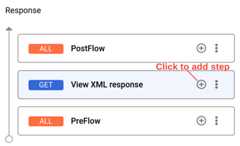
- In theAdd Policy Step dialog, click in theSelect existing policy field and selectXML to JSON-1.
ClickAdd. The XML to JSON policy is applied to the response.
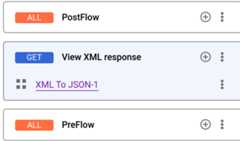
To view the code for theView XML Response conditional flow, clickSwitch To Code Editor.
- ClickSave.
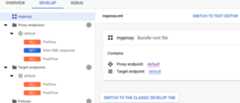
Now that you've added the policy, call the API again using cURL. Notice that you're still calling the same/xml resource. The target service still returns its block of XML, but now the policy in the API proxy will convert the response to JSON. Make this call:
curl -v https://YOUR_ENV_GROUP_HOSTNAME/mock-target-api/xml
whereYOUR ENV_GROUP_HOSTNAME is the environment group hostname. See Find the environment group hostname.
Note that the XML response is converted to JSON:
{"root":{"city":"San Jose","firstName":"John","lastName":"Doe","state":"CA"}}Except as otherwise noted, the content of this page is licensed under theCreative Commons Attribution 4.0 License, and code samples are licensed under theApache 2.0 License. For details, see theGoogle Developers Site Policies. Java is a registered trademark of Oracle and/or its affiliates.
Last updated 2026-02-19 UTC.
[8]ページ先頭