

JavaScript policy
This pageapplies toApigee andApigee hybrid.
View Apigee Edge documentation.
The JavaScript policy lets you add custom JavaScript code that executes in the context of the API proxy flow. This policy lets you implement custom behavior not otherwise covered by Apigee policies.
In your custom JavaScript code, you can use the objects, methods, and properties of the ApigeeJavaScript object model. You can get, set, and remove variables in the proxy flow context, execute custom logic, perform fault handling, extract data from requests or responses, and dynamically edit the backend target URL. You can also use basic cryptographic functions that are available in the object model.
The JavaScript policy lets you specify a JavaScript source file to execute, or you can include JavaScript code directly in the policy's configuration using the<Source> element. Either way, the JavaScript code executes when the step where the policy is attached executes.
For the source file option, the source code is always stored in a standard location in the proxy bundle:apiproxy/resources/jsc. Or, you can store the source code in a resource file at the environment or organization level. For instructions, seeResource files. You can also upload JavaScript using the Apigee UI proxy editor.
Apigee does not recommend using the JavaScript policy for the following:
- Logging. TheMessageLogging policy is better suited for logging with third-party logging platforms such as Splunk, Sumo, and Loggly. This policy also improves API proxy performance by executing in the PostClientFlow after the response returns to the client.
- Replacing Apigee policies. The JavaScript policy does not replace the capabilities of Apigee policies. If the capabilities you need are available in an Apigee policy, use that policy instead of implementing a custom JavaScript solution. Custom JavaScript code might not match the performance and optimization of Apigee policies.
JavaScript source files must have a.js extension.
Apigee supports JavaScript running on the Rhino JavaScript engine 1.7.13.
This policy is anExtensible policy and use of this policy might have cost or utilization implications, depending on your Apigee license. For information on policy types and usage implications, seePolicy types.
Samples
Rewrite the target URL
A common use case involves extracting data from a request body, storing it in a flow variable, and then using that flow variable elsewhere in the proxy flow. For example, suppose a user enters their name in an HTML form and submits it. To extract the form data and dynamically add it to the backend service URL, use a JavaScript policy.
Note: To try this example, create a new proxy in the proxy editor. When you create the proxy, provide a backend service URL, for example,http://www.example.com. This example dynamically rewrites the backend URL. If you need to create a new proxy, see the getting started tutorial.- In the Apigee UI, open the proxy you created in the proxy editor.
- Select theDevelop tab.
- From the New menu, selectNew Script.
- In the dialog, select JavaScript and name the script
js-example. - Paste the following code in the code editor and save the proxy. The
contextobject is available to JavaScript code anywhere in the proxy flow. It obtains flow-specific constants, calls usefulget/setmethods, and performs other operations. This object is part of the ApigeeJavaScript object model. Thetarget.urlflow variable is a built-in, read/write variable accessible in the Target Request flow. When you set that variable with the API URL, Apigee calls that backend URL. This rewrites the original target URL, which was the URL you specified when you created the proxy (for example,http://www.example.com).if(context.flow=="PROXY_REQ_FLOW"){varusername=context.getVariable("request.formparam.user");context.setVariable("info.username",username);}if(context.flow=="TARGET_REQ_FLOW"){context.setVariable("request.verb","GET");varname=context.getVariable("info.username");varurl="http://mocktarget.apigee.net/"context.setVariable("target.url",url+"?user="+name);}
- From the New Policy menu, selectJavaScript.
- Name the policy
target-rewrite. Accept the defaults, and save the policy. - After you select theProxy Endpoint Preflow in theNavigator, the policy is added to that flow.
- In theNavigator, selectTarget Endpoint PreFlow.
- In theNavigator, drag the JavaScript policy onto the Request side of theTarget Endpoint in the flow editor.
- Save.
- Substitute your organization name and proxy name when you call the API:
curl-i-H'Content-Type: application/x-www-form-urlencoded'-XPOST-d'user=Will'http://myorg-test.apigee.net/js-example
Examine the XML definition for the JavaScript policy used in this example. The<ResourceURL> element specifies the JavaScript source file to execute. This pattern applies to any JavaScript source file:jsc://filename.js. If your JavaScript code requires includes, use one or more<IncludeURL> elements, as described later in this document.
<?xmlversion="1.0"encoding="UTF-8"standalone="yes"?><Javascriptasync="false"continueOnError="false"enabled="true"timeLimit="200"name="target-rewrite"><DisplayName>target-rewrite</DisplayName><Properties/><ResourceURL>jsc://js-example.js</ResourceURL></Javascript>
Retrieve property value from JavaScript
You can add a<Property> element in the configuration and then retrieve its value with JavaScript at runtime.
Use the element'sname attribute to specify the name for accessing the property from JavaScript code. The<Property> element's value (the value between the opening and closing tags) is the literal value JavaScript receives.
In JavaScript, you retrieve the policy property value by accessing it as a property of theProperties object, as follows:
- Configure the property. The property value is the variable name
response.status.code.<Javascriptasync="false"continueOnError="false"enabled="true"timeLimit="200"name="JavascriptURLRewrite"><DisplayName>JavascriptURLRewrite</DisplayName><Properties><Propertyname="source">response.status.code</Property></Properties><ResourceURL>jsc://JavascriptURLRewrite.js</ResourceURL></Javascript>
- Retrieve the property using JavaScript. The
getVariablefunction then uses the retrieved variable name to retrieve the variable's value.varresponseCode=properties.source;// Returns "response.status.code"varvalue=context.getVariable(responseCode);// Get the value of response.status.codecontext.setVariable("response.header.x-target-response-code",value);
Handling errors
For examples and a discussion of error handling techniques you can use in a JavaScript callout, see Correct way to return an error from a JavaScript policy. Suggestions in theApigee Community are for informational purposes only and do not necessarily represent best practices recommended by Google.
request.content.asJSON in read-only mode converts large integers to exponential notation in the message body. This overwrites the message with the converted values.Element reference
The element reference describes the elements and attributes of the JavaScript policy.
<?xmlversion="1.0"encoding="UTF-8"standalone="yes"?><Javascriptasync="false"continueOnError="false"enabled="true"timeLimit="200"name="JavaScript-1"><DisplayName>JavaScript1</DisplayName><Properties><Propertyname="propName">propertyValue</Property></Properties><SSLInfo><Enabled>trueFalse</Enabled><ClientAuthEnabled>trueFalse</ClientAuthEnabled><KeyStore>ref://keystoreRef</KeyStore><KeyAlias>keyAlias</KeyAlias><TrustStore>ref://truststoreRef</TrustStore></SSLInfo><IncludeURL>jsc://a-javascript-library-file</IncludeURL><ResourceURL>jsc://my-javascript-source-file</ResourceURL><Source>insert_js_code_here</Source></Javascript>
<Javascript> Attributes
<languageVersion="VERSION_1_3"Javascriptname="Javascript-1"enabled="true"continueOnError="false"async="false"timeLimit="200">
| Attribute | Description | Default | Presence |
|---|---|---|---|
| languageVersion | Specifies the version of the JavaScript language the code is written in. Values include | VERSION_DEFAULT | Optional |
| timeLimit | Specifies the maximum time (in milliseconds) a script can execute. For example, if a 200 ms limit is exceeded, the policy throws this error: | N/A | Required |
The following table describes attributes that are common to all policy parent elements:
| Attribute | Description | Default | Presence |
|---|---|---|---|
name | The internal name of the policy. The value of the Optionally, use the | N/A | Required |
continueOnError | Set to Set to | false | Optional |
enabled | Set to Set to | true | Optional |
async | This attribute is deprecated. | false | Deprecated |
<DisplayName> element
Use in addition to thename attribute to label the policy in the management UI proxy editor with a different, natural-language name.
<DisplayName>Policy Display Name</DisplayName>
| Default | N/A If you omit this element, the value of the policy's |
|---|---|
| Presence | Optional |
| Type | String |
<IncludeURL> element
Specifies a JavaScript library file to load as a dependency for the main JavaScript file specified with the<ResourceURL> or<Source> element. The policy evaluates the scripts in the order in which they are listed in the policy. Your code can use the objects, methods, and properties of theJavaScript object model.
Include more than one JavaScript dependency resource using additional<IncludeURL> elements.
cURL using the-F option or as a file attachment through a REST client. TheContent-Type ismultipart/form-data. For more information, seeManaging resources.<IncludeURL>jsc://my-javascript-dependency.js</IncludeURL>
| Default: | None |
| Presence: | Optional |
| Type: | String |
<Property> element
Specifies a property you can access from JavaScript code at runtime.
<Properties><Propertyname="propName">propertyValue</Property></Properties>
| Default: | None |
| Presence: | Optional |
| Type: | String |
Attributes
| Attribute | Description | Default | Presence |
|---|---|---|---|
| name | Specifies the name of the property. | N/A | Required |
Example
See the example in theSamples section.
<ResourceURL> element
Specifies the main JavaScript file that executes in the API flow. You can store this file at the API proxy scope (under/apiproxy/resources/jsc in the API proxy bundle or in theScripts section of the API proxy editor'sNavigator pane). Alternatively, store it at the organization or environment scopes for reuse across multiple API proxies, as described inManaging resources. Your code can use the objects, methods, and properties of theJavaScript object model.
<ResourceURL>jsc://my-javascript.js</ResourceURL>
| Default: | None |
| Presence: | Either<ResourceURL> or<Source> is required. If both<ResourceURL> and<Source> are present, the policy ignores<ResourceURL>. |
| Type: | String |
Example
See the example in theSamples section.
<Source> element
You can insert JavaScript directly into the policy's XML configuration. The inserted JavaScript code executes when the policy executes in the API flow.
| Default: | None |
| Presence: | Either<ResourceURL> or<Source> is required. If both<ResourceURL> and<Source> are present, the policy ignores<ResourceURL>. |
| Type: | String |
Example
<Javascriptname='JS-ParseJsonHeaderFullString'timeLimit='200'><Properties><Propertyname='inboundHeaderName'>specialheader</Property><Propertyname='outboundVariableName'>json_stringified</Property></Properties><Source>varvarname='request.header.'+properties.inboundHeaderName+'.values.string';varh=context.getVariable(varname);if(h){h=JSON.parse(h);h.augmented=(newDate()).valueOf();varv=JSON.stringify(h,null,2)+'\n';// further indentvarr=newRegExp('^(\S*)','mg');v=v.replace(r,' $1');context.setVariable(properties.outboundVariableName,v);}</Source></Javascript>
<SSLInfo> element
Specifies the properties used to configure TLS for all HTTP client instances created by the JavaScript policy.
<SSLInfo><Enabled>trueFalse</Enabled><ClientAuthEnabled>trueFalse</ClientAuthEnabled><KeyStore>ref://keystoreRef</KeyStore><KeyAlias>keyAlias</KeyAlias><TrustStore>ref://truststoreRef</TrustStore></SSLInfo>
| Default: | None |
| Presence: | Optional |
| Type: | String |
The process of configuring TLS for an HTTP client is the same process used to configure TLS for a TargetEndpoint/TargetServer. SeeOptions for configuring TLS for more information.
Usage notes
Warning: The security model does not permit system calls. For example, internal file system reads or writes, current user information, process lists, or CPU/memory utilization are not permitted. Although some calls might be functional, they are unsupported and subject to active disablement at any time. For forward compatibility, avoid making these calls in your code.Debugging JavaScript policy code
Use theprint() function to output debug information to the transaction output panel in theDebug tool. For details and examples, seeDebug JavaScript with print() statements.
To view print statements in the Debug tool:
- Open theDebug tool and start a trace session for a proxy that contains your JavaScript policy.
- Call the proxy.
- In theDebug Tool, clickOutput from all Transactions to open the output panel.
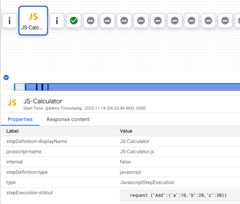
- Your print statements appear in this panel.
Flow Variables
This policy does not populate any variables by default. However, you can set and get flow variables in your JavaScript code by calling methods on thecontext object. For example:
context.setVariable("response.header.X-Apigee-Target",context.getVariable("target.name"))
Thecontext object is part of the ApigeeJavaScript object model.
Error reference
This section describes the fault codes and error messages that are returned and fault variables that are set by Apigee when this policy triggers an error. This information is important to know if you are developing fault rules to handle faults. To learn more, seeWhat you need to know about policy errors andHandling faults.
Runtime errors
These errors can occur when the policy executes.
Tip: Need help resolving an error? Click build in the Fix column for detailed troubleshooting information.| Fault code | HTTP status | Cause | Fix |
|---|---|---|---|
steps.javascript.ScriptExecutionFailed | 500 | TheJavaScript policy can throw many different types ofScriptExecutionFailed errors. Commonly seen types of errors includeRangeError,ReferenceError,SyntaxError,TypeError, andURIError. | build |
steps.javascript.ScriptExecutionFailedLineNumber | 500 | An error occurred in theJavaScript code. See the fault string for details. | N/A |
steps.javascript.ScriptSecurityError | 500 | A security error occurred when theJavaScript executed. See the fault string for details. | N/A |
Deployment errors
These errors can occur when you deploy a proxy containing this policy.
Tip: Need help resolving an error? Clickbuild next to the error's cause description to visit the troubleshooting page.| Error name | Cause | Fix |
|---|---|---|
InvalidResourceUrlFormat | If the format of the resource URL specified within the<ResourceURL> or the<IncludeURL> element of theJavaScript policy is invalid, then the deployment of the API proxy fails. | build |
InvalidResourceUrlReference | If the<ResourceURL> or the<IncludeURL> elements refer to aJavaScript file that does not exist, then the deployment of the API proxy fails. The referenced source file must exist either the API proxy, environment, or organization level. | build |
WrongResourceType | This error occurs during deployment if the<ResourceURL> or the<IncludeURL> elements of theJavaScript policy refer to any resource type other thanjsc (JavaScript file). | build |
NoResourceURLOrSource | The deployment of theJavaScript policy can fail with this error if the<ResourceURL> element is not declared or if the resource URL is not defined within this element.<ResourceURL> element is a mandatory element. Or, The<IncludeURL> element is declared but the resource URL is not defined within this element. The<IncludeURL> element is optional but if declared, the resource URL must be specified within the<IncludeURL> element. | build |
Fault variables
These variables are set when this policy triggers an error at runtime. For more information, seeWhat you need to know about policy errors.
| Variables | Where | Example |
|---|---|---|
fault.name="fault_name" | fault_name is the name of the fault, as listed in theRuntime errors table above. The fault name is the last part of the fault code. | fault.name Matches "ScriptExecutionFailed" |
javascript.policy_name.failed | policy_name is the user-specified name of the policy that threw the fault. | javascript.JavaScript-1.failed = true |
Example error response
Note: For error handling, the best practice is to trap theerrorcode part of the error response. Do not rely on the text in thefaultstring, because it could change.{"fault":{"faultstring":"Execution of SetResponse failed with error: Javascript runtime error: "ReferenceError:"status"isnotdefined.(setresponse.js:6)\"","detail":{"errorcode":"steps.javascript.ScriptExecutionFailed"}}}
Example fault rule
<FaultRulename="JavaScript Policy Faults"><Step><Name>AM-CustomErrorResponse</Name><Condition>(fault.nameMatches"ScriptExecutionFailed")</Condition></Step><Condition>(javascript.JavaScript-1.failed=true)</Condition></FaultRule>
Schema
Each policy type is defined by an XML schema (.xsd). For reference,policy schemas are available on GitHub.
Related topics
Apigee Community articles
You can find these related articles in theApigee Community:
Except as otherwise noted, the content of this page is licensed under theCreative Commons Attribution 4.0 License, and code samples are licensed under theApache 2.0 License. For details, see theGoogle Developers Site Policies. Java is a registered trademark of Oracle and/or its affiliates.
Last updated 2025-12-17 UTC.