

Step 8: Promote an archive to production
This pageapplies toApigee andApigee hybrid.
View Apigee Edge documentation.
Preview — Archive deployment
This feature is subject to the "Pre-GA Offerings Terms" in the General Service Terms section of theService Specific Terms. Pre-GA features are available "as is" and might have limited support. For more information, see thelaunch stage descriptions.
In this step, you'll promote an archive of your API proxy configuration to a production environment in your Apigee organization.
- Follow the steps inCreate an environment to perform the following:
- Create a newprod environment in your Apigee organization, enablingArchive as the deployment type. Use theUI orAPI.
- Attach the environment to a runtime instance using theInstances attachment API.
This command triggers a long-running operation. Ensure that the environment has been attached to the runtime before continuing.
- Create an environment group if you do not already have one using theCreate environment groups API.
Ensure that the environment group has been created before continuing. You can check the status of your new group using a request like the following:
curl -i -H "$AUTH" -H "Content-Type:application/json" \ "https://apigee.googleapis.com/v1/organizations/$PROJECT_ID/environments/ENVIRONMENT_NAME"
- Attach the new environment to the environment group using theEnvironment group attachment API.
Attaching an environment to the group makes the proxies in that environment routable via the hostnames in the group. This triggers a long-running operation that can take several minutes to complete. We recommend that you wait a minute or two before continuing to the next step. In the meantime you can check the status of the operation as before.
- Create a newprod environment in your local development environment:
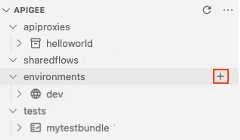
- In Apigee in VS Code, position your cursor over theenvironments folder in the Apigee section and click
 .
.
The Create environment wizard opens.
- Enterprod for the environment name and pressEnter.
The environment is created.
- Expand theprod environment folder in the Apigee section to view its contents.
- Position your cursor over thedeployments.json file in the Apigee section and click
 .
.The Deployments wizard opens.
- Select thehelloworld API proxy to add it to the deployment and clickOK.
The
deployments.jsonfile is opened in the editor. The file has been updated to include thehelloworldAPI proxy in theproxiesdeployment array, as shown below:{ "proxies": ["helloworld" ], "sharedflows": []}
- In Apigee in VS Code, position your cursor over theenvironments folder in the Apigee section and click
- Deploy an archive of your API proxy configuration to the
prodenvironment in your Apigee organization.- In theTerminal tab in Apigee VS Code, navigate to themyapigeeworkspace directory.
cd myapigeeworkspace
- Run the following command:
gcloud beta apigee archives deploy --environment=prod --labels=release=052021.1
The following provides an example of the response:
Using Apigee organization devWaiting for operation [$OPERATION_ID] to complete...⠹
- Run the following command to check the status of the operation, replacing$OPERATION_ID with the operation ID returned in the previous call:
gcloud beta apigee operations describe$OPERATION_ID
The following provides an example of the response. Note that
stateis set toIN_PROGRESS.Using Apigee organization 'prod'done: truemetadata: '@type': type.googleapis.com/google.cloud.apigee.v1.OperationMetadata operationType: INSERTstate: IN_PROGRESS targetResourceName:uriname: organizations/prod/operations/$OPERATION_IDorganization: prodresponse: '@type': type.googleapis.com/google.cloud.apigee.v1.CanaryEvaluation control: 1-5-0-20210319-071117-ghq74 endTime: '2021-03-20T06:15:44.329363950Z' metricLabels: env: test location: us-central1 name:uri startTime: '2021-03-20T06:14:44.306534584Z' treatment: 1-5-0-20210319-190954-if0wk verdict: NONEuuid:$OPERATION_ID
- Repeat the previous step until
stateis set toFINISHEDindicating that the archive depoloyment is complete. - Run the following command to view all archive deployments in the
prodenvironment:gcloud beta apigee archives list --environment=prod
The following provides an example of the response:
Using Apigee organization 'prod'ARCHIVE ID ENVIRONMENT DEPLOYED AT LABELS OPERATION STATUSvrytwbhso558oil53m prod 2021-04-20 21:20:53 release=052021.1 Deployed
- In theTerminal tab in Apigee VS Code, navigate to themyapigeeworkspace directory.
Congratulations! You've successfully promoted your API archive to an Apigee production environment!
Except as otherwise noted, the content of this page is licensed under theCreative Commons Attribution 4.0 License, and code samples are licensed under theApache 2.0 License. For details, see theGoogle Developers Site Policies. Java is a registered trademark of Oracle and/or its affiliates.
Last updated 2026-02-19 UTC.