

Test APIs
This pageapplies toApigee andApigee hybrid.
View Apigee Edge documentation.
Test APIs as described in the following sections. See alsoManage folders and files in an Apigee workspace.
Note: Before you test an API, you may need to build and export a set of test resources, such as API products, developers, or apps, that represent those same resources that might exist in your production environment. SeeBuild and export test resources.Determine the URL of the API proxy endpoint
When you deploy your environment, the URL of the API proxy endpoint is displayed in theemulators section, underActive deployments.
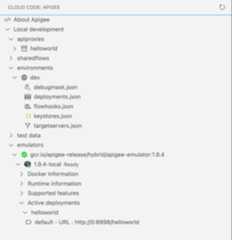
To copy the URL for the API proxy endpoint, position your cursor over the URL and click .
.
The URL for your API proxy endpoint is structured as follows:
https://0:8998/shopping/cart/addItem |_____||____________||______| | | | host+port basepath resource
By default, the host and port (traffic) default to0and8998, respectively.
You define the port when installing the Apigee Emulator, and the basepath and resource values whendeveloping your API proxy.
Use curl to test your APIs
To test your APIs using curl, open theTerminal tab and execute a call to your API.
For example:
curl 0:8998/helloworld
Authenticate using an API key
If your API requires API key-based authentication:
- Build and export the API product, developer, and developer app test resources, as described inBuild test resources
ClickActive developer apps in theActive test resources section of the Apigee Emulator and copy the
consumerKeyvalue (without the quotes) for the API product, as shown in the following figure.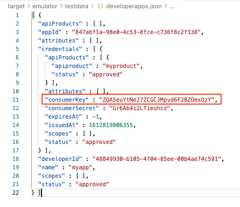
Pass the API key in your curl call, as required by your API. For example, the following curl call passes the API key in theapikey query parameter:
curl 0:8998/helloworld?apikey=ZQA5euYtNeJ7ZCGCJMpvd6F2BZOmxOzY
Except as otherwise noted, the content of this page is licensed under theCreative Commons Attribution 4.0 License, and code samples are licensed under theApache 2.0 License. For details, see theGoogle Developers Site Policies. Java is a registered trademark of Oracle and/or its affiliates.
Last updated 2025-12-15 UTC.