

Debug overview
This pageapplies toApigee andApigee hybrid.
View Apigee Edge documentation.
Debug is a tool for troubleshooting and monitoring API proxies running on Apigee. The Debug tool lets you probe the details of each step through an API proxy flow. Apigee lets you collect debug data, which shows the entire request/response flow of yourAPI proxies. This includes all request/response parameters along with transformations applied tothem at policy execution time. This is important for debugging and troubleshooting during API proxy development and deployment.
In previous versions of Apigee, the Debug tool was referred to as the Trace tool.Terminology: The termsdebug data anddebug session data are used interchangeably.Debug data collection and transmission
Apigee gateway nodes collect debug session data and cache it internally, before transmitting that data to the control plane in the Cloud. From there it is shared to the debug session UI, for operators to analyze.
If you useDebug masking, Apigee performs the masking in the gateway nodes, before transmitting the debug data to the control plane.
Using Debug
Create and manage debug sessions using the Debug tool using the UI or API, as described inUsing Debug. Alternatively, you can download debug sessions and view and analyze them offline, as described inUsing Offline Debug.
Apigee Support use of Debug
Only customers can trigger a debug session, but Apigee Support can access non-deleted past debug sessions during the course of a support case to help troubleshoot proxy-specific issues.
Note the following:
- Apigee Support has read-only permission to Debug data.
- Apigee Support may request that you run a debug to capture information about an issue, and that you provide the debug session ID or a link to the debug session so that Support may review the captured debug. Since saved debug sessions are valid for only 24 hours, we recommend that you download the debug session and attach it to the case opened with Support to enable offline viewing.
For Apigee hybrid users
Note: For Apigee hybrid v1.13.1 and later, the Debug tool is supported for newly created Apigeehybrid organizations withdata residency enabled.SeeAnalytics and debug data collection with data residency.If you are using Apigee hybrid, review the following sections.
Debug architecture
The following illustrates the process of creating a new debug session:
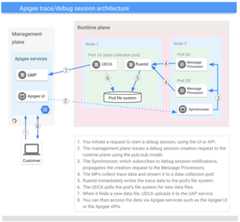
Debug data is persisted in the management plane for up to 24 hours.
Apigee hybrid requirements
This section lists important information for Apigee hybrid users.
Support for data residency
- If you have a newly created Apigee hybrid v1.13.1 org withdata residency enabled, follow the steps inUsing data residency with Apigee hybrid.
- Clocks on all Synchronizer nodes should be in sync and in UTC.
Older versions of Apigee hybrid do not support data residency.
Other requirements
- You must have the
apigee-udcaservice account configured. SeeSpecify configuration overrides. - Clocks on all Synchronizer nodes should be in sync and in UTC.
Except as otherwise noted, the content of this page is licensed under theCreative Commons Attribution 4.0 License, and code samples are licensed under theApache 2.0 License. For details, see theGoogle Developers Site Policies. Java is a registered trademark of Oracle and/or its affiliates.
Last updated 2025-12-17 UTC.