Notice
This document is for a development version of Ceph.
Block Devices and CloudStack
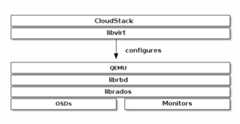
You may use Ceph Block Device images with CloudStack 4.0 and higher throughlibvirt, which configures the QEMU interface tolibrbd. Ceph stripesblock device images as objects across the cluster, which means that large CephBlock Device images have better performance than a standalone server!
To use Ceph Block Devices with CloudStack 4.0 and higher, you must install QEMU,libvirt, and CloudStack first. We recommend using a separate physical hostfor your CloudStack installation. CloudStack recommends a minimum of 4GB of RAMand a dual-core processor, but more CPU and RAM will perform better. Thefollowing diagram depicts the CloudStack/Ceph technology stack.
Important
To use Ceph Block Devices with CloudStack, you must haveaccess to a running Ceph Storage Cluster.
CloudStack integrates with Ceph’s block devices to provide CloudStack with aback end for CloudStack’s Primary Storage. The instructions below detail thesetup for CloudStack Primary Storage.
Note
We recommend installing with Ubuntu 14.04 or later so thatyou can use package installation instead of having to compilelibvirt from source.
Installing and configuring QEMU for use with CloudStack doesn’t require anyspecial handling. Ensure that you have a running Ceph Storage Cluster. InstallQEMU and configure it for use with Ceph; then, installlibvirt version0.9.13 or higher (you may need to compile from source) and ensure it is runningwith Ceph.
Note
Ubuntu 14.04 and CentOS 7.2 will havelibvirt with RBD storagepool support enabled by default.
Create a Pool
By default, Ceph block devices use therbd pool. Create a pool forCloudStack NFS Primary Storage. Ensure your Ceph cluster is running, then createthe pool.
cephosdpoolcreatecloudstack
SeeCreate a Pool for details on specifying the number of placement groupsfor your pools, andPlacement Groups for details on the number of placementgroups you should set for your pools.
A newly created pool must be initialized prior to use. Use therbd toolto initialize the pool:
rbdpoolinitcloudstack
Create a Ceph User
To access the Ceph cluster we require a Ceph user which has the correctcredentials to access thecloudstack pool we just created. Although we coulduseclient.admin for this, it’s recommended to create a user with onlyaccess to thecloudstack pool.
cephauthget-or-createclient.cloudstackmon'profile rbd'osd'profile rbd pool=cloudstack'
Use the information returned by the command in the next step when adding thePrimary Storage.
SeeUser Management for additional details.
Add Primary Storage
To add a Ceph block device as Primary Storage, the steps include:
Log in to the CloudStack UI.
ClickInfrastructure on the left side navigation bar.
SelectView All underPrimary Storage.
Click theAdd Primary Storage button on the top right hand side.
Fill in the following information, according to your infrastructure setup:
Scope (i.e. Cluster or Zone-Wide).
Zone.
Pod.
Cluster.
Name of Primary Storage.
ForProtocol, select
RBD.ForProvider, select the appropriate provider type (i.e. DefaultPrimary, SolidFire, SolidFireShared, or CloudByte). Depending on the provider chosen, fill out the information pertinent to your setup.
Add cluster information (
cephxis supported).ForRADOS Monitor, provide the IP addresses or DNS names of Ceph monitors. Please note that support for comma-separated list of IP addresses or DNS names is only present in Cloudstack v4.18.0.0 or later.
ForRADOS Pool, provide the name of an RBD pool.
ForRADOS User, provide a user that has sufficient rights to the RBD pool. Note: Do not include the
client.part of the user.ForRADOS Secret, provide the secret the user’s secret.
Storage Tags are optional. Use tags at your own discretion. For more information about storage tags in CloudStack, refer toStorage Tags.
ClickOK.
Create a Disk Offering
To create a new disk offering, refer toCreate a New Disk Offering.Create a disk offering so that it matches therbd tag.TheStoragePoolAllocator will choose therbdpool when searching for a suitable storage pool. If the disk offering doesn’tmatch therbd tag, theStoragePoolAllocator may select the pool youcreated (e.g.,cloudstack).
Limitations
Until v4.17.1.0, CloudStack will only bind to one monitor at a time. You can however use multiple DNS A or AAAA records in a round-robin fashion to spread connections over multiple monitors.
Brought to you by the Ceph Foundation
The Ceph Documentation is a community resource funded and hosted by the non-profitCeph Foundation. If you would like to support this and our other efforts, please considerjoining now.