Notice
This document is for a development version of Ceph.
QEMU and Block Devices
The most frequent Ceph Block Device use case involves providing block deviceimages to virtual machines. For example, a user may create a “golden” imagewith an OS and any relevant software in an ideal configuration. Then the usertakes a snapshot of the image. Finally the user clones the snapshot (potentiallymany times). SeeSnapshots for details. The ability to make copy-on-writeclones of a snapshot means that Ceph can provision block device images tovirtual machines quickly, because the client doesn’t have to download the entireimage each time it spins up a new virtual machine.
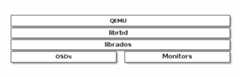
Ceph Block Devices attach to QEMU virtual machines. For details onQEMU, seeQEMU Open Source Processor Emulator. For QEMU documentation, seeQEMU Manual. For installation details, seeInstallation.
Important
To use Ceph Block Devices with QEMU, you must have access to arunning Ceph cluster.
Usage
The QEMU command line expects you to specify the Ceph pool and image name. Youmay also specify a snapshot.
QEMU will assume that Ceph configuration resides in the defaultlocation (e.g.,/etc/ceph/$cluster.conf) and that you are executingcommands as the defaultclient.admin user unless you expressly specifyanother Ceph configuration file path or another user. When specifying a user,QEMU uses theID rather than the fullTYPE:ID. SeeUser Management -User for details. Do not prepend the client type (i.e.,client.) to thebeginning of the userID, or you will receive an authentication error. Youshould have the key for theadmin user or the key of another user youspecify with the:id={user} option in a keyring file stored in default path(i.e.,/etc/ceph or the local directory with appropriate file ownership andpermissions. Usage takes the following form:
qemu-img{command}[options]rbd:{pool-name}/{image-name}[@snapshot-name][:option1=value1][:option2=value2...]
For example, specifying theid andconf options might look like the following:
qemu-img{command}[options]rbd:glance-pool/maipo:id=glance:conf=/etc/ceph/ceph.conf
Tip
Configuration values containing:,@, or= can be escaped with aleading\ character.
Creating Images with QEMU
You can create a block device image from QEMU. You must specifyrbd, thepool name, and the name of the image you wish to create. You must also specifythe size of the image.
qemu-imgcreate-frawrbd:{pool-name}/{image-name}{size}
For example:
qemu-imgcreate-frawrbd:data/foo10G
Important
Theraw data format is really the only sensibleformat option to use with RBD. Technically, you could use otherQEMU-supported formats (such asqcow2 orvmdk), but doingso would add additional overhead, and would also render the volumeunsafe for virtual machine live migration when caching (see below)is enabled.
Resizing Images with QEMU
You can resize a block device image from QEMU. You must specifyrbd,the pool name, and the name of the image you wish to resize. You must alsospecify the size of the image.
qemu-imgresizerbd:{pool-name}/{image-name}{size}
For example:
qemu-imgresizerbd:data/foo10G
Retrieving Image Info with QEMU
You can retrieve block device image information from QEMU. You mustspecifyrbd, the pool name, and the name of the image.
qemu-imginforbd:{pool-name}/{image-name}
For example:
qemu-imginforbd:data/foo
Running QEMU with RBD
QEMU can pass a block device from the host on to a guest, but sinceQEMU 0.15, there’s no need to map an image as a block device onthe host. Instead, QEMU attaches an image as a virtual blockdevice directly vialibrbd. This strategy increases performanceby avoiding context switches and taking advantage ofRBD caching.
You can useqemu-img to convert existing virtual machine images to Cephblock device images. For example, if you have a qcow2 image, you could run:
qemu-imgconvert-fqcow2-Orawdebian_squeeze.qcow2rbd:data/squeeze
To run a virtual machine booting from that image, you could run:
qemu-m1024-driveformat=raw,file=rbd:data/squeeze
RBD caching can significantly improve performance.Since QEMU 1.2, QEMU’s cache options controllibrbd caching:
qemu-m1024-driveformat=rbd,file=rbd:data/squeeze,cache=writeback
If you have an older version of QEMU, you can set thelibrbd cacheconfiguration (like any Ceph configuration option) as part of the‘file’ parameter:
qemu-m1024-driveformat=raw,file=rbd:data/squeeze:rbd_cache=true,cache=writeback
Important
If you set rbd_cache=true, you must set cache=writebackor risk data loss. Without cache=writeback, QEMU will not sendflush requests to librbd. If QEMU exits uncleanly in thisconfiguration, file systems on top of rbd can be corrupted.
Enabling Discard/TRIM
Since Ceph version 0.46 and QEMU version 1.1, Ceph Block Devices support thediscard operation. This means that a guest can send TRIM requests to let a Cephblock device reclaim unused space. This can be enabled in the guest by mountingext4 orXFS with thediscard option.
For this to be available to the guest, it must be explicitly enabledfor the block device. To do this, you must specify adiscard_granularity associated with the drive:
qemu-m1024-driveformat=raw,file=rbd:data/squeeze,id=drive1,if=none \-devicedriver=ide-hd,drive=drive1,discard_granularity=512
Note that this uses the IDE driver. The virtio driver supports discard since Linux kernel version 5.0.
If using libvirt, edit your libvirt domain’s configuration file usingvirshedit to include thexmlns:qemu value. Then, add aqemu:commandlineblock as a child of that domain. The following example shows how to set twodevices withqemuid= to differentdiscard_granularity values.
<domaintype='kvm'xmlns:qemu='http://libvirt.org/schemas/domain/qemu/1.0'><qemu:commandline><qemu:argvalue='-set'/><qemu:argvalue='block.scsi0-0-0.discard_granularity=4096'/><qemu:argvalue='-set'/><qemu:argvalue='block.scsi0-0-1.discard_granularity=65536'/></qemu:commandline></domain>
QEMU Cache Options
QEMU’s cache options correspond to the following CephRBD Cache settings.
Writeback:
rbd_cache=true
Writethrough:
rbd_cache=truerbd_cache_max_dirty=0
None:
rbd_cache=false
QEMU’s cache settings override Ceph’s cache settings (including settings thatare explicitly set in the Ceph configuration file).
Note
Prior to QEMU v2.4.0, if you explicitly setRBD Cache settingsin the Ceph configuration file, your Ceph settings override the QEMU cachesettings.
Brought to you by the Ceph Foundation
The Ceph Documentation is a community resource funded and hosted by the non-profitCeph Foundation. If you would like to support this and our other efforts, please considerjoining now.