
Getting Started
Sections
- User Interface
- Editors
- 3D Viewport
- Image Editor
- UV Editor
- Compositor
- Texture Nodes
- Geometry Node Editor
- Shader Editor
- Video Sequencer
- Movie Clip Editor
- Dope Sheet
- Timeline
- Graph Editor
- Drivers Editor
- Nonlinear Animation
- Text Editor
- Python Console
- Info Editor
- Outliner
- Properties Editor
- File Browser
- Asset Browser
- Spreadsheet
- Preferences
- Scenes & Objects
- Modeling
- Introduction
- Meshes
- Curves
- Curves (New)
- Surfaces
- Metaball
- Text
- Point Cloud
- Volumes
- Empties
- Modifiers
- Introduction
- Common Modifier Options
- Edit
- Generate
- Array Modifier
- Array (Legacy) Modifier
- Bevel Modifier
- Boolean Modifier
- Build Modifier
- Curve to Tube Modifier
- Decimate Modifier
- Edge Split Modifier
- Mask Modifier
- Mesh to Volume Modifier
- Mirror Modifier
- Multiresolution Modifier
- Remesh Modifier
- Scatter on Surface Modifier
- Screw Modifier
- Skin Modifier
- Solidify Modifier
- Subdivision Surface Modifier
- Triangulate Modifier
- Volume to Mesh Modifier
- Weld Modifier
- Wireframe Modifier
- Deform
- Armature Modifier
- Cast Modifier
- Curve Modifier
- Displace Modifier
- Hook Modifier
- Laplacian Deform Modifier
- Lattice Modifier
- Mesh Deform Modifier
- Shrinkwrap Modifier
- Simple Deform Modifier
- Smooth Modifier
- Smooth Corrective Modifier
- Smooth Laplacian Modifier
- Surface Deform Modifier
- Volume Displace Modifier
- Warp Modifier
- Wave Modifier
- Normals
- Physics
- Geometry Nodes Modifier
- Geometry Nodes
- Introduction
- Inspection
- Attributes
- Fields
- Instances
- Baking
- Node-Based Tools
- Gizmos
- Input Nodes
- Output Nodes
- Attribute Nodes
- Geometry Nodes
- Curve Nodes
- Grease Pencil Nodes
- Instances Nodes
- Mesh Nodes
- Read
- Edge Angle Node
- Edge Neighbors Node
- Edge Vertices Node
- Edges to Face Groups Node
- Face Area Node
- Face Group Boundaries Node
- Face Neighbors Node
- Face Set Node
- Is Face Planar Node
- Is Edge Smooth Node
- Is Face Smooth Node
- Mesh Island Node
- Shortest Edge Paths Node
- Vertex Neighbors Node
- Edge Length Node
- Face Corner Angle Node
- Is Edge Boundary Node
- Is Edge Loose Node
- Is Edge Manifold Node
- Is UV Split Node
- Sample
- Write
- Operations
- Dual Mesh Node
- Edge Paths to Curves Node
- Edge Paths to Selection Node
- Extrude Mesh Node
- Flip Faces Node
- Mesh Boolean Node
- Mesh to Curve Node
- Mesh to Density Grid Node
- Mesh to Points Node
- Mesh to SDF Grid Node
- Mesh to Volume Node
- Scale Elements Node
- Split Edges Node
- Subdivide Mesh Node
- Subdivision Surface Node
- Triangulate Node
- Primitives
- Topology
- UV
- Read
- Point Nodes
- Volume Nodes
- Simulation Zone
- Color Utility Nodes
- Texture Nodes
- Utilities Nodes
- Group
- Generate Nodes
- Hair Nodes
- Normals Nodes
- Transform
- Sculpting & Painting
- Grease Pencil
- Animation & Rigging
- Physics
- Rendering
- Introduction
- EEVEE
- Cycles
- Workbench
- Cameras
- Lights
- Materials
- Shader Nodes
- Introduction
- Input
- Output
- Shader
- Add Shader
- Background
- Diffuse BSDF
- Emission
- Glass BSDF
- Glossy BSDF
- Hair BSDF
- Holdout
- Mix Shader
- Metallic BSDF
- Principled BSDF
- Principled Hair BSDF
- Principled Volume
- Ray Portal BSDF
- Refraction BSDF
- Specular BSDF
- Subsurface Scattering
- Toon BSDF
- Translucent BSDF
- Transparent BSDF
- Sheen BSDF
- Volume Absorption
- Volume Scatter
- Volume Coefficients
- Displacement
- Texture
- Color
- Utilities
- Group
- Color Management
- Freestyle
- View Layers & Passes
- Render Output
- Compositing
- Introduction
- Sidebar
- Compositor System
- Image Kernels
- Input Nodes
- Output Nodes
- Color Nodes
- Creative Nodes
- Filter Nodes
- Keying Nodes
- Mask Nodes
- Tracking Nodes
- Texture Nodes
- Transform Nodes
- Utilities Nodes
- Camera & Lens Effects Nodes
- Group
- Layout Nodes
- Limitations
- Motion Tracking & Masking
- Video Editing
- Introduction
- Sequencer Scene
- Setup Your Project
- Edit Your Project
- Storyboarding
- Assets, Files, & Data System
- Add-ons
- Advanced
- Troubleshooting
- Glossary
- Manual Index
Get Involved
Mix Node
TheMix Node mixes values, colors and vectors inputsusing a factor to control the amount of interpolation.TheColor mode has additional blending modes.
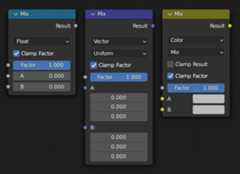
Inputs
- Factor
Controls the amount of mixing between the
AandBinputs.- A/B
The two inputs that are mixed together.
Properties
- Data Type
The data type that is used for mixing.The node supports float, vector, color, and rotation data types.
- Factor Mode (Vector only)
The factor mode can be set toUniform andNon-Uniform.In uniform mode, a single float controls the factor.In non-uniform mode, a vector controls the factor foreach XYZ channel separately.
- Mix (Color only)
The Blend modes can be selected in the select menu.SeeColor Blend Modes for details on each blending mode.
Add, Subtract, Multiply, Screen, Divide, Difference,Darken, Lighten, Overlay, Color Dodge, Color Burn,Hue, Saturation, Value, Color, Soft Light, Linear Light
- Clamp Factor
Limit the factor value between 0.0 and 1.0. If this option isunchecked then the node operates usingExtrapolation.
- Clamp Result (Color only)
Limit the Result to the range between 0.0 and 1.0.
Outputs
- Result
Output the result of the mix using the data type selected.
Examples
See theMix Color Node for additional examples.