

Overview
RQuantLib connectsGNUR withQuantLib.
What is R ?
GNU R, to quote from itshighly recommended website, is `GNU S’ - A language and environment forstatistical computing and graphics. R is similar to the award-winning Ssystem, which was developed at Bell Laboratories by John Chambers etal. It provides a wide variety of statistical and graphical techniques(linear and nonlinear modelling, statistical tests, time seriesanalysis, classification, clustering, …).
R is designed as a true computer language with control-flowconstructions for iteration and alternation, and it allows users to addadditional functionality by defining new functions. For computationallyintensive tasks, C, C++ and Fortran code can be linked and called at runtime. R is an official part for theGNU R.
What is QuantLib ?
QuantLib, to quote in turn fromits website, is aiming to provide a comprehensive software framework forquantitative finance. QuantLib is a free/open source library formodeling, trading, and risk management in real-life. QuantLib is writtenin C++ with a clean object model, and is then exported to differentlanguages such as Python, Ruby, Guile, MzScheme, Java, Perl, … via SWIG..
So what can RQuantLib(currently) do?
There are two core areas of pricing: options, and fixed income.Utilities such as calendaring functions are also available.
Option Pricing
RQuantLib started with support for (vanilla and exotic) equityoptions. Standard European and American exercises are supported as wellas Binary and Barrier options. Asian options are supported with bothgeometric and arithmetic compounding.
For all of the option types, upon evaluation an element of a simpleclass is returned. Each of the the specific option classes inherits froma base class Option, and print and summary methods are provided for thebase class.
Moreover, another base class ImpliedVolatility is provided withmethods print and summary and implied volatility solvers for Europeanand American are provided (Binaries seem to trigger a QuantLib bug asfar as I can tell).
For both option and implied volatility calculations, operations arelimited to the scalar case. However, using the R, or rather, S objectframework makes the work fairly convenient.
Lastly, for the basic European Option, an “array” interface isprovided. Here, any of the usual input variables is allow to be invector form. Solutions are then computed for the “multi-dimensionalouter product” of all input vectors. Concretely, if called with threestrike prices, four maturities and five volatilities, then 3 * 4 * 5arrays are returned for the common variables of interest (i.e. value,delta, gamma, …). In other words, value is now an array over allpossible combination of all possible input values. This allows for verycompact comparison and scenario analysis.
Fixed Income
Support for Fixed Income started in the 0.2.* releases. TheDiscountCurve function constructs the spot term structure of interestrates based on input market data including the settlement date, depositrates, futures prices, FRA rates, or swap rates, in variouscombinations. It returns the corresponding discount factors, zero rates,and forward rates for a vector of times that is specified as input.
The BermudanSwaption function prices a Bermudan swaption withspecified strike and maturity (in years), after calibrating the selectedshort-rate model to an input swaption volatility matrix. Swaptionmaturities are in years down the rows, and swap tenors are in yearsalong the columns, in the usual fashion. It is assumed that the Bermudanswaption is exercisable on each reset date of the underlying swaps.
Starting with release 0.3.0, a large number of additional FixedIncome functions have become available thanks to the work of KhanhNguyen that was part of the the Google Summer of Code 2009 program. Thenew functions include support for (where we list the available helppages):
- CallableBond
- ConvertibleFixedCouponBond
- ConvertibleFloatingCouponBond
- ConvertibleZeroCouponBond
- Enum
- FittedBondCurve
- FixedRateBond
- FixedRateBondCurve
- FixedRateBondPriceByYield
- FixedRateBondYield
- FloatingRateBond
- ZeroCouponBond
- ZeroPriceByYield
- ZeroYield
The Fixed Income functions are a good illustration of the R/C++interface provided byRcpp.
Utilities
As a first example of available calendaring functions,businessDay can compute whether a given date (scalar orvector) is a business in a given ‘calendar’ which can be chosen from awide set of country and settlements choices.
What else is there?
There arelots more financial instruments covered inQuantLib. RQuantLib should grow to accomodate these. Help in writing theR wrappers would accelerate the provision of RQuantLib hooks forthese.
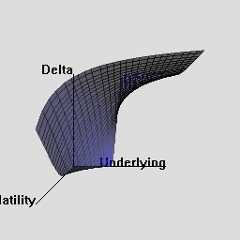
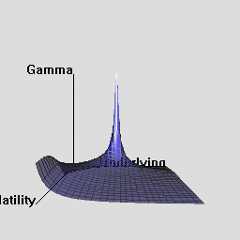
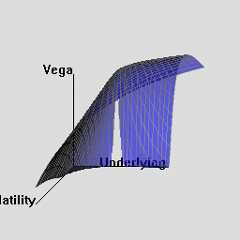
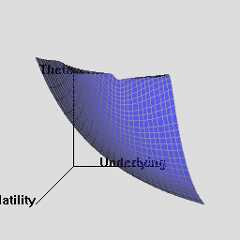
The RQuantLib package also contains an animated OpenGL demo.Unfortunately, GL support is not always very stable for a variety ofgraphics cards and drivers on both Linux and Windows, so this may infact crash instead of run. This really appears to a hardware or driverissue as the code runs fine on some hardware combinations.
As a simpler alternative, consider these animated graphs made fromcombing the Rgl snapshots which approximates the effect of the OpenGLanimation.

Examples
A simple example forEuropeanOption
Let’s start with a simple vanilla option, and look at the print andsummary methods.
>library(RQuantLib)> EO<-EuropeanOption("call",100,100,0.01,0.03,0.5,0.4)>print(EO)Concise summary of valuationfor EuropeanOption value delta gamma vega theta rho divRho11.63650.56730.013827.6336-11.839022.5475-28.3657>summary(EO)Detailed summary of valuationfor EuropeanOption value delta gamma vega theta rho divRho11.63650.56730.013827.6336-11.839022.5475-28.3657with parameters type underlying strike dividendYield riskFreeRate"call""100""100""0.01""0.03" maturity volatility"0.5""0.4"A simpleexample for EuropeanOptionImpliedVolatility
Let us now compute implied volatility for the same the optionparameters as above, but at a price increased by 0.50. Note how we usethe value element of the previous answer.
> EOImpVol<-EuropeanOptionImpliedVolatility("call",value=EO$value+0.50,100,100,0.01,0.03,0.5,0.4)>print(EOImpVol)Implied Volatilityfor EuropeanOptionImpliedVolatility is0.418> EOImpVol$impliedVol[1]0.4181017This shows also how the result value get be accessed directly.
An example of thearray-style access
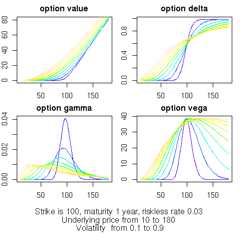
Here is an example of computing option values and analytics forseveral ranges of input values. For simplicit, we simply show the callto the built-in example from the RQuantLib documentation for thisfunction:
>example(EuropeanOptionArrays)ErpnOA> und.seq<-seq(10,180,by =5)ErpnOA> vol.seq<-seq(0.2,0.8,by =0.1)ErpnOA> EOarr<-EuropeanOptionArrays("call",underlying = und.seq,strike =100,dividendYield =0.01,riskFreeRate =0.03,maturity =1,volatility = vol.seq)ErpnOA> old.par<-par(no.readonly =TRUE)ErpnOA>par(mfrow =c(2,2),oma =c(5,0,0,0),mar =c(2,2,2,1))ErpnOA>plot(EOarr$parameter$underlying, EOarr$value[,1],type ="n",main ="option value",xlab ="",ylab ="")ErpnOA>for (iin1:length(vol.seq))lines(EOarr$parameter$underlying, EOarr$value[, i],col = i)ErpnOA>plot(EOarr$parameter$underlying, EOarr$delta[,1],type ="n",main ="option delta",xlab ="",ylab ="")ErpnOA>for (iin1:length(vol.seq))lines(EOarr$parameter$underlying, EOarr$delta[, i],col = i)ErpnOA>plot(EOarr$parameter$underlying, EOarr$gamma[,1],type ="n",main ="option gamma",xlab ="",ylab ="")ErpnOA>for (iin1:length(vol.seq))lines(EOarr$parameter$underlying, EOarr$gamma[, i],col = i)ErpnOA>plot(EOarr$parameter$underlying, EOarr$vega[,1],type ="n",main ="option vega",xlab ="",ylab ="")ErpnOA>for (iin1:length(vol.seq))lines(EOarr$parameter$underlying, EOarr$vega[, i],col = i)ErpnOA>mtext(text =paste("Strike is 100, maturity 1 year, riskless rate 0.03","\nUnderlying price from", und.seq[1],"to", und.seq[length(und.seq)],"\nVolatility from", vol.seq[1],"to", vol.seq[length(vol.seq)]),side =1,font =1, oute .... [TRUNCATED]ErpnOA>par(old.par)The resulting chart looks as follows:
An example forDiscountCurves
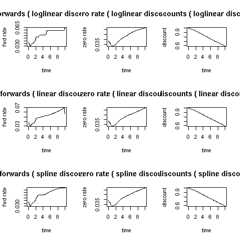
The example in the DiscountCurve manual page follows:
>example(DiscountCurve)DscntC> savepar<-par(mfrow =c(3,3))DscntC> params<-list(tradeDate =c(2,15,2002),settleDate =c(2,19,2002),dt =0.25,interpWhat ="discount",interpHow ="loglinear")DscntC> tsQuotes<-list(d1w =0.0382,d1m =0.0372,fut1 =96.2875,fut2 =96.7875,fut3 =96.9875,fut4 =96.6875,fut5 =96.4875,fut6 =96.3875,fut7 =96.2875,fut8 =96.0875,s3y =0.0398,s5y =0.0443,s10y =0.05165,s15y =0.055175)DscntC> times<-seq(0,10,0.1)DscntC> curves<-DiscountCurve(params, tsQuotes, times)DscntC>plot(curves,setpar =FALSE)DscntC> params$interpHow="linear"DscntC> curves<-DiscountCurve(params, tsQuotes, times)DscntC>plot(curves,setpar =FALSE)DscntC> params$interpHow="spline"DscntC> curves<-DiscountCurve(params, tsQuotes, times)DscntC>plot(curves,setpar =FALSE)DscntC>par(savepar)The resulting chart looks as follows:
Download
From this machine, you can get theRQuantLibtararchive, the(old)reference manual or simply peruse theentiredirectory.
Alternatively, you can also getRQuantLib from aComprehensive R ArchiveNetwork (CRAN)
Lastly,RQuantLib sources, after having been on r-forge, arenow hosted atGitHub; please seetheRQuantLibpage for another short overview and access to the git archive. Issuetickets and pull request (ideally after initial discussion) arewelcome.
Installation on Unix
It goes almost without saying that QuantLibmust beinstalled in order to use RQuantLib as the latter package has to linkagainst the libraries provided by the former libraries. If you do nothave QuantLib, you will have to install it first prefore proceeding. Thesame now goes for the Boost C++ libraries.
ForDebian users (as well as forUbuntu and other derivatives, this is as simple as sayingapt-get install libquantlib0 libquantlib-dev. Others willhave to compile QuantLib, see theQuantLib site.
Generally, for Linux or Unix users, the usualR CMD INSTALL RQuantLib.tar.gz should work from outside R,as should a call toinstall.packages(). At least, it doeson my Debian Linux system.
Feedback and comments are of course welcome in general, and inparticular on the installation.
Installation on Windows
Thanks to therwinlibrepository for QuantLib which provides a static Windows library,Windows binary packages for R can be built so that CRAN can providebinaries as usual. Check the status of that repository for the QuantLibversion used which may be behind, and consider contributing a currentbuild.
Copyright
Copyright(c) 2002 - 2018 by Dirk Eddelbuettel
Copyright(c) 2015 - 2018 by Dirk Eddelbuettel and Terri Leitch
Copyright(c) 2009 - 2010 by Dirk Eddelbuettel and Khanh Nguyen
Copyright(c) 2005 - 2007 by Dominick Samperi
License
GPL (>= 2)
Initially created: Mon Feb 25 20:25:25 EDT 2002
Last modified: Sun May 26 10:25:40 CDT 2024