binb: Binb is not Beamer


Motivation
TheBeamerpackage is very popular for making pdf presentations from LaTeX, andalso supported from Markdown andRMarkdown. This package(currently) provides functionality to use the following custom (LaTeX)themes forBeamerdirectly via RMarkdown:
- Metropolis (formerly
mtheme) by Matthias Vogelgesang (longerdemo) - IQSS by IstaZahn (longerdemo)
- Presento byRatul Saha (longerdemo)
- Monash by Rob J Hyndman
The original LaTeX styles been converted to be directly useable fromRMarkdown
Examples
Metropolis
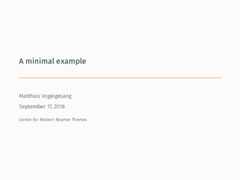
Consider the following minimal example, adapted from the originalminimal example at the bottom of theMetropolis page:
---title: A minimal exampleauthor: Matthias Vogelgesangdate: \todayinstitute: Centre for Modern Beamer Themesoutput: binb::metropolis---Hello, world!It creates athree-pagepdf file which we converted into this animated gif:
IQSS
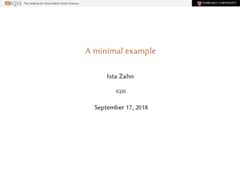
Similarly, for IQSS we use the following input adapting the exampleabove but showing sections and subsections for the nice headings itgenerates:
---title: A minimal exampleauthor: Ista Zahndate: \todayinstitute: IQSSoutput: binb::iqss---Hello, world!Another planet!This creates thispdf filewhich we converted into this animated gif:
Presento
The following small example adapted some of the slides from originalminimal example from thePresento repo:
---author: Ratul Sahaaddress: www.ratulsaha.comtitle: PRESENTOsubtitle: clean, simple and extensibledate: \todayoutput: binb::presento---- \begin{center}\largetext{The design is \underline{clean}}\end{center} \bigskip- \begin{center}\largetext{The rules are \underline{simple}}\end{center} \bigskip- \item \begin{center}\largetext{The code is \underline{extensible}}\end{center}- \montserratfont This is \textsc{Montserrat} \bigskip- \notosansfont This is \textsc{Noto Sans} \bigskip- \latolightfont This is Lato (light) \bigskip- \inconsolatafont This is inconsolata \bigskip- \textsc{This is Alegreya Sans small caps} \bigskip\begin{center} \crule[colordgray] \crule[colorhgray] \crule[colorblue] \crule[colorgreen] \crule[colororange]\end{center}____\begin{center} \hugetext{BIG BOLD TEXT} \medskip \small but background color does not work\end{center}____\tikz[overlay,remember picture] \node[opacity=0.8, at=(current page.center)]{% \includegraphics[width=\paperwidth]{images/skeleton}};\begin{textblock}{7}(7,2.5) {\color{colorblue}\hugetext{\textbf{RUN!}}}\end{textblock}From this, one can creats thispdffile which can be converted into this animated gif:

Monash
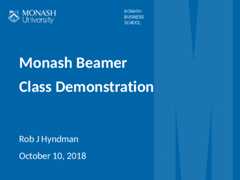
Below is an example of theMonash Business School themebyRob Hyndman. (The source is alittle longerandincluded in the repo and package so not shown here.)
Status
The package is still new and susceptible to change, but onCRAN.
Usage
The package is onCRAN andcan be installed via a standard
install.packages("binb")and can then be used as a Markdown template via RStudio, or via codesuch as
library(rmarkdown)draft("myslides.Rmd",template="metropolis",package="binb",edit=FALSE)setwd("myslides")## template creates a new subdirrender("myslides.Rmd")to create a first draft of a newmyslides.Rmd.
Once installed, the above code examples should work as expected.
Requirements
Beyond the R package dependencies, a workingpandocbinary is needed. RStudio installs its own copy, otherwise do what isneeded on your OS (i.e., something likesudo apt-get install pandoc pandoc-citeproc).
TheMetropolis LaTeXpackage is used, but we assume that is is installed via TeXLive, MikTeXor another LaTeX bundle. The LaTeX code for theIQSS Beamer Themeand thePresentoTheme are included (and adapted forRMarkdown use).
These themes use additional (free) fonts you may need to install:
- Metropolis wantsFira Sans but can proceedwith alternate fonts;
- IQSS BeamerTheme really requiresLibertinus,see theIQSS BeamerTheme page for details.
- Presento ThemewantsMontserrat,Lato Light (alsohere),Noto Sans,AlgreyaSans as the small caps font andInconsolataas a monospaced font.
- Monash wantsCarlito which somesystems (such Ubuntu) provide.
If you useDebian orUbuntu, you can use the informal fontpackages I created forFira and FiraSans,Libertinus,Montserrat,AlegreyaSans, respectively.
Most modern desktop systems make it easy to install additional fontsas a user. However, instructions vary so please see for your particularsystem.
Authors
Dirk Eddelbuettel, Ista Zahn and Rob Hyndman
License
GPL (>= 2) for this package.
Initially created: Wed Sep 19 20:16:59 CDT 2018
Last modified: Sun May 26 09:57:45 CDT 2024