
Filter database entries
❗️
Deprecated as of version 2025-09-03
This page describes the API for versions up to and including
2022-06-28. In the new2025-09-03version, the concepts of databases and data sources were split up, as described inUpgrading to 2025-09-03.Refer to the new page instead:
When youquery a database, you can send afilter object in the body of the request that limits the returned entries based on the specified criteria.
For example, the below query limits the response to entries where the"Task completed"checkbox property value istrue:
curl -X POST 'https://api.notion.com/v1/databases/897e5a76ae524b489fdfe71f5945d1af/query' \ -H 'Authorization: Bearer '"$NOTION_API_KEY"'' \ -H 'Notion-Version: 2022-06-28' \ -H "Content-Type: application/json" \--data '{ "filter": { "property": "Task completed", "checkbox": { "equals": true } }}'Here is the same query using theNotion SDK for JavaScript:
const { Client } = require('@notionhq/client');const notion = new Client({ auth: process.env.NOTION_API_KEY });// replace with your own database IDconst databaseId = 'd9824bdc-8445-4327-be8b-5b47500af6ce';const filteredRows = async () => {const response = await notion.databases.query({ database_id: databaseId, filter: { property: "Task completed", checkbox: { equals: true } },}); return response;}Filters can be chained with theand andor keys so that multiple filters are applied at the same time. (SeeQuery a database for additional examples.)
{ "and": [ { "property": "Done", "checkbox": { "equals": true } }, { "or": [ { "property": "Tags", "contains": "A" }, { "property": "Tags", "contains": "B" } ] } ]}If no filter is provided, all the pages in the database will be returned with pagination.
The filter object
Eachfilter object contains the following fields:
| Field | Type | Description | Example value |
|---|---|---|---|
property | string | The name of the property as it appears in the database, or the property ID. | "Task completed" |
checkboxdatefilesformulamulti_selectnumberpeoplephone_numberrelationrich_textselectstatustimestampverificationID | object | The type-specific filter condition for the query. Only types listed in the Field column of this table are supported. Refer totype-specific filter conditions for details on corresponding object values. | "checkbox": { "equals": true } |
{ "filter": { "property": "Task completed", "checkbox": { "equals": true } }}👍
The filter object mimics the databasefilter option in the Notion UI.
Type-specific filter conditions
Checkbox
| Field | Type | Description | Example value |
|---|---|---|---|
equals | boolean | Whether acheckbox property value matches the provided value exactly.Returns or excludes all database entries with an exact value match. | false |
does_not_equal | boolean | Whether acheckbox property value differs from the provided value.Returns or excludes all database entries with a difference in values. | true |
{ "filter": { "property": "Task completed", "checkbox": { "does_not_equal": true } }}Date
📘
For the
after,before,equals, on_or_before, andon_or_afterfields, if a date string with a time is provided, then the comparison is done with millisecond precision.If no timezone is provided, then the timezone defaults to UTC.
A date filter condition can be used to limitdate property value types and thetimestamp property typescreated_time andlast_edited_time.
The condition contains the below fields:
| Field | Type | Description | Example value |
|---|---|---|---|
after | string (ISO 8601 date) | The value to compare the date property value against. Returns database entries where the date property value is after the provided date. | "2021-05-10""2021-05-10T12:00:00""2021-10-15T12:00:00-07:00" |
before | string (ISO 8601 date) | The value to compare the date property value against. Returns database entries where the date property value is before the provided date. | "2021-05-10""2021-05-10T12:00:00""2021-10-15T12:00:00-07:00" |
equals | string (ISO 8601 date) | The value to compare the date property value against. Returns database entries where the date property value is the provided date. | "2021-05-10""2021-05-10T12:00:00""2021-10-15T12:00:00-07:00" |
is_empty | true | The value to compare the date property value against. Returns database entries where the date property value contains no data. | true |
is_not_empty | true | The value to compare the date property value against. Returns database entries where the date property value is not empty. | true |
next_month | object (empty) | A filter that limits the results to database entries where the date property value is within the next month. | {} |
next_week | object (empty) | A filter that limits the results to database entries where the date property value is within the next week. | {} |
next_year | object (empty) | A filter that limits the results to database entries where the date property value is within the next year. | {} |
on_or_after | string (ISO 8601 date) | The value to compare the date property value against. Returns database entries where the date property value is on or after the provided date. | "2021-05-10""2021-05-10T12:00:00""2021-10-15T12:00:00-07:00" |
on_or_before | string (ISO 8601 date) | The value to compare the date property value against. Returns database entries where the date property value is on or before the provided date. | "2021-05-10""2021-05-10T12:00:00""2021-10-15T12:00:00-07:00" |
past_month | object (empty) | A filter that limits the results to database entries where thedate property value is within the past month. | {} |
past_week | object (empty) | A filter that limits the results to database entries where thedate property value is within the past week. | {} |
past_year | object (empty) | A filter that limits the results to database entries where thedate property value is within the past year. | {} |
this_week | object (empty) | A filter that limits the results to database entries where thedate property value is this week. | {} |
{ "filter": { "property": "Due date", "date": { "on_or_after": "2023-02-08" } }}Files
| Field | Type | Description | Example value |
|---|---|---|---|
is_empty | true | Whether the files property value does not contain any data. Returns all database entries with an empty files property value. | true |
is_not_empty | true | Whether thefiles property value contains data.Returns all entries with a populated files property value. | true |
{ "filter": { "property": "Blueprint", "files": { "is_not_empty": true } }}Formula
The primary field of theformula filter condition object matches the type of the formula’s result. For example, to filter a formula property that computes acheckbox, use aformula filter condition object with acheckbox field containing a checkbox filter condition as its value.
| Field | Type | Description | Example value |
|---|---|---|---|
checkbox | object | Acheckbox filter condition to compare the formula result against. Returns database entries where the formula result matches the provided condition. | Refer to thecheckbox filter condition. |
date | object | Adate filter condition to compare the formula result against. Returns database entries where the formula result matches the provided condition. | Refer to thedate filter condition. |
number | object | Anumber filter condition to compare the formula result against. Returns database entries where the formula result matches the provided condition. | Refer to thenumber filter condition. |
string | object | Arich text filter condition to compare the formula result against. Returns database entries where the formula result matches the provided condition. | Refer to therich text filter condition. |
{ "filter": { "property": "One month deadline", "formula": { "date":{ "after": "2021-05-10" } } }}Multi-select
| Field | Type | Description | Example value |
|---|---|---|---|
contains | string | The value to compare the multi-select property value against. Returns database entries where the multi-select value matches the provided string. | "Marketing" |
does_not_contain | string | The value to compare the multi-select property value against. Returns database entries where the multi-select value does not match the provided string. | "Engineering" |
is_empty | true | Whether the multi-select property value is empty. Returns database entries where the multi-select value does not contain any data. | true |
is_not_empty | true | Whether the multi-select property value is not empty. Returns database entries where the multi-select value does contains data. | true |
{ "filter": { "property": "Programming language", "multi_select": { "contains": "TypeScript" } }}Number
| Field | Type | Description | Example value |
|---|---|---|---|
does_not_equal | number | Thenumber to compare the number property value against.Returns database entries where the number property value differs from the provided number. | 42 |
equals | number | Thenumber to compare the number property value against.Returns database entries where the number property value is the same as the provided number. | 42 |
greater_than | number | Thenumber to compare the number property value against.Returns database entries where the number property value exceeds the provided number. | 42 |
greater_than_or_equal_to | number | Thenumber to compare the number property value against.Returns database entries where the number property value is equal to or exceeds the provided number. | 42 |
is_empty | true | Whether thenumber property value is empty.Returns database entries where the number property value does not contain any data. | true |
is_not_empty | true | Whether the number property value is not empty. Returns database entries where the number property value contains data. | true |
less_than | number | Thenumber to compare the number property value against.Returns database entries where the number property value is less than the provided number. | 42 |
less_than_or_equal_to | number | Thenumber to compare the number property value against.Returns database entries where the number property value is equal to or is less than the provided number. | 42 |
{ "filter": { "property": "Estimated working days", "number": { "less_than_or_equal_to": 5 } }}People
You can apply a people filter condition topeople,created_by, andlast_edited_by database property types.
The people filter condition contains the following fields:
| Field | Type | Description | Example value |
|---|---|---|---|
contains | string (UUIDv4) | The value to compare the people property value against. Returns database entries where the people property value contains the provided string. | "6c574cee-ca68-41c8-86e0-1b9e992689fb" |
does_not_contain | string (UUIDv4) | The value to compare the people property value against. Returns database entries where the people property value does not contain the provided string. | "6c574cee-ca68-41c8-86e0-1b9e992689fb" |
is_empty | true | Whether the people property value does not contain any data. Returns database entries where the people property value does not contain any data. | true |
is_not_empty | true | Whether the people property value contains data. Returns database entries where the people property value is not empty. | true |
{ "filter": { "property": "Last edited by", "people": { "contains": "c2f20311-9e54-4d11-8c79-7398424ae41e" } }}Relation
| Field | Type | Description | Example value |
|---|---|---|---|
contains | string (UUIDv4) | The value to compare the relation property value against. Returns database entries where the relation property value contains the provided string. | "6c574cee-ca68-41c8-86e0-1b9e992689fb" |
does_not_contain | string (UUIDv4) | The value to compare the relation property value against. Returns entries where the relation property value does not contain the provided string. | "6c574cee-ca68-41c8-86e0-1b9e992689fb" |
is_empty | true | Whether the relation property value does not contain data. Returns database entries where the relation property value does not contain any data. | true |
is_not_empty | true | Whether the relation property value contains data. Returns database entries where the property value is not empty. | true |
{ "filter": { "property": "✔️ Task List", "relation": { "contains": "0c1f7cb280904f18924ed92965055e32" } }}Rich text
| Field | Type | Description | Example value |
|---|---|---|---|
contains | string | Thestring to compare the text property value against.Returns database entries with a text property value that includes the provided string. | "Moved to Q2" |
does_not_contain | string | Thestring to compare the text property value against.Returns database entries with a text property value that does not include the provided string. | "Moved to Q2" |
does_not_equal | string | Thestring to compare the text property value against.Returns database entries with a text property value that does not match the provided string. | "Moved to Q2" |
ends_with | string | Thestring to compare the text property value against.Returns database entries with a text property value that ends with the provided string. | "Q2" |
equals | string | Thestring to compare the text property value against.Returns database entries with a text property value that matches the provided string. | "Moved to Q2" |
is_empty | true | Whether the text property value does not contain any data. Returns database entries with a text property value that is empty. | true |
is_not_empty | true | Whether the text property value contains any data. Returns database entries with a text property value that contains data. | true |
starts_with | string | Thestring to compare the text property value against.Returns database entries with a text property value that starts with the provided string. | "Moved" |
{ "filter": { "property": "Description", "rich_text": { "contains": "cross-team" } }}Rollup
A rollup database property can evaluate to an array, date, or number value. The filter condition for the rollup property contains arollup key and a corresponding object value that depends on the computed value type.
Filter conditions forarray rollup values
array rollup values| Field | Type | Description | Example value |
|---|---|---|---|
any | object | The value to compare each rollup property value against. Can be afilter condition for any other type. Returns database entries where the rollup property value matches the provided criteria. | "rich_text": { "contains": "Take Fig on a walk" } |
every | object | The value to compare each rollup property value against. Can be afilter condition for any other type. Returns database entries where every rollup property value matches the provided criteria. | "rich_text": { "contains": "Take Fig on a walk" } |
none | object | The value to compare each rollup property value against. Can be afilter condition for any other type. Returns database entries where no rollup property value matches the provided criteria. | "rich_text": { "contains": "Take Fig on a walk" } |
{ "filter": { "property": "Related tasks", "rollup": { "any": { "rich_text": { "contains": "Migrate database" } } } }}Filter conditions fordate rollup values
date rollup valuesA rollup value is stored as adate only if the "Earliest date", "Latest date", or "Date range" computation is selected for the property in the Notion UI.
{ "filter": { "property": "Parent project due date", "rollup": { "date": { "on_or_before": "2023-02-08" } } }}Filter conditions fornumber rollup values
number rollup values{ "filter": { "property": "Total estimated working days", "rollup": { "number": { "does_not_equal": 42 } } }}Select
| Field | Type | Description | Example value |
|---|---|---|---|
equals | string | Thestring to compare the select property value against.Returns database entries where the select property value matches the provided string. | "This week" |
does_not_equal | string | Thestring to compare the select property value against.Returns database entries where the select property value does not match the provided string. | "Backlog" |
is_empty | true | Whether the select property value does not contain data. Returns database entries where the select property value is empty. | true |
is_not_empty | true | Whether the select property value contains data. Returns database entries where the select property value is not empty. | true |
{ "filter": { "property": "Frontend framework", "select": { "equals": "React" } }}Status
| Field | Type | Description | Example value |
|---|---|---|---|
| equals | string | The string to compare the status property value against. Returns database entries where the status property value matches the provided string. | "This week" |
| does_not_equal | string | The string to compare the status property value against. Returns database entries where the status property value does not match the provided string. | "Backlog" |
| is_empty | true | Whether the status property value does not contain data. Returns database entries where the status property value is empty. | true |
| is_not_empty | true | Whether the status property value contains data. Returns database entries where the status property value is not empty. | true |
{ "filter": { "property": "Project status", "status": { "equals": "Not started" } }}Timestamp
Use a timestamp filter condition to filter results based oncreated_time orlast_edited_time values.
| Field | Type | Description | Example value |
|---|---|---|---|
| timestamp | created_time last_edited_time | A constant string representing the type of timestamp to use as a filter. | "created_time" |
| created_time last_edited_time | object | A date filter condition used to filter the specified timestamp. | Refer to thedate filter condition. |
{ "filter": { "timestamp": "created_time", "created_time": { "on_or_before": "2022-10-13" } }}🚧
The
timestampfilter condition does not require a property name. The API throws an error if you provide one.
Verification
| Field | Type | Description | Example value |
|---|---|---|---|
| status | string | The verification status being queried. Valid options are:verified,expired,noneReturns database entries where the current verification status matches the queried status. | "verified" |
{ "filter": { "property": "verification", "verification": { "status": "verified" } }}ID
Use a timestamp filter condition to filter results based on theunique_id value.
| Field | Type | Description | Example value |
|---|---|---|---|
does_not_equal | number | The value to compare the unique_id property value against. Returns database entries where the unique_id property value differs from the provided value. | 42 |
equals | number | The value to compare the unique_id property value against. Returns database entries where the unique_id property value is the same as the provided value. | 42 |
greater_than | number | The value to compare the unique_id property value against. Returns database entries where the unique_id property value exceeds the provided value. | 42 |
greater_than_or_equal_to | number | The value to compare the unique_id property value against. Returns database entries where the unique_id property value is equal to or exceeds the provided value. | 42 |
less_than | number | The value to compare the unique_id property value against. Returns database entries where the unique_id property value is less than the provided value. | 42 |
less_than_or_equal_to | number | The value to compare the unique_id property value against. Returns database entries where the unique_id property value is equal to or is less than the provided value. | 42 |
{ "filter": { "and": [ { "property": "ID", "unique_id": { "greater_than": 1 } }, { "property": "ID", "unique_id": { "less_than": 3 } } ] }}Compound filter conditions
You can use a compound filter condition to limit the results of a database query based on multiple conditions. This mimics filter chaining in the Notion UI.
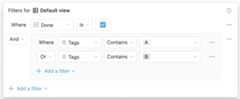
An example filter chain in the Notion UI
The above filters in the Notion UI are equivalent to the following compound filter condition via the API:
{ "and": [ { "property": "Done", "checkbox": { "equals": true } }, { "or": [ { "property": "Tags", "contains": "A" }, { "property": "Tags", "contains": "B" } ] } ]}A compound filter condition contains anand oror key with a value that is an array of filter objects or nested compound filter objects. Nesting is supported up to two levels deep.
| Field | Type | Description | Example value |
|---|---|---|---|
and | array | An array offilter objects or compound filter conditions. Returns database entries that matchall of the provided filter conditions. | Refer to the examples below. |
| or | array | An array offilter objects or compound filter conditions. Returns database entries that matchany of the provided filter conditions | Refer to the examples below. |
Example compound filter conditions
{ "filter": { "and": [ { "property": "Complete", "checkbox": { "equals": true } }, { "property": "Working days", "number": { "greater_than": 10 } } ] }}{ "filter": { "or": [ { "property": "Description", "rich_text": { "contains": "2023" } }, { "and": [ { "property": "Department", "select": { "equals": "Engineering" } }, { "property": "Priority goal", "checkbox": { "equals": true } } ] } ] }}