
Drive UI integration overview
TheGoogle Drive user interface(UI) is aGoogle-provided application where Drive users can create,organize, discover, and share content stored on Google Drive. You canintegrate your Drive-enabled app with the Drive UIto take advantage of these features. There are two integrations that you canperform:
- Using theDrive UI's "New" button.
- Using theDrive UI's "Open with" menu item.
Drive UI's "New" button
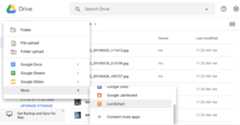
If you want Drive UI users to call your app to create a file,integrate your app with the Drive UI's "New" button.
The "New" button lets users open your application or other editor-style apps,such as Google Docs and Google Sheets, to create a new document.
Drive UI's "Open with" menu item
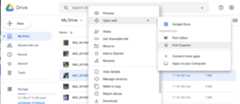
If you want Drive UI users to open documents with your app,integrate your app with the Drive UI's "Open with" menu item.
When a user right-clicks on a file in the Drive UI, a contextmenu opens. The right-click menu contains an "Open with" item letting the userselect an application to open the file.
Related topics
For instructions on how to begin your integration, continue toConfigure aDrive UI integration.
Except as otherwise noted, the content of this page is licensed under theCreative Commons Attribution 4.0 License, and code samples are licensed under theApache 2.0 License. For details, see theGoogle Developers Site Policies. Java is a registered trademark of Oracle and/or its affiliates.
Last updated 2025-12-11 UTC.