
Extend Google Workspace Studio
These guides explain how to extend the functionality of Google Workspace Studioby building custom steps that flows can run.
To get started, follow our quickstart guide,Build a calculator step with Apps Script.
Flows let Google Workspace users automate tasksacross services by combining a series of steps without writing any code. Byextending flows, you let users add your app's functions assteps.
For example, users can triage and assign incoming customer questions with aflow that does the following:
- Starts when you receive an email from a customer.
- Prompts Gemini to triage the email.
- Create a task for me to follow up with the sales or support team.
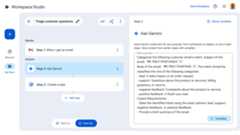
Workspace Studio concepts
The following terms and concepts define the key components ofWorkspace Studio:
- Flows
- Users build flows in Workspace Studioto automate tasks in Google Workspace and beyond.Flows have deepsystem integration, contextual awareness, and can optionally use AI.
- Step
- A single step in a flow's automated process.Essentially, it's a single task in a sequence of tasks that follow a startingevent. Each step runs synchronously, meaning it completes its operationbefore the next step in the sequence begins. Users set the order of steps,allowing them to customize the logical flow of tasks. Steps can have but don'trequire inputs and outputs. Example steps include, "send an email", "post in aChat space, and "ask Gemini". Steps can include tasks outside ofGoogle Workspace, like creating a CRM lead.
- Input variable
- Input variables are received by steps. Input variables are set by the user ona step's configuration card while the user sets up the step. For example,collect an email address, a datetime, or a Gemini prompt.
- Output variable
- Output variables are returned by steps, and can be sent to another step.For example, you use an output variable to pass an email address to anotherstep that uses it to specify the recipient of an email.
- Dynamic Variable
- A variable whose data can only be determined when the user configures theflow. For example, Google Forms have varyingquestions and answers. The number of questions and answers (and their content)can't be determined until a specific Form starts aflow. Dynamic variables account for this case.
- Custom Resource
- A custom data structure that you can define to group multiple variablestogether. For example, to create a CRM lead, pass a custom resource containingan email address, street address, and name.
- Card
Building block for user interfaces in add-ons. Cards support adefined layout, interactive UI elements like buttons, and rich media likeimages. Cards have special features for building flows:
IncludeVariables: A property that enables dynamic variable inclusion.Type: Defines the type of data that input variables expect.
- Activity Log
Describes what happens when an flow runs. Bydefault,activity logs include the name of the starter or step statically defined inthe manifest. You can further provide customized activity logs.
See what you can make
Flows are built on the add-onsplatform in Google Workspace. If you already have an existingadd-on, you can extend its functionality to includeFlows by updating its manifest to contain aflow-specific section.
If you're starting from scratch, follow our quickstart guide,Build a calculator step with Apps Script.
Then read these guides to continue customizing yourflow step:
- Build a step
- Input variables
- Validate an input variable
- Output variables
- Define a custom resource
- Dynamic variables
- Build a configuration card
- Log activity and errors
- Workspace Studio event objects
Except as otherwise noted, the content of this page is licensed under theCreative Commons Attribution 4.0 License, and code samples are licensed under theApache 2.0 License. For details, see theGoogle Developers Site Policies. Java is a registered trademark of Oracle and/or its affiliates.
Last updated 2025-12-11 UTC.