
Understand the JavaScript SEO basics
Do you suspect that JavaScript issues might be blocking your page or some of your content from showing up in Google Search? Learn how to fix JavaScript-related problems with ourtroubleshooting guide.JavaScript is an important part of the web platform because it provides many features that turn the web into a powerful application platform. Making your JavaScript-powered web applications discoverable via Google Search can help you find new users and re-engage existing users as they search for the content your web app provides. While Google Search runs JavaScript with anevergreen version of Chromium, there area few things that you can optimize.
This guide describes how Google Search processes JavaScript and best practices for improving JavaScript web apps for Google Search.
How Google processes JavaScript
Google processes JavaScript web apps in three main phases:
- Crawling
- Rendering
- Indexing
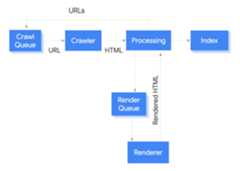
Googlebot queues pages for both crawling and rendering. It is not immediately obvious when a page is waiting for crawling and when it is waiting for rendering. When Googlebot fetches a URL from the crawling queue by making an HTTP request, it first checks if you allow crawling. Googlebot reads therobots.txt file. If it marks the URL as disallowed, then Googlebot skips making an HTTP request to this URL and skips the URL. Google Search won't render JavaScript from blocked files or on blocked pages.
Googlebot then parses the response for other URLs in thehref attribute of HTML links and adds the URLs to the crawl queue. To prevent link discovery, use thenofollow mechanism.
Crawling a URL and parsing the HTML response works well for classical websites or server-side rendered pages where the HTML in the HTTP response contains all content. Some JavaScript sites may use theapp shell model where the initial HTML does not contain the actual content and Google needs to execute JavaScript before being able to see the actual page content that JavaScript generates.
Googlebot queues all pages for rendering, unless arobotsmeta tag or header tells Google not to index the page. The page may stay on this queue for a few seconds, but it can take longer than that. Once Google's resources allow, a headless Chromium renders the page and executes the JavaScript. Googlebot parses the rendered HTML for links again and queues the URLs it finds for crawling. Google also uses the rendered HTML to index the page.
Keep in mind thatserver-side or pre-rendering is still a great idea because it makes your website faster for users and crawlers, and not all bots can run JavaScript.
Describe your page with unique titles and snippets
Unique, descriptive<title> elements andmeta descriptions help users quickly identify the best result for their goal. You can use JavaScript to set or change the meta description as well as the<title> element.
Set the canonical URL
Therel="canonical" link tag helps Google find the canonical version of a page. You can use JavaScript to set the canonical URL, but keep in mind that you shouldn't use JavaScript to change the canonical URL to something else than the URL you specified as the canonical URL in the original HTML. The best way to set the canonical URL is to use HTML, but if you have to use JavaScript, make sure that you always set the canonical URL to the same value as the original HTML. If you can't set the canonical URL in the HTML, then you can use JavaScript to set the canonical URL and leave it out of the original HTML.
Write compatible code
Browsers offer many APIs and JavaScript is a quickly-evolving language. Google has some limitations regarding which APIs and JavaScript features it supports. To make sure your code is compatible with Google, follow ourguidelines for troubleshooting JavaScript problems.
We recommendusing differential serving and polyfills if you feature-detect a missing browser API that you need. Since some browser features cannot be polyfilled, we recommend that you check the polyfill documentation for potential limitations.
Use meaningful HTTP status codes
Googlebot usesHTTP status codes to find out if something went wrong when crawling the page.
To tell Googlebot if a page can't be crawled or indexed, use a meaningful status code, like a404 for a page that could not be found or a401 code for pages behind a login. You can use HTTP status codes to tell Googlebot if a page has moved to a new URL, so that the index can be updated accordingly.
Here's alist of HTTP status codes and how they effect Google Search.
Avoidsoft 404 errors in single-page apps
In client-side rendered single-page apps, routing is often implemented as client-side routing. In this case, using meaningful HTTP status codes can be impossible or impractical. To avoidsoft 404 errors when using client-side rendering and routing, use one of the following strategies:
- Use aJavaScript redirect to a URL for which the server responds with a
404HTTP status code (for example/not-found). - Add a
<meta name="robots" content="noindex">to error pages using JavaScript.
Here is sample code for the redirect approach:
fetch(`/api/products/${productId}`).then(response=>response.json()).then(product=>{if(product.exists){showProductDetails(product);// shows the product information on the page}else{// this product does not exist, so this is an error page.window.location.href='/not-found';// redirect to 404 page on the server.}})
Here is sample code for thenoindex tag approach:
fetch(`/api/products/${productId}`).then(response=>response.json()).then(product=>{if(product.exists){showProductDetails(product);// shows the product information on the page}else{// this product does not exist, so this is an error page.// Note: This example assumes there is no other robots meta tag present in the HTML.constmetaRobots=document.createElement('meta');metaRobots.name='robots';metaRobots.content='noindex';document.head.appendChild(metaRobots);}})
Use the History API instead of fragments
Google can only discover your links if they are<a> HTML elements with anhref attribute.
For single-page applications with client-side routing, use theHistory API to implement routing between different views of your web app. To ensure that Googlebot can parse and extract your URLs, don't use fragments to load different page content. The following example is a bad practice, because Googlebot can't reliably resolve the URLs:
<nav><ul><li><ahref="#/products">Ourproducts</a></li><li><ahref="#/services">Ourservices</a></li></ul></nav><h1>Welcometoexample.com!</h1><divid="placeholder"><p>Learnmoreabout<ahref="#/products">ourproducts</a>and<ahref="#/services">ourservices</a></p></div><script>window.addEventListener('hashchange',functiongoToPage(){// this function loads different content based on the current URL fragmentconstpageToLoad=window.location.hash.slice(1);// URL fragmentdocument.getElementById('placeholder').innerHTML=load(pageToLoad);});</script>
Instead, you can make sure your URLs are accessible to Googlebot by implementing the History API:
<nav><ul><li><ahref="/products">Ourproducts</a></li><li><ahref="/services">Ourservices</a></li></ul></nav><h1>Welcometoexample.com!</h1><divid="placeholder"><p>Learnmoreabout<ahref="/products">ourproducts</a>and<ahref="/services">ourservices</a></p></div><script>functiongoToPage(event){event.preventDefault();// stop the browser from navigating to the destination URL.consthrefUrl=event.target.getAttribute('href');constpageToLoad=hrefUrl.slice(1);// remove the leading slashdocument.getElementById('placeholder').innerHTML=load(pageToLoad);window.history.pushState({},window.title,hrefUrl)// Update URL as well as browser history.}// Enable client-side routing for all links on the pagedocument.querySelectorAll('a').forEach(link=>link.addEventListener('click',goToPage));</script>
Properly inject therel="canonical" link tag
While we don't recommend using JavaScript for this, it is possible to inject a You can prevent Google from indexing a page or following links through therobots You can use JavaScript to add arobots Googlebot caches aggressively in order to reduce network requests and resource usage. WRS may ignore caching headers. This may lead WRS to use outdated JavaScript or CSS resources. Content fingerprinting avoids this problem by making a fingerprint of the content part of the filename, like When usingstructured data on your pages, you can useJavaScript to generate the required JSON-LD and inject it into the page. Make sure totest your implementation to avoid issues. Google supports web components. When Google renders a page, itflattens the shadow DOM and light DOM content. This means Google can only see content that's visible in the rendered HTML. To make sure that Google can still see your content after it's rendered, use theRich Results Test or theURL Inspection Tool and look at the rendered HTML. If the content isn't visible in the rendered HTML, Google won't be able to index it. The following example creates a web component that displays its light DOM content inside its shadow DOM. One way to make sure both light DOM and shadow DOM content is displayed in the rendered HTML is to use aSlot element. After rendering, Google can index this content: Images can be quite costly on bandwidth and performance. A good strategy is to use lazy-loading to only load images when the user is about to see them. To make sure you're implementing lazy-loading in a search-friendly way, followour lazy-loading guidelines. Create pages for users, not just search engines. When you're designing your site, think about the needs of your users, including those who may not be using a JavaScript-capable browser (for example, people who use screen readers or less advanced mobile devices). One of the easiest ways to test your site's accessibility is to preview it in your browser with JavaScript turned off, or to view it in a text-only browser such as Lynx. Viewing a site as text-only can also help you identify other content which may be hard for Google to see, such as text embedded in images.rel="canonical" link tag with JavaScript. Google Search will pick up the injected canonical URL when rendering the page. Here is an example to inject arel="canonical" link tag with #"Add rel=canonical with JavaScript" translate="no" dir="ltr" is-upgraded syntax="JavaScript">fetch('/api/cats/'+id).then(function(response){returnresponse.json();}).then(function(cat){// creates a canonical link tag and dynamically builds the URL// e.g. https://example.com/cats/simbaconstlinkTag=document.createElement('link');linkTag.setAttribute('rel','canonical');linkTag.href='https://example.com/cats/'+cat.urlFriendlyName;document.head.appendChild(linkTag);}); When using JavaScript to inject therel="canonical" link tag, make sure that this is the onlyrel="canonical" link tag on the page. Incorrect implementations might create multiplerel="canonical" link tag or change an existingrel="canonical" link tag. Conflicting or multiplerel="canonical" link tags may lead to unexpected results.Userobots
meta tags carefullymeta tag. For example, adding the followingmeta tag to the top of your page blocks Google from indexing the page:<!--Googlewon'tindexthispageorfollowlinksonthispage--><metaname="robots"content="noindex, nofollow">
meta tag to a page or change its content. The following example code shows how to change therobotsmeta tag with JavaScript to prevent indexing of the current page if an API call doesn't return content.fetch('/api/products/'+productId).then(function(response){returnresponse.json();}).then(function(apiResponse){if(apiResponse.isError){// get therobots
meta tagvarmetaRobots=document.querySelector('meta[name="robots"]');// if there was norobotsmeta tag, add oneif(!metaRobots){metaRobots=document.createElement('meta');metaRobots.setAttribute('name','robots');document.head.appendChild(metaRobots);}// tell Google to exclude this page from the indexmetaRobots.setAttribute('content','noindex');// display an error message to the usererrorMsg.textContent='This product is no longer available';return;}// display product information// ...});noindex tag, it may skip rendering and JavaScript execution, which means using JavaScript to change or remove therobotsmeta tag fromnoindex may not work as expected. If youdo want the page indexed, don't use anoindex tag in the original page code.Use long-lived caching
main.2bb85551.js. The fingerprint depends on the content of the file, so updates generate a different filename every time. Check out theweb.dev guide on long-lived caching strategies to learn more.Use structured data
Follow best practices for web components
<script> class MyComponent extends HTMLElement { constructor() { super(); this.attachShadow({ mode: 'open' }); } connectedCallback() { let p = document.createElement('p'); p.innerHTML = 'Hello World, this is shadow DOM content. Here comes the light DOM: <slot></slot>'; this.shadowRoot.appendChild(p); } } window.customElements.define('my-component', MyComponent);</script><my-component> <p>This is light DOM content. It's projected into the shadow DOM.</p> <p>WRS renders this content as well as the shadow DOM content.</p></my-component><my-component> Hello World, this is shadow DOM content. Here comes the light DOM: <p>This is light DOM content. It's projected into the shadow DOM<p> <p>WRS renders this content as well as the shadow DOM content.</p></my-component>
Fix images and lazy-loaded content
Design for accessibility
Except as otherwise noted, the content of this page is licensed under theCreative Commons Attribution 4.0 License, and code samples are licensed under theApache 2.0 License. For details, see theGoogle Developers Site Policies. Java is a registered trademark of Oracle and/or its affiliates.
Last updated 2025-12-17 UTC.