
#NoHacked: Identifying and Diagnosing Injected Gibberish URL Hacking
Monday, August 17, 2015
Today in our #NoHacked campaign, we'll be discussing how to identify and diagnose a trending hack. Even if your site is not infected with this specific type of hack, many of these steps can be helpful for other types of hacks. Next week, we'll be following up with a post about fixing this hack. Follow along with discussions onTwitter andGoogle+ using the #NoHacked tag. (Part 1,Part 2,Part 3)
Identifying Symptoms
Gibberish pages
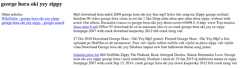
The hallmark of this type of hacking is spammy pages that appear to be added to the site. These pages contain keyword-rich gibberish text, links, and images in order to manipulate search engines. For example, the hack creates pages likewww.example.com/pf/download-2012-free-full-crack.html which contain gibberish content like below:
Cloaking
This hack often usescloaking to avoid webmasters from detecting it. Cloaking refers to the practice of presenting different content or URLs to webmasters, visitors, and search engines. For example, the webmaster of the site might be shown an empty or HTTP404 page which would lead the webmaster to believe the hack is no longer present. However, users who visit the page from search results will still be redirected to spammy pages, and search engines that crawl the site will still be presented with gibberish content.
Monitoring your Site
Properly monitoring your site for hacking allows you to remedy the hack more quickly and minimize damage the hack might cause. There are several ways you can monitor your site for this particular hack.
Looking for a surge in website traffic
Because this hack creates many keyword heavy URLs that are crawled by search engines, check to see if there was any recent, unexpected surges in traffic. If you do see a surge, use theSearch Analytics tool in Search Console to investigate whether or not hacked pages are the source of the unusual website traffic.
Tracking your site appearance in search results
Periodically checking how your site appears in search results is good practice for all webmasters. It also allows you to spot symptoms of hacking. You can check your site in Google by using thesite: operator on your site (that is, search forsite:example.com). If you see any gibberish links associated with your site or a label that says "This site may be hacked.", your site might have been compromised.
Signing up for alerts from Google
We recommend you sign up forSearch Console. In Search Console, you can check if Google has detected any hacked pages on your site by looking in theManual Actions Viewer orSecurity Issues report. Search Console will also message you if Google has detected any hacked pages on your site.
Also, we recommend you set upGoogle Alerts for your site. Google Alerts will email you if Google finds new results for a search query. For example, you can set up a Google Alert for your site in conjunction withcommon spammy terms likesite:example.com cheap software. If you receive an email that Google has returned a new query for that term, you should immediately check what pages on your site are triggering that alert.
Diagnosing your Site
Gathering tools that can help
In Search Console, you have access to theFetch as Google tool in Search Console. The Fetch as Google tool allows you to see a page as Google sees it. This will help you to identify cloaked hacked pages. Additional tools from others are listed in the appendix to this post.
Checking for hacked pages
If you're not sure if there is hacked content on your site, theGoogle Hacked Troubleshooter can walk you through some basic checks. For this type of hack, you'll want to perform asite: search on your site. Look for suspicious pages and URLs loaded with strange keywords in the search results. If you have a large number of pages on your site, you might need to try a more targeted query.Find common spam terms and append them to yoursite: search query likesite:example.com cheap software. Try this with several spammy terms to see if any results show up.
Checking for cloaking on hacked pages
Because this type of hacking employs cloaking to prevent accurate detection, it's very important that you use the Fetch as Google tool in Search Console to check the spammy pages you found in the previous step. Remember, cloaked pages can show you an HTTP404 page that tricks you into thinking the hack is fixed even if the page is still live. You should also use Fetch as Google on your home page as well. This type of hack often adds text or links to the home page.
We hope this post has given you a better idea of how to identify and diagnose hacks that inject gibberish URLs on your site. Tune in next week where we'll be explaining how to remove this hack from your site. Be sure to follow our social campaigns and share any tips or tricks you might have about staying safe on the web with the #NoHacked hashtag.
If you have any additional questions, you can post in theWebmaster Help Forums where a community of webmasters can help answer your questions. You can also join ourHangout on Air about Security on August 26.
Appendix
These are tools that scan your site and may be able to find problematic content. Other than VirusTotal, Google doesn't run or support them:Virus Total,Aw-snap.info,Sucuri Site Check,Wepawet. These are tools that may be able to scan your site for problematic content. Keep in mind that these scanners can't guarantee that they will identify every type of problematic content.
Posted by Eric Kuan, Webmaster Relations Specialist and Yuan Niu, Webspam Analyst
Except as otherwise noted, the content of this page is licensed under theCreative Commons Attribution 4.0 License, and code samples are licensed under theApache 2.0 License. For details, see theGoogle Developers Site Policies. Java is a registered trademark of Oracle and/or its affiliates.