
Tracking mobile usability in Webmaster Tools
Wednesday, October 29, 2014
Mobile is growing at a fantastic pace—in usage, not just in screen size. To keep you informed of issues mobile users might be seeing across your website, we've added theMobile Usability feature toWebmaster Tools.
The new feature shows mobile usability issues we've identified across your website, complete with graphs over time so that you see the progress that you've made.
A mobile-friendly site is one that you can easily read and use on a smartphone, by only having to scroll up or down. Swiping left/right to search for content, zooming to read text and use UI elements, or not being able to see the content at all make a site harder to use for users on mobile phones. To help, the Mobile Usability reports show the following issues: Flash content,missingviewport (a critical meta-tag for mobile pages),tiny fonts, fixed-widthviewports,content not sized toviewport, andclickable links/buttons too close to each other.
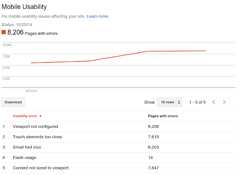
We strongly recommend you take a look at these issues in Webmaster Tools, and think about how they might be resolved; sometimes it's just a matter of tweaking your site's template! More information on how to make a great mobile-friendly website can be found in ourWeb Fundamentals website (with more information to come soon).
If you have any questions, you can join us in ourwebmaster help forums (on your phone too)!
Posted byJohn Mueller, Webmaster Trends Analyst, Zurich
Except as otherwise noted, the content of this page is licensed under theCreative Commons Attribution 4.0 License, and code samples are licensed under theApache 2.0 License. For details, see theGoogle Developers Site Policies. Java is a registered trademark of Oracle and/or its affiliates.