
Change the style of landmarks
Landmarks and prominent places can have their own icons. You can choose from twodifferent icon types to represent these types of places:Standard POI icons are similar in appearance to other map place markers;Illustrated POI icons feature a more distinctive appearance.
Experimental: This feature can only be set for light map styles. When you link alight map style that has custom landmark styles to a map ID, these styles alsoapply to the dark map style.To change the landmark icon style, perform the following steps:
Zoom in on the map enough to see landmarks shown. For example, zoom in toParis with a zoom level of 13.
InMap features, select thegear icon to open theMap Settings menu.
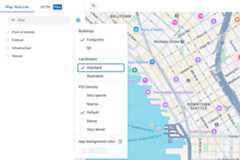
Select theStandard landmark style to display standard POI icons:
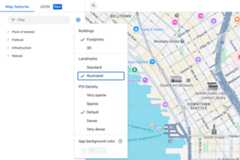
Select theIllustrated landmark style to display distinctive POIicons:
Open theLandmark element pane by using the filter or the map inspector.For more information, seeFind map features.
In theLandmark element pane, you can customize the visibility, iconcolor, text fill color, and text stroke color.
Except as otherwise noted, the content of this page is licensed under theCreative Commons Attribution 4.0 License, and code samples are licensed under theApache 2.0 License. For details, see theGoogle Developers Site Policies. Java is a registered trademark of Oracle and/or its affiliates.
Last updated 2025-12-11 UTC.