
Change the style of buildings

Page Summary
This feature, available on Android, iOS, Maps JavaScript API, and Maps Static, offers customization options for building displays on vector maps.
By default, vector maps use a 3D building style at zoom level 17 and higher, while a 2D "Footprints" style provides a cleaner look with customizable fill and stroke colors.
Users can switch between 3D and Footprints building styles in the Style Editor under the "Buildings" feature type, but stroke customization is limited to the Footprints style.
When you use a vector map in Android, iOS, or JavaScript,buildings use the3D style beginning at zoom level 17 and higher bydefault. If you want to display only the 2Doutlines of buildings for a cleaner appearance, select theFootprints style.
Experimental: This feature can only be set for light map styles. When you link alight map style that has custom building styles to a map ID, these styles alsoapply to the dark map style.Set the building style
- Zoom in on the map enough to see buildings shown.
- In theMap features panel, select thegear icon to open theMap Settings menu.

To display buildings with a 3D outline, select3D:
Note: Stroke color and stroke width customizations are not available for 3Dstyle buildings.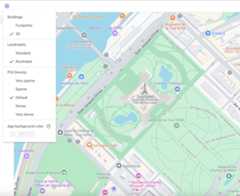
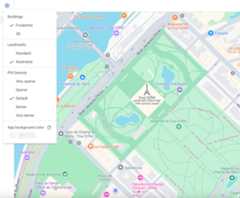
To display buildings with a 2D footprint, selectFootprints:
Except as otherwise noted, the content of this page is licensed under theCreative Commons Attribution 4.0 License, and code samples are licensed under theApache 2.0 License. For details, see theGoogle Developers Site Policies. Java is a registered trademark of Oracle and/or its affiliates.
Last updated 2025-12-11 UTC.