
Rendering type (raster and vector)

Page Summary
The Maps JavaScript API offers two map types: raster (default) and vector (recommended for enhanced user experience with tilt and heading control).
You can set the rendering type using the
renderingTypemap option or by associating a map ID with specific rendering settings.Vector maps provide better visual quality and allow for tilt and heading manipulation, requiring enabling specific interactions for these features.
Map IDs offer pre-configured rendering types and can be created and managed through the Cloud console, enabling customization without code changes.
Using a map ID and API key from the same Google Cloud project is recommended for optimal integration and management.
The Maps JavaScript API offers two different implementations of the map: rasterand vector. The raster map is loaded by default, and loads the map as a grid ofpixel-based raster image tiles, which are generated by Google Maps Platformserver-side, then served to your web app. The vector map is a composed ofvector-based tiles, which are drawn at load time on the client-side usingWebGL, a web technology that allows the browser to access the GPU on the user'sdevice to render 2D and 3D graphics. The vector map type is recommended for thebest user experience, as it provides improved visual fidelity as well as theability to control tilt and heading on the map.Learn more about vector map features.
Set the rendering type for a map either by specifying therenderingType mapoption, or by setting the option on an associated map ID. TherenderingTypeoption overrides any rendering type settings made by configuring a map ID.
Specify therenderingType option
Use therenderingType option to specify either the raster or vectorrendering type for your map (no map ID required). For maps loaded using adivelement and JavaScript, the default rendering type isgoogle.maps.RenderingType.RASTER. Take these steps to set therenderingTypeoption:
Load the
RenderingTypelibrary; this can be done when loading the Mapslibrary:const{Map,RenderingType}=awaitgoogle.maps.importLibrary("maps");When initializing the map, use the
renderingTypeoption to specify eitherRenderingType.VECTORorRenderingType.RASTER:map=newMap(document.getElementById('map'),{zoom:4,center:position,renderingType:RenderingType.VECTOR,});
When the vector map rendering type is set, you must set the options for theneeded features.
- To enable tilt, set the
tiltInteractionEnabledmap option totrueor callmap.setTiltInteractionEnabled(true). - To enable panning, set the
headingInteractionEnabledmap option totrueor callmap.setHeadingInteractionEnabled(true).
For maps loaded using the<gmp-map> element, the default rendering type isgoogle.maps.RenderingType.VECTOR, with tilt and heading control enabled. Toset the rendering type by using the<gmp-map> element, use therendering-type attribute.
Use a map ID to set rendering type
You can also specify the rendering type by using a map ID. To create a new mapID, follow the steps inUsing Cloud-based Map Styling - Get a map ID.Be sure to set the Map type toJavaScript, and select an option (VectororRaster). CheckTilt andRotation to enable tilt and rotationon the map. Doing so will allow you to programmatically adjust these values, andalso lets users adjust tilt and heading directly on the map. If the use of tiltor heading will adversely affect your app, leaveTilt andRotation un-checked so users will not be able to adjust tilt and rotation.
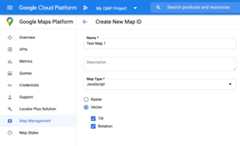
Next, update your map initialization code with the map ID you created. You canfind your map IDs on theMapsManagement page. Provide a map ID when you instantiate the map using themapId property as shown here:
map=newgoogle.maps.Map(document.getElementById('map'),{center:{lat:-34.397,lng:150.644},zoom:8,mapId:'MAP_ID'});
Except as otherwise noted, the content of this page is licensed under theCreative Commons Attribution 4.0 License, and code samples are licensed under theApache 2.0 License. For details, see theGoogle Developers Site Policies. Java is a registered trademark of Oracle and/or its affiliates.
Last updated 2025-12-18 UTC.