
Track YouTube video views & comments

Page Summary
This solution is a beginner-level automation project that takes 20 minutes to set up and uses a time-driven trigger.
The project tracks public YouTube video performance (views, likes, comments) in a Google Sheets spreadsheet.
The script checks for updates daily and sends a Gmail message for videos with new comment activity, enabling user engagement.
The solution utilizes Spreadsheet, YouTube Data API, and Mail Apps Script services to gather data, retrieve video details and statistics, and send email notifications.
Coding level: Beginner
Duration: 20 minutes
Project type: Automation with atime-driven trigger
Objectives
- Understand what the solution does.
- Understand what the Apps Script services do within thesolution.
- Set up the script.
- Run the script.
About this solution
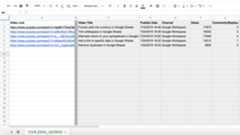
This solution tracks the performance of public YouTube videos, including views,likes, and comments, in a Google Sheets spreadsheet. The trigger checksfor updated information each day and sends a Gmail message if videoshave new comment activity so that you can engage with questions and comments.
How it works
The script uses the advanced YouTube service to get YouTube video details andstatistics for the video URLs listed in theVideo Link column in each sheet.If the number of comments for a listed video has gone up, the script sends anemail notification to the email address that the sheet is named after.
Apps Script services
This solution uses the following services:
- Spreadsheet service–Gets the YouTubeURL information from the spreadsheet.
- YouTube Data API advanced service–Gets theYouTube video details and statistics for each video URL.
- Mail service–Creates and sends an emailin Gmail with a list of videos that have new comments.
Prerequisites
To use this sample, you need the following prerequisites:
- A Google Account (Google Workspace accounts mightrequire administrator approval).
- A web browser with access to the internet.
Set up the script
Create the Apps Script project
- Click the following button to make a copy of theTrack YouTube video views andcomments spreadsheet. The Apps Script project forthis solution is attached to the spreadsheet.
Make a copy - In your copied spreadsheet, change the name of theYour_Email_Addresssheet to your email address.
- Add the YouTube video URLs you want to track or use the provided URLs fortesting. The URLs must start with the format
www.youtube.com/watch?v=. - ClickExtensions>Apps Script. IfYouTube is already listed underServices, you can skip to the next2 steps.
- Next toServices, click Add a service.
- From the list, selectYouTube Data API and clickAdd.
Create a trigger
- In the Apps Script project, clickTriggers>Add trigger.
- ForChoose which function to run, selectmarkVideos.
- ForSelect event source, selectTime-driven.
- ForSelect type of time based trigger, selectDay timer.
- ForSelect time of day, choose your preferred time.
- When prompted, authorize the script.If the OAuth consent screen displays the warning,This app isn't verified,continue by selectingAdvanced>Go to {Project Name} (unsafe).
Run the script
The trigger you set up runs the script once daily. You can run the scriptmanually to test it.
- In the Apps Script project, clickEditor.
- In the function dropdown, selectmarkVideos.
- ClickRun.
- Switch back to the spreadsheet to review the information the script added tothe sheet.
- Open your email to review the email with the list of videos that have morethan zero comments. When the script runs in the future, it only sends anemail with videos whose comment count has increased since the last time thescript ran.
Review the code
To review the Apps Script code for this solution, clickView source code below:
View source code
Code.gs
// To learn how to use this script, refer to the documentation:// https://developers.google.com/apps-script/samples/automations/youtube-tracker/*Copyright 2022 Google LLCLicensed under the Apache License, Version 2.0 (the "License");you may not use this file except in compliance with the License.You may obtain a copy of the License at https://www.apache.org/licenses/LICENSE-2.0Unless required by applicable law or agreed to in writing, softwaredistributed under the License is distributed on an "AS IS" BASIS,WITHOUT WARRANTIES OR CONDITIONS OF ANY KIND, either express or implied.See the License for the specific language governing permissions andlimitations under the License.*/// Sets preferences for email notification. Choose 'Y' to send emails, 'N' to skip emails.constEMAIL_ON="Y";// Matches column names in Video sheet to variables. If the column names change, update these variables.constCOLUMN_NAME={VIDEO:"Video Link",TITLE:"Video Title",};/** * Gets YouTube video details and statistics for all * video URLs listed in 'Video Link' column in each * sheet. Sends email summary, based on preferences above, * when videos have new comments or replies. */functionmarkVideos(){constss=SpreadsheetApp.getActiveSpreadsheet();constsheets=SpreadsheetApp.getActiveSpreadsheet().getSheets();// Runs through process for each tab in Spreadsheet.for(constdataSheetofsheets){consttabName=dataSheet.getName();constrange=dataSheet.getDataRange();constnumRows=range.getNumRows();constrows=range.getValues();constheaderRow=rows[0];// Finds the column indices.constvideoColumnIdx=headerRow.indexOf(COLUMN_NAME.VIDEO);consttitleColumnIdx=headerRow.indexOf(COLUMN_NAME.TITLE);// Creates empty array to collect data for email table.constemailContent=[];// Processes each row in spreadsheet.for(leti=1;i <numRows;++i){constrow=rows[i];// Extracts video ID.constvideoId=extractVideoIdFromUrl(row[videoColumnIdx]);// Processes each row that contains a video ID.if(!videoId){continue;}// Calls getVideoDetails function and extracts target data for the video.constdetailsResponse=getVideoDetails(videoId);consttitle=detailsResponse.items[0].snippet.title;constpublishDate=detailsResponse.items[0].snippet.publishedAt;constpublishDateFormatted=newDate(publishDate);constviews=detailsResponse.items[0].statistics.viewCount;constlikes=detailsResponse.items[0].statistics.likeCount;constcomments=detailsResponse.items[0].statistics.commentCount;constchannel=detailsResponse.items[0].snippet.channelTitle;// Collects title, publish date, channel, views, comments, likes details and pastes into tab.constdetailsRow=[title,publishDateFormatted,channel,views,comments,likes,];dataSheet.getRange(i+1,titleColumnIdx+1,1,6).setValues([detailsRow]);// Determines if new count of comments/replies is greater than old count of comments/replies.constaddlCommentCount=comments-row[titleColumnIdx+4];// Adds video title, link, and additional comment count to table if new counts > old counts.if(addlCommentCount >0){constemailRow=[title,row[videoColumnIdx],addlCommentCount];emailContent.push(emailRow);}}// Sends notification email if Content is not empty.if(emailContent.length >0 &&EMAIL_ON==="Y"){sendEmailNotificationTemplate(emailContent,tabName);}}}/** * Gets video details for YouTube videos * using YouTube advanced service. */functiongetVideoDetails(videoId){constpart="snippet,statistics";constresponse=YouTube.Videos.list(part,{id:videoId});returnresponse;}/** * Extracts YouTube video ID from url. * (h/t https://stackoverflow.com/a/3452617) */functionextractVideoIdFromUrl(url){letvideoId=url.split("v=")[1];constampersandPosition=videoId.indexOf("&");if(ampersandPosition!==-1){videoId=videoId.substring(0,ampersandPosition);}returnvideoId;}/** * Assembles notification email with table of video details. * (h/t https://stackoverflow.com/questions/37863392/making-table-in-google-apps-script-from-array) */functionsendEmailNotificationTemplate(content,emailAddress){consttemplate=HtmlService.createTemplateFromFile("email");template.content=content;constmsg=template.evaluate();MailApp.sendEmail(emailAddress,"New comments or replies on YouTube",msg.getContent(),{htmlBody:msg.getContent()},);}
email.html
<!-- Copyright 2022 Google LLC Licensed under the Apache License, Version 2.0 (the "License"); you may not use this file except in compliance with the License. You may obtain a copy of the License at http://www.apache.org/licenses/LICENSE-2.0 Unless required by applicable law or agreed to in writing, software distributed under the License is distributed on an "AS IS" BASIS, WITHOUT WARRANTIES OR CONDITIONS OF ANY KIND, either express or implied. See the License for the specific language governing permissions and limitations under the License.--><body> Hello,<br><br>You have new comments and/or replies on videos: <br><br> <table border="1"> <tr> <th>Video Title</th> <th>Link</th> <th>Number of new replies and comments</th> </tr> <? for (var i = 0; i < content.length; i++) { ?> <tr> <? for (var j = 0; j < content[i].length; j++) { ?> <td align="center"><?= content[i][j] ?></td> <? } ?> </tr> <? } ?> </table></body>Contributors
This sample is maintained by Google with the help of Google Developer Experts.
Next steps
Except as otherwise noted, the content of this page is licensed under theCreative Commons Attribution 4.0 License, and code samples are licensed under theApache 2.0 License. For details, see theGoogle Developers Site Policies. Java is a registered trademark of Oracle and/or its affiliates.
Last updated 2025-12-11 UTC.