
Collect & review timesheets from employees

Page Summary
This solution automates collecting, calculating, approving, and notifying employees about their weekly timesheets using Google Forms, Google Sheets, and Apps Script.
The script uses the Spreadsheet service to manage form responses and add calculation and approval columns, the Forms service to create the timesheet form, and the Mail service to send approval status emails.
Setting up the script involves copying a sample spreadsheet with the attached Apps Script project and authorizing the script.
Running the script requires adding data through the form, setting approval statuses in the spreadsheet, and using the custom menu to calculate columns and notify employees.
Coding level: Beginner
Duration: 15 minutes
Project type: Automation with acustom menu
Objectives
- Understand what the solution does.
- Understand what the Apps Script services do within thesolution.
- Set up the script.
- Run the script.
About this solution
Collect employees' weekly timesheets using a form with Google Forms. FromGoogle Sheets, calculate employees' pay, approve or disapprove theirtimesheets, and send emails notifying them of their approval status.
How it works
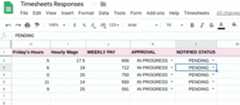
The script creates a form and links the responses to the spreadsheet. Thescript adds columns to the form responses sheet that calculate employees' totalhours and weekly pay. Once a timesheet is reviewed, the script emails theemployee the approval status.
Apps Script services
This solution uses the following services:
- Spreadsheet service–Receives formresponses and writes columns to the sheet to manage approvals.
- Forms service–Creates a formfor employeesto enter their weekly timesheets.
- Mail service–Sends emails to employees tonotify them when their timesheets have been approved or not.
Prerequisites
To use this sample, you need the following prerequisites:
- A Google Account (Google Workspace accounts mightrequire administrator approval).
- A web browser with access to the internet.
Set up the script
Create the Apps Script project
- Click the following button to make a copy of theCollect and reviewtimesheets sample spreadsheet. The Apps Script project forthis solution is attached to the spreadsheet.
Make a copy - In your copied spreadsheet, clickTimesheets>Form setup. You might need torefresh the page for this custom menu to appear.
When prompted, authorize the script.If the OAuth consent screen displays the warning,This app isn't verified,continue by selectingAdvanced>Go to {Project Name} (unsafe).
After you authorize the script, clickTimesheets>Form setup again.
Add data
- ClickTools>Manage form>Go to live form.
- Fill out and submit the form with test data.
Run the script
- Switch back to the spreadsheet.
- From theForm Responses sheet, clickTimesheets>Column setup.
- In theApproval column, mark your sample responses asApproved orNot Approved.
- ClickTimesheets>Notifyemployees.
- Check your email to confirm you received an approval or rejection email.
Review the code
To review the Apps Script code for this solution, clickView source code below:
View source code
Code.gs
// To learn how to use this script, refer to the documentation:// https://developers.google.com/apps-script/samples/automations/timesheets/*Copyright 2022 Google LLCLicensed under the Apache License, Version 2.0 (the "License");you may not use this file except in compliance with the License.You may obtain a copy of the License at https://www.apache.org/licenses/LICENSE-2.0Unless required by applicable law or agreed to in writing, softwaredistributed under the License is distributed on an "AS IS" BASIS,WITHOUT WARRANTIES OR CONDITIONS OF ANY KIND, either express or implied.See the License for the specific language governing permissions andlimitations under the License.*/// Global variables representing the index of certain columns.constCOLUMN_NUMBER={EMAIL:2,HOURS_START:4,HOURS_END:8,HOURLY_PAY:9,TOTAL_HOURS:10,CALC_PAY:11,APPROVAL:12,NOTIFY:13,};// Global variables:constAPPROVED_EMAIL_SUBJECT="Weekly Timesheet APPROVED";constREJECTED_EMAIL_SUBJECT="Weekly Timesheet NOT APPROVED";constAPPROVED_EMAIL_MESSAGE="Your timesheet has been approved.";constREJECTED_EMAIL_MESSAGE="Your timesheet has not been approved.";/** * Creates the menu item "Timesheets" for user to run scripts on drop-down. */functiononOpen(){constui=SpreadsheetApp.getUi();ui.createMenu("Timesheets").addItem("Form setup","setUpForm").addItem("Column setup","columnSetup").addItem("Notify employees","checkApprovedStatusToNotify").addToUi();}/** * Adds "WEEKLY PAY" column with calculated values using array formulas. * Adds an "APPROVAL" column at the end of the sheet, containing * drop-down menus to either approve/disapprove employee timesheets. * Adds a "NOTIFIED STATUS" column indicating whether or not an * employee has yet been e mailed. */functioncolumnSetup(){constsheet=SpreadsheetApp.getActiveSheet();constlastCol=sheet.getLastColumn();constlastRow=sheet.getLastRow();constfrozenRows=sheet.getFrozenRows();constbeginningRow=frozenRows+1;constnumRows=lastRow-frozenRows;// Calls helper functions to add new columns.addCalculatePayColumn(sheet,beginningRow);addApprovalColumn(sheet,beginningRow,numRows);addNotifiedColumn(sheet,beginningRow,numRows);}/** * Adds TOTAL HOURS and CALCULATE PAY columns and automatically calculates * every employee's weekly pay. * * @param {Object} sheet Spreadsheet object of current sheet. * @param {Integer} beginningRow Index of beginning row. */functionaddCalculatePayColumn(sheet,beginningRow){sheet.insertColumnAfter(COLUMN_NUMBER.HOURLY_PAY);sheet.getRange(1,COLUMN_NUMBER.TOTAL_HOURS).setValue("TOTAL HOURS");sheet.getRange(1,COLUMN_NUMBER.CALC_PAY).setValue("WEEKLY PAY");// Calculates weekly total hours.sheet.getRange(beginningRow,COLUMN_NUMBER.TOTAL_HOURS).setFormula("=ArrayFormula(D2:D+E2:E+F2:F+G2:G+H2:H)");// Calculates weekly pay.sheet.getRange(beginningRow,COLUMN_NUMBER.CALC_PAY).setFormula("=ArrayFormula(I2:I * J2:J)");}/** * Adds an APPROVAL column allowing managers to approve/ * disapprove of each employee's timesheet. * * @param {Object} sheet Spreadsheet object of current sheet. * @param {Integer} beginningRow Index of beginning row. * @param {Integer} numRows Number of rows currently in use. */functionaddApprovalColumn(sheet,beginningRow,numRows){sheet.insertColumnAfter(COLUMN_NUMBER.CALC_PAY);sheet.getRange(1,COLUMN_NUMBER.APPROVAL).setValue("APPROVAL");// Make sure approval column is all drop-down menus.constapprovalColumnRange=sheet.getRange(beginningRow,COLUMN_NUMBER.APPROVAL,numRows,1,);constdropdownValues=["APPROVED","NOT APPROVED","IN PROGRESS"];construle=SpreadsheetApp.newDataValidation().requireValueInList(dropdownValues).build();approvalColumnRange.setDataValidation(rule);approvalColumnRange.setValue("IN PROGRESS");}/** * Adds a NOTIFIED column allowing managers to see which employees * have/have not yet been notified of their approval status. * * @param {Object} sheet Spreadsheet object of current sheet. * @param {Integer} beginningRow Index of beginning row. * @param {Integer} numRows Number of rows currently in use. */functionaddNotifiedColumn(sheet,beginningRow,numRows){sheet.insertColumnAfter(COLUMN_NUMBER.APPROVAL);// globalsheet.getRange(1,COLUMN_NUMBER.APPROVAL+1).setValue("NOTIFIED STATUS");// Make sure notified column is all drop-down menus.constnotifiedColumnRange=sheet.getRange(beginningRow,COLUMN_NUMBER.APPROVAL+1,numRows,1,);constdropdownValues=["NOTIFIED","PENDING"];construle=SpreadsheetApp.newDataValidation().requireValueInList(dropdownValues).build();notifiedColumnRange.setDataValidation(rule);notifiedColumnRange.setValue("PENDING");}/** * Sets the notification status to NOTIFIED for employees * who have received a notification email. * * @param {Object} sheet Current Spreadsheet. * @param {Object} notifiedValues Array of notified values. * @param {Integer} i Current status in the for loop. * @parma {Integer} beginningRow Row where iterations began. */functionupdateNotifiedStatus(sheet,notifiedValues,i,beginningRow){// Update notification status.notifiedValues[i][0]="NOTIFIED";sheet.getRange(i+beginningRow,COLUMN_NUMBER.NOTIFY).setValue("NOTIFIED");}/** * Checks the approval status of every employee, and calls helper functions * to notify employees via email & update their notification status. */functioncheckApprovedStatusToNotify(){constsheet=SpreadsheetApp.getActiveSheet();constlastRow=sheet.getLastRow();constlastCol=sheet.getLastColumn();// lastCol here is the NOTIFIED column.constfrozenRows=sheet.getFrozenRows();constbeginningRow=frozenRows+1;constnumRows=lastRow-frozenRows;// Gets ranges of email, approval, and notified values for every employee.constemailValues=sheet.getRange(beginningRow,COLUMN_NUMBER.EMAIL,numRows,1).getValues();constapprovalValues=sheet.getRange(beginningRow,COLUMN_NUMBER.APPROVAL,lastRow-frozenRows,1).getValues();constnotifiedValues=sheet.getRange(beginningRow,COLUMN_NUMBER.NOTIFY,numRows,1).getValues();// Traverses through employee's row.for(leti=0;i <numRows;i++){// Do not notify twice.if(notifiedValues[i][0]==="NOTIFIED"){continue;}constemailAddress=emailValues[i][0];constapprovalValue=approvalValues[i][0];// Sends notifying emails & update status.if(approvalValue==="IN PROGRESS"){}elseif(approvalValue==="APPROVED"){MailApp.sendEmail(emailAddress,APPROVED_EMAIL_SUBJECT,APPROVED_EMAIL_MESSAGE,);updateNotifiedStatus(sheet,notifiedValues,i,beginningRow);}elseif(approvalValue==="NOT APPROVED"){MailApp.sendEmail(emailAddress,REJECTED_EMAIL_SUBJECT,REJECTED_EMAIL_MESSAGE,);updateNotifiedStatus(sheet,notifiedValues,i,beginningRow);}}}/** * Set up the Timesheets Responses form, & link the form's trigger to * send manager an email when a new request is submitted. */functionsetUpForm(){constsheet=SpreadsheetApp.getActiveSpreadsheet();if(sheet.getFormUrl()){constmsg="Form already exists. Unlink the form and try again.";SpreadsheetApp.getUi().alert(msg);return;}// Create the form.constform=FormApp.create("Weekly Timesheets").setCollectEmail(true).setDestination(FormApp.DestinationType.SPREADSHEET,sheet.getId()).setLimitOneResponsePerUser(false);form.addTextItem().setTitle("Employee Name:").setRequired(true);form.addTextItem().setTitle("Monday Hours:").setRequired(true);form.addTextItem().setTitle("Tuesday Hours:").setRequired(true);form.addTextItem().setTitle("Wednesday Hours:").setRequired(true);form.addTextItem().setTitle("Thursday Hours:").setRequired(true);form.addTextItem().setTitle("Friday Hours:").setRequired(true);form.addTextItem().setTitle("HourlyWage:").setRequired(true);// Set up on form submit trigger.ScriptApp.newTrigger("onFormSubmit").forForm(form).onFormSubmit().create();}/** * Handle new form submissions to trigger the workflow. * * @param {Object} event Form submit event */functiononFormSubmit(event){constresponse=getResponsesByName(event.response);// Load form responses into a new row.constrow=["New","",response["Emoloyee Email:"],response["Employee Name:"],response["Monday Hours:"],response["Tuesday Hours:"],response["Wednesday Hours:"],response["Thursday Hours:"],response["Friday Hours:"],response["Hourly Wage:"],];constsheet=SpreadsheetApp.getActiveSpreadsheet();sheet.appendRow(row);}/** * Converts a form response to an object keyed by the item titles. Allows easier * access to response values. * * @param {FormResponse} response * @return {Object} Form values keyed by question title */functiongetResponsesByName(response){constinitialValue={email:response.getRespondentEmail(),timestamp:response.getTimestamp(),};returnresponse.getItemResponses().reduce((obj,itemResponse)=>{constkey=itemResponse.getItem().getTitle();obj[key]=itemResponse.getResponse();returnobj;},initialValue);}
Contributors
This sample is maintained by Google with the help of Google Developer Experts.
Next steps
Except as otherwise noted, the content of this page is licensed under theCreative Commons Attribution 4.0 License, and code samples are licensed under theApache 2.0 License. For details, see theGoogle Developers Site Policies. Java is a registered trademark of Oracle and/or its affiliates.
Last updated 2025-12-11 UTC.