
Manage new employee equipment requests

Page Summary
This solution automates the process of requesting and managing system access and equipment for new employees using Google Forms and Apps Script.
The script utilizes Apps Script services like Forms, Spreadsheet, Mail, and Script to create forms, manage responses, send email notifications, and set up triggers.
The workflow is initiated when a form is submitted, sending an email notification to the designated contact, and another notification is sent to the requester when the status is marked "Completed" in the spreadsheet, at which point the request is moved to a completed sheet.
Coding level: Beginner
Duration: 10 minutes
Project type: Automation with anevent-driven triggerand atime-driven trigger
Objectives
- Understand what the solution does.
- Understand what the Apps Script services do within thesolution.
- Set up the script.
- Run the script.
About this solution
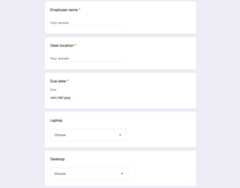
New employees usually require system access and equipment from IT. To managethese requests, you can create a form with Google Forms for users to indicatewhat accessand devices employees need. Once IT completes the request and updates itsstatus, requesters receive an email notification.
How it works
The script creates an equipment request form. You can customize the items on theform in thesample script's code. When someonesubmits the form, the script sends an email notification to the designated pointof contact for requests. Once the request status in the spreadsheet ischanged to "Completed," the script sends a confirmation email to the person whosubmitted the form.
Apps Script services
This solution uses the following services:
- Forms service–Creates the formfor IT requests.
- Spreadsheet service–Checks to see ifthe request form already exists to mitigate duplicates. Manages the formresponses by moving them to thePending andCompleted sheets as needed.
- Mail service–Creates and sends the requestand completion notification emails.
- Script service–Creates the triggers. Onefires when a form is submitted and the other fires every five minutes to checkif a request's status is marked as "Completed."
Prerequisites
To use this sample, you need the following prerequisites:
- A Google Account (Google Workspace accounts mightrequire administrator approval).
- A web browser with access to the internet.
Set up the script
Create the Apps Script project
- Click the following button to make a copy of theManage employee equipmentrequests spreadsheet. The Apps Script project for thissolution is attached to the spreadsheet.
Make a copy - ClickExtensions>Apps Script.
- Next to the
REQUEST_NOTIFICATION_EMAILvariable, replace the sample emailwith your email. - Click Save
 .
.
Set up the spreadsheet
- Return to the spreadsheet and clickEquipment requests>Set up. You might need to refreshthe page for this custom menu to appear.
When prompted, authorize the script.If the OAuth consent screen displays the warning,This app isn't verified,continue by selectingAdvanced>Go to {Project Name} (unsafe).
ClickEquipment requests>Set up again.
Run the script
- ClickTools>Manage form>Go to live form.
- Fill out and submit the form.
- Check your email for a notification about the equipment request.
- Return to the spreadsheet and on thePending requests sheet, change thestatus of the request toCompleted.
- Within 5 minutes, the script sends another email notifying you that therequest has been completed. The script moves the request from thePendingrequests sheet to theCompleted requests sheet.
Review the code
To review the Apps Script code for this solution, clickView source code below:
View source code
Code.gs
// To learn how to use this script, refer to the documentation:// https://developers.google.com/apps-script/samples/automations/equipment-requests/*Copyright 2022 Google LLCLicensed under the Apache License, Version 2.0 (the "License");you may not use this file except in compliance with the License.You may obtain a copy of the License at https://www.apache.org/licenses/LICENSE-2.0Unless required by applicable law or agreed to in writing, softwaredistributed under the License is distributed on an "AS IS" BASIS,WITHOUT WARRANTIES OR CONDITIONS OF ANY KIND, either express or implied.See the License for the specific language governing permissions andlimitations under the License.*/// Update this variable with the email address you want to send equipment requests to.constREQUEST_NOTIFICATION_EMAIL="request_intake@example.com";// Update the following variables with your own equipment options.constAVAILABLE_LAPTOPS=['15" high Performance Laptop (OS X)','15" high Performance Laptop (Windows)','15" high performance Laptop (Linux)','13" lightweight laptop (Windows)',];constAVAILABLE_DESKTOPS=["Standard workstation (Windows)","Standard workstation (Linux)","High performance workstation (Windows)","High performance workstation (Linux)","Mac Pro (OS X)",];constAVAILABLE_MONITORS=['Single 27"','Single 32"','Dual 24"'];// Form field titles, used for creating the form and as keys when handling// responses./** * Adds a custom menu to the spreadsheet. */functiononOpen(){SpreadsheetApp.getUi().createMenu("Equipment requests").addItem("Set up","setup_").addItem("Clean up","cleanup_").addToUi();}/** * Creates the form and triggers for the workflow. */functionsetup_(){constss=SpreadsheetApp.getActiveSpreadsheet();if(ss.getFormUrl()){constmsg="Form already exists. Unlink the form and try again.";SpreadsheetApp.getUi().alert(msg);return;}constform=FormApp.create("Equipment Requests").setCollectEmail(true).setDestination(FormApp.DestinationType.SPREADSHEET,ss.getId()).setLimitOneResponsePerUser(false);form.addTextItem().setTitle("Employee name").setRequired(true);form.addTextItem().setTitle("Desk location").setRequired(true);form.addDateItem().setTitle("Due date").setRequired(true);form.addListItem().setTitle("Laptop").setChoiceValues(AVAILABLE_LAPTOPS);form.addListItem().setTitle("Desktop").setChoiceValues(AVAILABLE_DESKTOPS);form.addListItem().setTitle("Monitor").setChoiceValues(AVAILABLE_MONITORS);// Hide the raw form responses.for(constsheetofss.getSheets()){if(sheet.getFormUrl()===ss.getFormUrl()){sheet.hideSheet();}}// Start workflow on each form submitScriptApp.newTrigger("onFormSubmit_").forForm(form).onFormSubmit().create();// Archive completed items every 5m.ScriptApp.newTrigger("processCompletedItems_").timeBased().everyMinutes(5).create();}/** * Cleans up the project (stop triggers, form submission, etc.) */functioncleanup_(){constformUrl=SpreadsheetApp.getActiveSpreadsheet().getFormUrl();if(!formUrl){return;}for(consttriggerofScriptApp.getProjectTriggers()){ScriptApp.deleteTrigger(trigger);}FormApp.openByUrl(formUrl).deleteAllResponses().setAcceptingResponses(false);}/** * Handles new form submissions to trigger the workflow. * * @param {Object} event - Form submit event */functiononFormSubmit_(event){constresponse=mapResponse_(event.response);sendNewEquipmentRequestEmail_(response);constequipmentDetails=Utilities.formatString("%s\n%s\n%s",response.Laptop,response.Desktop,response.Monitor,);constrow=["New","",response["Due date"],response["Employee name"],response["Desk location"],equipmentDetails,response.email,];constss=SpreadsheetApp.getActiveSpreadsheet();constsheet=ss.getSheetByName("Pending requests");sheet.appendRow(row);}/** * Sweeps completed and cancelled requests, notifying the requestors and archiving them * to the completed sheet. * * @param {Object} event */functionprocessCompletedItems_(){constss=SpreadsheetApp.getActiveSpreadsheet();constpending=ss.getSheetByName("Pending requests");constcompleted=ss.getSheetByName("Completed requests");constrows=pending.getDataRange().getValues();for(leti=rows.length;i>=2;i--){constrow=rows[i-1];conststatus=row[0];if(status==="Completed"||status==="Cancelled"){pending.deleteRow(i);completed.appendRow(row);console.log(`Deleted row:${i}`);sendEquipmentRequestCompletedEmail_({"Employee name":row[3],"Desk location":row[4],email:row[6],});}}}/** * Sends an email notification that a new equipment request has been submitted. * * @param {Object} request - Request details */functionsendNewEquipmentRequestEmail_(request){consttemplate=HtmlService.createTemplateFromFile("new-equipment-request.html",);template.request=request;template.sheetUrl=SpreadsheetApp.getActiveSpreadsheet().getUrl();constmsg=template.evaluate();MailApp.sendEmail({to:REQUEST_NOTIFICATION_EMAIL,subject:"New equipment request",htmlBody:msg.getContent(),});}/** * Sends an email notifying the requestor that the request is complete. * * @param {Object} request - Request details */functionsendEquipmentRequestCompletedEmail_(request){consttemplate=HtmlService.createTemplateFromFile("request-complete.html");template.request=request;constmsg=template.evaluate();MailApp.sendEmail({to:request.email,subject:"Equipment request completed",htmlBody:msg.getContent(),});}/** * Converts a form response to an object keyed by the item titles. Allows easier * access to response values. * * @param {FormResponse} response * @return {Object} Form values keyed by question title */functionmapResponse_(response){constinitialValue={email:response.getRespondentEmail(),timestamp:response.getTimestamp(),};returnresponse.getItemResponses().reduce((obj,itemResponse)=>{constkey=itemResponse.getItem().getTitle();obj[key]=itemResponse.getResponse();returnobj;},initialValue);}
new-equipment-request.html
<!DOCTYPE html><!-- Copyright 2022 Google LLC Licensed under the Apache License, Version 2.0 (the "License"); you may not use this file except in compliance with the License. You may obtain a copy of the License at http://www.apache.org/licenses/LICENSE-2.0 Unless required by applicable law or agreed to in writing, software distributed under the License is distributed on an "AS IS" BASIS, WITHOUT WARRANTIES OR CONDITIONS OF ANY KIND, either express or implied. See the License for the specific language governing permissions and limitations under the License.--><html> <body> <p> A new equipment request has been made by <?= request.email ?>. </p> <p> Employee name: <?= request['Employee name'] ?><br/> Desk location name: <?= request['Desk location'] ?><br/> Due date: <?= request['Due date'] ?><br/> Laptop model: <?= request['Laptop'] ?><br/> Desktop model: <?= request['Desktop'] ?><br/> Monitor(s): <?= request['Monitor'] ?><br/> </p> See <a href="<?= sheetUrl ?>">the spreadsheet</a> to take or assign this item. </body></html>
request-complete.html
<!DOCTYPE html><!-- Copyright 2022 Google LLC Licensed under the Apache License, Version 2.0 (the "License"); you may not use this file except in compliance with the License. You may obtain a copy of the License at http://www.apache.org/licenses/LICENSE-2.0 Unless required by applicable law or agreed to in writing, software distributed under the License is distributed on an "AS IS" BASIS, WITHOUT WARRANTIES OR CONDITIONS OF ANY KIND, either express or implied. See the License for the specific language governing permissions and limitations under the License.--><html> <body> <p> An equipment request has been completed. </p> <p> Employee name: <?= request['Employee name'] ?><br/> Desk location name: <?= request['Desk location'] ?><br/> </p> </body></html>
Contributors
This sample is maintained by Google with the help of Google Developer Experts.
Next steps
Except as otherwise noted, the content of this page is licensed under theCreative Commons Attribution 4.0 License, and code samples are licensed under theApache 2.0 License. For details, see theGoogle Developers Site Policies. Java is a registered trademark of Oracle and/or its affiliates.
Last updated 2025-12-11 UTC.