
Respond to feedback

Page Summary
This solution automatically creates draft email replies to feedback submitted through Google Forms.
The script uses an event-driven trigger to run each time a form is submitted.
Draft emails are created in Gmail, addressed to the form submitter, and include their responses and a thank-you message.
The solution utilizes the Apps Script Script, Spreadsheet, and Gmail services.
Setting up involves copying a sample spreadsheet with the attached Apps Script project and enabling the auto draft replies through a custom menu.
Coding level: Beginner
Duration: 15 minutes
Project type: Automation with acustom menu andanevent-driven trigger
Objectives
- Understand what the solution does.
- Understand what the Apps Script services do within thesolution.
- Set up the script.
- Run the script.
About this solution
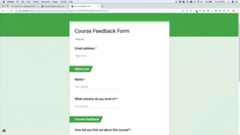
Automatically create draft email replies to feedback from Google Forms. Thissolution focuses on course feedback from students, but you can apply it to anyuse case for which you receive feedback via Google Forms.
How it works
The script installs an event-driven trigger that runs each time a user submits aform. With each form submission, the script creates an email draft in Gmail. Theemail is addressed to the person who submitted the form and includes the formresponses and a generic thank-you message. You can edit the email before yousend it.
Apps Script services
This solution uses the following services:
- Script service–Installs the event-driventrigger that fires when someone submits a form.
- Spreadsheet service–Sends the formresponses to Gmail.
- Gmail service–Creates the email draft withthe thank-you message and form responses.
Prerequisites
To use this sample, you need the following prerequisites:
- A Google Account (Google Workspace accounts mightrequire administrator approval).
- A web browser with access to the internet.
Set up the script
Click the following button to make a copy of theRespond to feedback sample spreadsheet. The Apps Script project for this solution is attached to the spreadsheet.
Make a copy
Run the script
- ClickForm reply tool>Enable auto draft replies. You might need to refresh the page for thiscustom menu to appear.
When prompted, authorize the script.If the OAuth consent screen displays the warning,This app isn't verified,continue by selectingAdvanced>Go to {Project Name} (unsafe).
ClickForm reply tool>Enable autodraft replies again.
ClickTools>Manage form>Go to live form.
Fill out the form and clickSubmit.
Open Gmail and check your drafts. You should have a new draftwith the formresponse.
Review the code
To review the Apps Script code for this solution, clickView source code below:
View source code
Code.gs
// To learn how to use this script, refer to the documentation:// https://developers.google.com/apps-script/samples/automations/course-feedback-response/*Copyright 2022 Google LLCLicensed under the Apache License, Version 2.0 (the "License");you may not use this file except in compliance with the License.You may obtain a copy of the License at https://www.apache.org/licenses/LICENSE-2.0Unless required by applicable law or agreed to in writing, softwaredistributed under the License is distributed on an "AS IS" BASIS,WITHOUT WARRANTIES OR CONDITIONS OF ANY KIND, either express or implied.See the License for the specific language governing permissions andlimitations under the License.*//** * Creates custom menu for user to run scripts. */functiononOpen(){constui=SpreadsheetApp.getUi();ui.createMenu("Form Reply Tool").addItem("Enable auto draft replies","installTrigger").addToUi();}/** * Installs a trigger on the Spreadsheet for when a Form response is submitted. */functioninstallTrigger(){ScriptApp.newTrigger("onFormSubmit").forSpreadsheet(SpreadsheetApp.getActive()).onFormSubmit().create();}/** * Creates a draft email for every response on a form * * @param {Object} event - Form submit event */functiononFormSubmit(e){constresponses=e.namedValues;// parse form response dataconsttimestamp=responses.Timestamp[0];constemail=responses["Email address"][0].trim();// create email bodyconstemailBody=createEmailBody(responses);// create draft emailcreateDraft(timestamp,email,emailBody);}/** * Creates email body and includes feedback from Google Form. * * @param {string} responses - The form response data * @return {string} - The email body as an HTML string */functioncreateEmailBody(responses){// parse form response dataconstname=responses.Name[0].trim();constindustry=responses["What industry do you work in?"][0];constsource=responses["How did you find out about this course?"][0];constrating=responses["On a scale of 1 - 5 how would you rate this course?"][0];constproductFeedback=responses["What could be different to make it a 5 rating?"][0];constotherFeedback=responses["Any other feedback?"][0];// create email bodyconsthtmlBody=`Hi${name},<br><br>Thanks for responding to our course feedback questionnaire.<br><br>It's really useful to us to help improve this course.<br><br>Have a great day!<br><br>Thanks,<br>Course Team<br><br>****************************************************************<br><br><i>Your feedback:<br><br>What industry do you work in?<br><br>${industry}<br><br>How did you find out about this course?<br><br>${source}<br><br>On a scale of 1 - 5 how would you rate this course?<br><br>${rating}<br><br>What could be different to make it a 5 rating?<br><br>${productFeedback}<br><br>Any other feedback?<br><br>${otherFeedback}<br><br></i>`;returnhtmlBody;}/** * Create a draft email with the feedback * * @param {string} timestamp Timestamp for the form response * @param {string} email Email address from the form response * @param {string} emailBody The email body as an HTML string */functioncreateDraft(timestamp,email,emailBody){console.log("draft email create process started");// create subject lineconstsubjectLine=`Thanks for your course feedback!${timestamp}`;// create draft emailGmailApp.createDraft(email,subjectLine,"",{htmlBody:emailBody,});}
Contributors
This sample was created by Ben Collins, Educator atbenlcollins.com and Google Developer Expert.
- Find Ben on Twitter@benlcollins.
- Read Ben'sblog.
This sample is maintained by Google with the help of Google Developer Experts.
Next steps
Except as otherwise noted, the content of this page is licensed under theCreative Commons Attribution 4.0 License, and code samples are licensed under theApache 2.0 License. For details, see theGoogle Developers Site Policies. Java is a registered trademark of Oracle and/or its affiliates.
Last updated 2025-12-11 UTC.