
Make an agenda for meetings

Page Summary
This beginner-level automation project uses an event-driven trigger to automatically create and attach agenda documents to Google Calendar meetings.
The solution works by creating a template document and then checking for calendar events with "#agenda" in the description, copying the template, adding it to the event, and sharing it with attendees when the tag is present.
The Apps Script services used in this solution include Drive, Document, Calendar, Base, and Script services to manage files, create documents, interact with calendar events, get user information, and set up triggers.
To set up the script, you need a Google Account and internet access, and you will open the project, make a copy, run the
setUpfunction, and authorize the script.To run the script, you create or edit a Google Calendar event, add
#agendato the description, and an agenda document will be created and shared with attendees.
Coding level: Beginner
Duration: 15 minutes
Project type: Automation with anevent-driven trigger
Objectives
- Understand what the solution does.
- Understand what the Apps Script services do within thesolution.
- Set up the script.
- Run the script.
About this solution
Automatically create agenda documents in Google Docs and attach them to yourGoogle Calendar meetings.
How it works
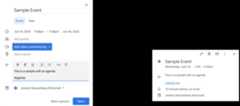
The script creates a document template for an agenda. When you update yourcalendar, the script checks to see if any events you own include "#agenda" inthe description. If the tag is present, the script makes a copy of the template,adds it to the calendar event, and shares it with the event attendees.
Apps Script services
This solution uses the following services:
- Drive service–Checks to see if the templatedocument exists and if it doesn't, creates a new folder for the templatedocument.Creates a copy of the template document for each new agenda.
- Document service–Creates the agendatemplate.
- Calendar service–Checks for events withthe "#agenda" tag and updates the event description with a link to the agendadoc.
- Base service–Uses the
Sessionclass to getthe user's email. This helps build the trigger for the current user. - Script service–Creates a trigger that fireswhenever there's a change to the user's calendar.
Prerequisites
To use this sample, you need the following prerequisites:
- A Google Account (Google Workspace accounts mightrequire administrator approval).
- A web browser with access to the internet.
Set up the script
- Click the button below to open the sampleMake an agenda for meetingsApps Script project.
Open the project - ClickOverview.
- On the overview page, click Make a copy
 .
. - In your copied project, in the function dropdown, selectsetUp.
- ClickRun.
- When prompted, authorize the script.If the OAuth consent screen displays the warning,This app isn't verified,continue by selectingAdvanced>Go to {Project Name} (unsafe).
Run the script
- OpenGoogle Calendar.
- Create a new event or edit an existing one.
- In the description, add
#agendaand save the event. - Check your email for an email notification that a document has been sharedwith you, or refresh Calendar and click on theevent again to see the link to the agenda document.
All attendees receive the email notification to view the agenda. Thescript gives attendees permission to edit, but you can edit the script toupdatethe agenda document permissions for attendees.
Review the code
To review the Apps Script code for this solution, clickView source code below:
View source code
Code.gs
// To learn how to use this script, refer to the documentation:// https://developers.google.com/apps-script/samples/automations/agenda-maker/*Copyright 2022 Google LLCLicensed under the Apache License, Version 2.0 (the "License");you may not use this file except in compliance with the License.You may obtain a copy of the License at https://www.apache.org/licenses/LICENSE-2.0Unless required by applicable law or agreed to in writing, softwaredistributed under the License is distributed on an "AS IS" BASIS,WITHOUT WARRANTIES OR CONDITIONS OF ANY KIND, either express or implied.See the License for the specific language governing permissions andlimitations under the License.*//** * Checks if the folder for Agenda docs exists, and creates it if it doesn't. * * @return {*} Drive folder ID for the app. */functioncheckFolder(){constfolders=DriveApp.getFoldersByName("Agenda Maker - App");// Finds the folder if it existswhile(folders.hasNext()){constfolder=folders.next();if(folder.getDescription()==="Apps Script App - Do not change this description"&&folder.getOwner().getEmail()===Session.getActiveUser().getEmail()){returnfolder.getId();}}// If the folder doesn't exist, creates oneconstfolder=DriveApp.createFolder("Agenda Maker - App");folder.setDescription("Apps Script App - Do not change this description");returnfolder.getId();}/** * Finds the template agenda doc, or creates one if it doesn't exist. */functiongetTemplateId(folderId){constfolder=DriveApp.getFolderById(folderId);constfiles=folder.getFilesByName("Agenda TEMPLATE##");// If there is a file, returns the ID.while(files.hasNext()){constfile=files.next();returnfile.getId();}// Otherwise, creates the agenda template.// You can adjust the default template hereconstdoc=DocumentApp.create("Agenda TEMPLATE##");constbody=doc.getBody();body.appendParagraph("##Attendees##").setHeading(DocumentApp.ParagraphHeading.HEADING1).editAsText().setBold(true);body.appendParagraph(" ").editAsText().setBold(false);body.appendParagraph("Overview").setHeading(DocumentApp.ParagraphHeading.HEADING1).editAsText().setBold(true);body.appendParagraph(" ");body.appendParagraph("- Topic 1: ").editAsText().setBold(true);body.appendParagraph(" ").editAsText().setBold(false);body.appendParagraph("- Topic 2: ").editAsText().setBold(true);body.appendParagraph(" ").editAsText().setBold(false);body.appendParagraph("- Topic 3: ").editAsText().setBold(true);body.appendParagraph(" ").editAsText().setBold(false);body.appendParagraph("Next Steps").setHeading(DocumentApp.ParagraphHeading.HEADING1).editAsText().setBold(true);body.appendParagraph("- Takeaway 1: ").editAsText().setBold(true);body.appendParagraph("- Responsible: ").editAsText().setBold(false);body.appendParagraph("- Accountable: ");body.appendParagraph("- Consult: ");body.appendParagraph("- Inform: ");body.appendParagraph(" ");body.appendParagraph("- Takeaway 2: ").editAsText().setBold(true);body.appendParagraph("- Responsible: ").editAsText().setBold(false);body.appendParagraph("- Accountable: ");body.appendParagraph("- Consult: ");body.appendParagraph("- Inform: ");body.appendParagraph(" ");body.appendParagraph("- Takeaway 3: ").editAsText().setBold(true);body.appendParagraph("- Responsible: ").editAsText().setBold(false);body.appendParagraph("- Accountable: ");body.appendParagraph("- Consult: ");body.appendParagraph("- Inform: ");doc.saveAndClose();folder.addFile(DriveApp.getFileById(doc.getId()));returndoc.getId();}/** * When there is a change to the calendar, searches for events that include "#agenda" * in the decrisption. * */functiononCalendarChange(){// Gets recent events with the #agenda tagconstnow=newDate();constevents=CalendarApp.getEvents(now,newDate(now.getTime()+2*60*60*1000000),{search:"#agenda"},);constfolderId=checkFolder();consttemplateId=getTemplateId(folderId);constfolder=DriveApp.getFolderById(folderId);// Loops through any events foundfor(i=0;i <events.length;i++){constevent=events[i];// Confirms whether the event has the #agenda tagletdescription=event.getDescription();if(description.search("#agenda")===-1)continue;// Only works with events created by the owner of this calendarif(event.isOwnedByMe()){// Creates a new document from the template for an agenda for this eventconstnewDoc=DriveApp.getFileById(templateId).makeCopy();newDoc.setName(`Agenda for${event.getTitle()}`);constfile=DriveApp.getFileById(newDoc.getId());folder.addFile(file);constdoc=DocumentApp.openById(newDoc.getId());constbody=doc.getBody();// Fills in the template with information about the attendees from the// calendar eventconstconf=body.findText("##Attendees##");if(conf){constref=conf.getStartOffset();for(constiinevent.getGuestList()){constguest=event.getGuestList()[i];body.insertParagraph(ref+2,guest.getEmail());}body.replaceText("##Attendees##","Attendees");}// Replaces the tag with a link to the agenda documentconstagendaUrl=`https://docs.google.com/document/d/${newDoc.getId()}`;description=description.replace("#agenda",`<a href=${agendaUrl}>Agenda Doc</a>`,);event.setDescription(description);// Invites attendees to the Google doc so they automatically receive access to the agendanewDoc.addEditor(newDoc.getOwner());for(constiinevent.getGuestList()){constguest=event.getGuestList()[i];newDoc.addEditor(guest.getEmail());}}}return;}/** * Creates an event-driven trigger that fires whenever there's a change to the calendar. */functionsetUp(){constemail=Session.getActiveUser().getEmail();ScriptApp.newTrigger("onCalendarChange").forUserCalendar(email).onEventUpdated().create();}
Modifications
You can edit the sample as much as you'd like to fit your needs. Below area few optional changes you can make.
Update agenda document permissions for attendees
The script gives attendees permission to edit. If you want to limit the permissions to view only, replace theaddEditor method with theaddViewer method in the following part of the code:
for (let i in event.getGuestList()) { let guest = event.getGuestList()[i]; newDoc.addEditor(guest.getEmail());Edit the agenda document template
To update the agenda document template, take the following steps:
- After you create your first agenda in a calendar event, open Google Drive.
- Open the folder calledAgenda Maker - App.
- Open theAgenda TEMPLATE## document and make your edits.
Contributors
This sample was created by Jeremy Glassenberg, Product Management and PlatformStrategy Consultant. Find Jeremy on Twitter@jglassenberg.
This sample is maintained by Google with the help of Google Developer Experts.
Next steps
Except as otherwise noted, the content of this page is licensed under theCreative Commons Attribution 4.0 License, and code samples are licensed under theApache 2.0 License. For details, see theGoogle Developers Site Policies. Java is a registered trademark of Oracle and/or its affiliates.
Last updated 2025-12-11 UTC.