
Work with tabs

Page Summary
Apps Script for Google Docs allows access to content from any tab within a document.
Google Docs introducestabs as an organizational layer within a single document, similar to Sheets.
Tab properties, content, and hierarchy (including child tabs) are accessible through
Document.getTabs()and methods of theTabandDocumentTabclasses.Existing methods on the
Documentclass now operate on the active tab (or the first tab), and accessing content within a specific tab is recommended usingTab.asDocumentTab().User selection, including cursor position and selection range, operates within the context of the active tab, and the active tab itself can be set using
Document.setActiveTab(tabId).
Apps Script for Google Docs lets you access content from anytab in the document.
What are tabs?
Google Docs features an organizational layer calledtabs. Docsallows users to create one or more tabs within a single document, similar to howthere are tabs in Sheets today. Each tab has its own title and an ID (appendedin the URL). A tab can also havechild tabs, which are tabs that are nestedbeneath another tab.
Access Tabs
Tab properties and content are accessible withDocument.getTabs(),which returns a list ofTabs. The later sections give a brief overview of theTab class; theTab class documentationalso provides more detailed information.
Tab properties
Tab properties can be retrieved using methods such asTab.getId() andTab.getTitle().
Tab contents
Document content within each tab can be retrieved usingTab.asDocumentTab().TheChanges to Document Class structuresection describes how this can be used.
Tab hierarchy
Child tabs are exposed in Google Apps Script throughTab.getChildTabs().Accessing content from all tabs requires traversing the "tree" of child tabs.For example, consider a document that contains a tab hierarchy as follows:
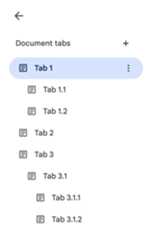
In order to accessTab 3.1.2, you could do the following:
//PrinttheIDofTab3.1.2.constdoc=DocumentApp.getActiveDocument();consttab=doc.getTabs()[2].getChildTabs()[0].getChildTabs()[1];console.log(tab.getId());
See the sample code blocks in the later sections, which provides sample code foriterating across all tabs in a document.
Other ways of retrieving tabs
There are two other ways of retrieving tabs:
Document.getTab(tabId):Returns the Tab with the specified ID.Document.getActiveTab():Returns the user's active Tab. Only works inscripts that arebound to a document. Thelater sections describe this in more detail.
Changes to Document Class structure
In the past, documents did not have a concept of tabs, so the Document Classexposed methods to directly access and modify the text contents of the document.The following methods fall into this category:
Document.addBookmark(position)Document.addFooter()Document.addHeader()Document.addNamedRange(name, range)Document.getBody()Document.getBookmark(id)Document.getBookmarks()Document.getFooter()Document.getFootnotes()Document.getHeader()Document.getNamedRangeById(id)Document.getNamedRanges()Document.getNamedRanges(name)Document.newPosition(element, offset)Document.newRange()
With the additional structural hierarchy of tabs, these methods no longersemantically represent the text content from all tabs in the document. The textcontent will now be represented in a different layer; all of the aforementionedtext methods are accessible throughDocumentTab.
These existing methods on theDocument class will access or modify contentfrom either the active tab (in scriptsbound to aparticular document) or the first tab (if an active one is not available).
Access text content within a specific Tab
Instead of using the text methods off ofDocument, it is recommended to usethe methods that are available off of theDocumentTab class instead (which isavailable through theTab.asDocumentTab()method). For example:
//Printthetextfromthebodyoftheactivetab.constdoc=DocumentApp.getActiveDocument();constdocumentTab=doc.getActiveTab().asDocumentTab();constbody=documentTab.getBody();console.log(body.getText());
Changes to user selection
Note: The concept of the user's selection is only relevant and can only be usedor changed by scripts that arebound to adocument.Text selection methods
TheDocument class provides getters and setters to manage where in the textthe user is selecting, within the active document. These methods operate withinthe context of the active tab of the user running the script.
Document.getCursor():Returns the user's cursor position in theactive tab.Document.getSelection():Returns the user's selection range in theactive tab.Document.setCursor(position):Sets the user's cursor position in the active document. If the Position is in aninactive tab, then the user's active tab is also switched to the tab associatedwith that Position.Document.setSelection(range):Sets the user's selection range in the active document. If the Range is in aninactive tab, then the user's active tab is also switched to the tab associatedwith that Range.
Tab selection methods and use cases
With the introduction of tabs, it may be useful to get and set the active tab ofthe user running the script. This can be done using the following methods:
Document.getActiveTab():Returns the user's activeTabin the active document.Document.setActiveTab(tabId):Sets the user's selectedTabin the current document to the tab with thespecified ID.
The user's holistic "selection" is made up of a combination of the active tabalong with either the current cursor position or selection range. The twopatterns for working with an active selection is to either explicitly modify theuser's active tab to a specific tab or use the user's active tab.
Explicitly changing the user's active tab can be done by usingDocument.setActiveTab(tabId).Alternatively, callingDocument.setCursor(position)orDocument.setSelection(range)with aPosition orRange from an inactive tab will make that tab newlyactive.
If the intended behavior of the script is to use the user's active tabwithout changing it, thenDocument.setActiveTab(tabId)is not necessary. TheDocument.getCursor()andDocument.getSelection()methods will already be operating over the active tab, based on the tab that theuser is running the script from.
Note that a document does not support multiple tab selections or multiplepositions or ranges across different tabs. Therefore, usingDocument.setActiveTab(tabId)will clear out the previous cursor position or selection range.
Position and range methods for a specific Tab
The specific tab is what gives meaning to the text selection concepts ofPosition andRange. In other words, a cursor position or a selection rangeare only meaningful if the script knows the specific tab that the position orrange is within.
This is achieved by using theDocumentTab.newPosition(element, offset) andDocumentTab.newRange()methods, which construct a Position or Range that targets the specificDocumentTab that the method is called from. In contrast,Document.newPosition(element, offset)andDocument.newRange()will construct a Position or Range that targets the active tab (or the firsttab, if the script is not bound).
See the sample code blocks in the later sections, which provides sample code forworking with selections.
Common usage patterns for tabs
The following code samples describe various ways of interacting with tabs.
Read tab content from all tabs in the document
Existing code that did this before the tabs feature can be migrated to supporttabs by traversing the tabs tree and calling getter methods off ofTab andDocumentTab instead ofDocument. The following partial code sample shows howto print all of the text contents from every tab in a document. This tabtraversal code can be adapted for many other use cases which don't care aboutthe actual structure of the tabs.
/**Logsalltextcontentsfromalltabsintheactivedocument.*/functionlogAllText(){//Generatealistofallthetabsinthedocument,includingany//nestedchildtabs.DocumentApp.openById('abc123456')canalso//beusedinsteadofDocumentApp.getActiveDocument().constdoc=DocumentApp.getActiveDocument();constallTabs=getAllTabs(doc);//Logthecontentfromeachtabinthedocument.for(consttabofallTabs){//GettheDocumentTabfromthegenericTabobject.constdocumentTab=tab.asDocumentTab();//GetthebodyfromthegivenDocumentTab.constbody=documentTab.getBody();//Getthebodytextandlogittotheconsole.console.log(body.getText());}}/***Returnsaflatlistofalltabsinthedocument,intheorder*theywouldappearintheUI(i.e.top-downordering).Includes*allchildtabs.*/functiongetAllTabs(doc){constallTabs=[];//Iterateoveralltabsandrecursivelyaddanychildtabsto//generateaflatlistofTabs.for(consttabofdoc.getTabs()){addCurrentAndChildTabs(tab,allTabs);}returnallTabs;}/***Addstheprovidedtabtothelistofalltabs,andrecurses*throughandaddsallchildtabs.*/functionaddCurrentAndChildTabs(tab,allTabs){allTabs.push(tab);for(constchildTaboftab.getChildTabs()){addCurrentAndChildTabs(childTab,allTabs);}}
Read tab content from the first tab in the document
This is similar to reading all tabs.
/***Logsalltextcontentsfromthefirsttabintheactive*document.*/functionlogAllText(){//Generatealistofallthetabsinthedocument,includingany//nestedchildtabs.constdoc=DocumentApp.getActiveDocument();constallTabs=getAllTabs(doc);//Logthecontentfromthefirsttabinthedocument.constfirstTab=allTabs[0];//GettheDocumentTabfromthegenericTabobject.constdocumentTab=firstTab.asDocumentTab();//GetthebodyfromtheDocumentTab.constbody=documentTab.getBody();//Getthebodytextandlogittotheconsole.console.log(body.getText());}
Update tab contents in the first tab
The following partial code sample shows how to target a specific tab when makingupdates.
/**Insertstextintothefirsttaboftheactivedocument.*/functioninsertTextInFirstTab(){//Getthefirsttab's body.constdoc=DocumentApp.getActiveDocument();constfirstTab=doc.getTabs()[0];constfirstDocumentTab=firstTab.asDocumentTab();constfirstTabBody=firstDocumentTab.getBody();//Appendaparagraphandapagebreaktothefirsttab's body//section.firstTabBody.appendParagraph("A paragraph.");firstTabBody.appendPageBreak();}
Update tab contents in the active or selected tab
The following partial code sample shows how to target the active tab when makingupdates.
/***Insertstextintotheactive/selectedtaboftheactive*document.*/functioninsertTextInActiveTab(){//Gettheactive/selectedtab's body.constdoc=DocumentApp.getActiveDocument();constactiveTab=doc.getActiveTab();constactiveDocumentTab=activeTab.asDocumentTab();constactiveTabBody=activeDocumentTab.getBody();//Appendaparagraphandapagebreaktotheactivetab's body//section.activeTabBody.appendParagraph("A paragraph.");activeTabBody.appendPageBreak();}
Set a cursor position or selection range in the active tab
The following partial code sample shows how to update the cursor position or theselection range within the user's active tab. This is only relevant in boundscripts.
/** * Changes the user's selection to select all tables within the tab * with the provided ID. */functionselectAllTables(tabId){constdoc=DocumentApp.getActiveDocument();consttab=doc.getTab(tabId);constdocumentTab=tab.asDocumentTab();//Buildarangethatencompassesalltableswithinthespecified//tab.constrangeBuilder=documentTab.newRange();consttables=documentTab.getBody().getTables();for(leti=0;i<tables.length;i++){rangeBuilder.addElement(tables[i]);}//Setthedocument's selection to the tables within the specified // tab. Note that this actually switches the user'sactivetabas//well.doc.setSelection(rangeBuilder.build());}
Set the active or selected tab
The following partial code sample shows how to change the user's active tab.This is only relevant in bound scripts.
/** * Changes the user's selected tab to the tab immediately following * the currently selected one. Handles child tabs. * *Only changes the selection if there is a tab following the
* currently selected one. */functionselectNextTab(){constdoc=DocumentApp.getActiveDocument();constallTabs=getAllTabs(doc);constactiveTab=doc.getActiveTab();//Findtheindexofthecurrentlyactivetab.letactiveTabIndex=-1;for(leti=0;i<allTabs.length;i++){if(allTabs[i].getId()===activeTab.getId()){activeTabIndex=i;}}//Updatetheuser'sselectedtabifthereisavalidnexttab.constnextTabIndex=activeTabIndex+1;if(nextTabIndex<allTabs.length){doc.setActiveTab(allTabs[nextTabIndex].getId());}}
Except as otherwise noted, the content of this page is licensed under theCreative Commons Attribution 4.0 License, and code samples are licensed under theApache 2.0 License. For details, see theGoogle Developers Site Policies. Java is a registered trademark of Oracle and/or its affiliates.
Last updated 2025-12-11 UTC.