
Tasks Service

Page Summary
The Tasks service in Apps Script allows you to use the Google Tasks API to manage tasks in Gmail.
This is an advanced service that needs to be enabled before use.
Detailed information and a sample application demonstrating read and write operations are available.
Sample code is provided for listing task lists, listing tasks within a list, and adding a new task.
The Tasks service allows you to use theGoogle Tasks API in Apps Script. This APIgives users the ability to manage their tasks in Gmail.
Note: This is an advanced service that must beenabled before use.Reference
For detailed information on this service, see thereference documentation for the Tasks API.Like all advanced services in Apps Script, the Tasks service uses the sameobjects, methods, and parameters as the public API. For more information, seeHow method signatures are determined.
To report issues and find other support, see theTasks support guide.
Sample application
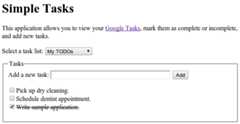
The sample web application Simple Tasks demonstrates how to use the Tasksservice for both read and write operations. You can view the full source codeon ourGitHub repository.
Sample code
The sample code below usesversion 1 ofthe API.
List task lists
This sample lists the task lists in your account.
/** * Lists the titles and IDs of tasksList. * @see https://developers.google.com/tasks/reference/rest/v1/tasklists/list */functionlistTaskLists(){try{// Returns all the authenticated user's task lists.consttaskLists=Tasks.Tasklists.list();// If taskLists are available then print all tasklists.if(!taskLists.items){console.log("No task lists found.");return;}// Print the tasklist title and tasklist id.for(leti=0;i <taskLists.items.length;i++){consttaskList=taskLists.items[i];console.log('Task list with title "%s" and ID "%s" was found.',taskList.title,taskList.id,);}}catch(err){// TODO (developer) - Handle exception from Task APIconsole.log("Failed with an error %s ",err.message);}}
List tasks
This sample lists the tasks within a given task list.
/** * Lists task items for a provided tasklist ID. * @param {string} taskListId The tasklist ID. * @see https://developers.google.com/tasks/reference/rest/v1/tasks/list */functionlistTasks(taskListId){try{// List the task items of specified tasklist using taskList id.consttasks=Tasks.Tasks.list(taskListId);// If tasks are available then print all task of given tasklists.if(!tasks.items){console.log("No tasks found.");return;}// Print the task title and task id of specified tasklist.for(leti=0;i <tasks.items.length;i++){consttask=tasks.items[i];console.log('Task with title "%s" and ID "%s" was found.',task.title,task.id,);}}catch(err){// TODO (developer) - Handle exception from Task APIconsole.log("Failed with an error %s",err.message);}}
Add task
This sample adds a new task to a task list.
/** * Adds a task to a tasklist. * @param {string} taskListId The tasklist to add to. * @see https://developers.google.com/tasks/reference/rest/v1/tasks/insert */functionaddTask(taskListId){// Task details with title and notes for inserting new tasklettask={title:"Pick up dry cleaning",notes:"Remember to get this done!",};try{// Call insert method with taskDetails and taskListId to insert Task to specified tasklist.task=Tasks.Tasks.insert(task,taskListId);// Print the Task ID of created task.console.log('Task with ID "%s" was created.',task.id);}catch(err){// TODO (developer) - Handle exception from Tasks.insert() of Task APIconsole.log("Failed with an error %s",err.message);}}
Except as otherwise noted, the content of this page is licensed under theCreative Commons Attribution 4.0 License, and code samples are licensed under theApache 2.0 License. For details, see theGoogle Developers Site Policies. Java is a registered trademark of Oracle and/or its affiliates.
Last updated 2025-12-11 UTC.