
Merchant API Service

Page Summary
The Merchant API service allows you to utilize the Merchant API in Apps Script for uploading products and managing Merchant Center accounts.
To use the Merchant API service in Apps Script, you need to link your project to a standard Google Cloud project, enable the Apps Script Advanced service, and register your Cloud project with your Merchant Center account.
The Apps Script Advanced service for the Merchant API can be enabled either by modifying the
appsscript.jsonmanifest file or by adding the service through the Apps Script editor for existing projects or additional sub-APIs.Code examples are provided for common tasks such as listing products, filtering disapproved products, retrieving reports, and listing data sources using the Merchant API service in Apps Script.
The Merchant API service lets you useMerchant API inApps Script, to upload products and manage Merchant Centeraccounts.
For detailed information about Merchant API, see thereferencedocumentation. Like all advanced services inApps Script, the Merchant API service uses the same objects,methods, and parameters as the public API.
Merchant API is a collection of sub-APIs - groups of related services andresources. Here's the list ofsub-APIs.
To use the Merchant API service in Apps Script, follow these steps:
Make sure that your Apps Script project is linked to a standardGoogle Cloud project. For information, seeUse a different standardCloudproject.
Enable the Apps Script Advanced service, as described in this document:
- Enable
appsscript.jsonfor new projects. - Enable Apps Script for existing projects.
- Enable
Register your standard Google Cloud project with your Merchant Centeraccount, as described in the Merchant APIquickstart guide.
Enable Apps Script Advanced service
You can enable the Apps Script service using either of the following twomethods:
Enable APIs inappsscript.json
Note: If you are using an existing Apps Script project, use theEnableApps Script for additional sub-APIs or existingprojects instructions.The following example shows anappsscript.json file that enables the Products,Accounts, Reports, and Data sources sub-APIs.
In the Apps Script editor, selectProject Settings
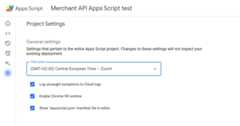
Enable theShow "appsscript.json" manifest file in editor option.
In the editor, select the
appsscript.jsonfile.Replace the contents of your
appsscript.jsonfile with the following:{"dependencies":{"enabledAdvancedServices":[{"userSymbol":"MerchantApiAccounts","version":"accounts_v1","serviceId":"merchantapi"},{"userSymbol":"MerchantApiDataSources","version":"datasources_v1","serviceId":"merchantapi"},{"userSymbol":"MerchantApiProducts","version":"products_v1","serviceId":"merchantapi"},{"userSymbol":"MerchantApiReports","version":"reports_v1","serviceId":"merchantapi"}]},"exceptionLogging":"STACKDRIVER","runtimeVersion":"V8"}ClickSave.
You can now refer to the following sub-APIs within your code as:
a.
MerchantApiAccountsb.
MerchantApiDataSourcesc.
MerchantApiProductsd.
MerchantApiReports
Enable Apps Script for additional sub-APIs or existing projects
To enable sub-APIs in existing projects, do the following:
Open your Apps Script project.
At the left, clickEditor < >.
At the left, next toServices, clickAdd a service +.
Select the sub-API you want to enable within the version selector.
Append the identifier with name of your sub-API. For example, to enable theInventories sub-API, select version
inventories_v1and change theidentifier toMerchantApiInventories.
Warning: Each service must have a unique identifier. Always append the nameof the sub-API to the Identifier.
You can now refer to Inventories sub-API within your code as
MerchantApiInventories.
Sample code
This section explains how to use Merchant API for selected features.
List the products
This example demonstrates how to list the products for a given Merchant Centeraccount.
/***ListsallproductsforagivenMerchantCenteraccount.*/functionproductList(){//IMPORTANT://EnabletheMerchantAPIProductssub-APIAdvancedServiceandcallit//"MerchantApiProducts"//ReplacethiswithyourMerchantCenterID.constaccountId='<MERCHANT_CENTER_ID>';//Constructtheparentnameconstparent='accounts/'+accountId;try{console.log('Sending list Products request');letpageToken;//Setthepagesizeto1000.Thisisthemaximumallowedpagesize.letpageSize=1000;console.log('Retrieved products below:');//CalltheProducts.listAPImethod.UsethepageTokentoiteratethrough//allpagesofresults.do{response=MerchantApiProducts.Accounts.Products.list(parent,{pageToken,pageSize});console.log(response);pageToken=response.nextPageToken;}while(pageToken);//Exitswhenthereisnonextpagetoken.}catch(e){console.log('ERROR!');console.log(e);}}Filter disapproved products
This example demonstrates how to filter disapproved products in a MerchantCenter account.
/***DemonstrateshowtofilterdisapprovedproductsusingtheMerchantAPIReportsservice.*/functionfilterDisapprovedProducts(){//IMPORTANT://EnabletheMerchantAPIReportssub-APIAdvancedServiceandcallit//"MerchantApiReports"//EnabletheMerchantAPIProductssub-APIAdvancedServiceandcallit//"MerchantApiProducts"//ReplacethiswithyourMerchantCenterID.constaccountId='<INSERT_MERCHANT_CENTER_ID>';//Constructtheparentnameconstparent='accounts/'+accountId;try{console.log('Sending search Report request');//SetpageSizetothemaximumvalue(default:1000)letpageSize=1000;letpageToken;//ThequerybelowisanexampleofaqueryfortheproductViewthatgetsproductinformations//foralldisapprovedproducts.letquery='SELECT offer_id,'+'id,'+'price,'+'title'+' FROM product_view'+' WHERE aggregated_reporting_context_status = "NOT_ELIGIBLE_OR_DISAPPROVED"';//CalltheReports.searchAPImethod.UsethepageTokentoiteratethrough//allpagesofresults.do{response=MerchantApiReports.Accounts.Reports.search({query,pageSize,pageToken},parent);for(constreportRowofresponse.results){console.log("Printing data from Product View:");console.log(reportRow);//OPTIONALLY,youcangetthefullproductdetailsbycallingtheGetProductmethod.letproductName=parent+"/products/"+reportRow.getProductView().getId();product=MerchantApiProducts.Accounts.Products.get(productName);console.log(product);}pageToken=response.nextPageToken;}while(pageToken);//Exitswhenthereisnonextpagetoken.}catch(e){console.log('ERROR!');console.log('Error message:'+e.message);}}Retrieve a report for a given account
This example demonstrates how to retrieve a report for a given Merchant Centeraccount.
/***SearchesareportforagivenMerchantCenteraccount.*/functionsearchReport(){//IMPORTANT://EnabletheMerchantAPIReportssub-APIAdvancedServiceandcallit//"MerchantApiReports"//ReplacethiswithyourMerchantCenterID.constaccountId='<MERCHANT_CENTER_ID>';//Constructtheparentnameconstparent='accounts/'+accountId;try{console.log('Sending search Report request');//SetpageSizetothemaximumvalue(default:1000)letpageSize=1000;letpageToken;//Uncommentthedesiredqueryfrombelow.Documentationcanbefoundat//https://developers.google.com/merchant/api/reference/rest/reports_v1beta/accounts.reports#ReportRow//Thequerybelowisanexampleofaqueryfortheproduct_view.letquery='SELECT offer_id,'+'id,'+'price,'+'gtin,'+'item_issues,'+'channel,'+'language_code,'+'feed_label,'+'title,'+'brand,'+'category_l1,'+'product_type_l1,'+'availability,'+'shipping_label,'+'thumbnail_link,'+'click_potential'+' FROM product_view';/*//Thequerybelowisanexampleofaqueryfortheprice_competitiveness_product_view.letquery="SELECT offer_id,"+"id,"+"benchmark_price,"+"report_country_code,"+"price,"+"title,"+"brand,"+"category_l1,"+"product_type_l1"+" FROM price_competitiveness_product_view"+" WHERE date BETWEEN '2023-03-03' AND '2025-03-10'";*//*//Thequerybelowisanexampleofaqueryfortheprice_insights_product_view.letquery="SELECT offer_id,"+"id,"+"suggested_price,"+"price,"+"effectiveness,"+"title,"+"brand,"+"category_l1,"+"product_type_l1,"+"predicted_impressions_change_fraction,"+"predicted_clicks_change_fraction,"+"predicted_conversions_change_fraction"+" FROM price_insights_product_view";*//*//Thequerybelowisanexampleofaqueryfortheproduct_performance_view.letquery="SELECT offer_id,"+"conversion_value,"+"marketing_method,"+"customer_country_code,"+"title,"+"brand,"+"category_l1,"+"product_type_l1,"+"custom_label0,"+"clicks,"+"impressions,"+"click_through_rate,"+"conversions,"+"conversion_rate"+" FROM product_performance_view"+" WHERE date BETWEEN '2023-03-03' AND '2025-03-10'";*///CalltheReports.searchAPImethod.UsethepageTokentoiteratethrough//allpagesofresults.do{response=MerchantApiReports.Accounts.Reports.search({query,pageSize,pageToken},parent);for(constreportRowofresponse.results){console.log(reportRow);}pageToken=response.nextPageToken;}while(pageToken);//Exitswhenthereisnonextpagetoken.}catch(e){console.log('ERROR!');console.log(e);console.log('Error message:'+e.message);if(e.stack){console.log('Stack trace:'+e.stack);}}}List all data sources
This example demonstrates how to list all the data sources in a given MerchantCenter account.
/***ListsalldatasourcesforagivenMerchantCenteraccount.*/functionlistDataSources(){//IMPORTANT://EnabletheMerchantAPIDataSourcessub-APIAdvancedServiceandcallit//"MerchantApiDataSources"//ReplacethiswithyourMerchantCenterID.constaccountId='<MERCHANT_CENTER_ID>';//Constructtheparentnameconstparent='accounts/'+accountId;letdataSources=[];letprimaryDataSources=[];try{console.log('Sending list DataSources request');letpageToken;letpageSize=10;//CalltheDataSources.listAPImethod.UsethepageTokentoiteratethrough//allpagesofresults.do{response=MerchantApiDataSources.Accounts.DataSources.list(parent,{pageSize,pageToken});for(constdatasourceofresponse.dataSources){dataSources.push(datasource);if(datasource.primaryProductDataSource){primaryDataSources.push(datasource);}}pageToken=response.nextPageToken;}while(pageToken);//Exitswhenthereisnonextpagetoken.console.log('Retrieved '+dataSources.length+' data sources.');console.log('There were '+primaryDataSources.length+' primary product data sources.');}catch(e){console.log('ERROR!');console.log(e);}}Except as otherwise noted, the content of this page is licensed under theCreative Commons Attribution 4.0 License, and code samples are licensed under theApache 2.0 License. For details, see theGoogle Developers Site Policies. Java is a registered trademark of Oracle and/or its affiliates.
Last updated 2025-12-11 UTC.