此页面由社区从英文翻译而来。了解更多并加入 MDN Web Docs 社区。
<position>
Baseline Widely available
This feature is well established and works across many devices and browser versions. It’s been available across browsers since 2015年7月.
CSS<position>(或<bg-position>)数据类型表示用于设置相对于元素盒子的位置的 2 维空间中的坐标。它被用于background-position 和offset-anchor 属性。
备注:由<position> 值表述的最终位置并不需要位于元素的盒子中。
语法
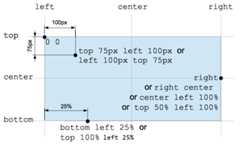
<position> 数据类型可用一个或两个关键字(可带有偏移量)指定。
关键字值为:中(center)、上(top)、右(right)、下(bottom)、左(left)。每个关键字代表元素盒子的边缘或两个边缘之间的中心线。根据上下文,center 可以表示左边缘和右边缘之间的中心,或者顶部边缘或底部边缘之间的中心。
如果指定了偏移量,其值可以是相对值<percentage> 或绝对值<length>。正值是向右或向下的偏移,取决于应用的边缘。负值则是在相反方向上的偏移。
如果仅指定单个偏移量,则用于指定 x 轴坐标,其他轴的值默认为center。
css
/* 单值语法 */keyword /* 水平或垂直位置;另一个轴默认为 center */value /* x 轴上的位置;y 轴默认为 50% *//* 2 值语法 */keyword keyword /* 每个方向一个关键字(顺序无关) */keyword value /* 水平位置为关键字,垂直位置为值 */value keyword /* 水平位置为值,垂直位置为关键字 */value value /* 每个方向一个值(先水平然后垂直) *//* 4 值语法 */keyword value keyword value /* 每个值都是其前面的关键字的偏移量 */备注:background-position 属性也接受三值语法。这无法在其他使用<position> 的属性中使用。
插值
横坐标值和纵坐标值都独立进行插值。而由于两者插值速度都由同一缓动函数定义,点将沿一条直线移动。
形式语法
<position> =
<position-one>|
<position-two>|
<position-four>

<position-one> =
left|
center|
right|
top|
bottom|
x-start|
x-end|
y-start|
y-end|
block-start|
block-end|
inline-start|
inline-end|
<length-percentage>

<position-two> =
[left|center|right|x-start|x-end]&&[top|center|bottom|y-start|y-end]|
[left|center|right|x-start|x-end|<length-percentage>][top|center|bottom|y-start|y-end|<length-percentage>]|
[block-start|center|block-end]&&[inline-start|center|inline-end]|
[start|center|end]{2}

<position-four> =
[[left|right|x-start|x-end]<length-percentage>]&&[[top|bottom|y-start|y-end]<length-percentage>]|
[[block-start|block-end]<length-percentage>]&&[[inline-start|inline-end]<length-percentage>]|
[[start|end]<length-percentage>]{2}

<length-percentage> =
<length>|
<percentage>
示例
有效位置值
centerleftcenter topright 8.5%bottom 12vmin right -6px10% 20%8rem 14px
无效位置值
left rightbottom top10px 15px 20px 15px
规范
| Specification |
|---|
| CSS Values and Units Module Level 4 # position |