This page was translated from English by the community.Learn more and join the MDN Web Docs community.
<position>
Baseline Widely available
This feature is well established and works across many devices and browser versions. It’s been available across browsers since 2015년 7월.
CSS<position> (또는<bg-position>)자료형은 요소 박스에 대한 상대 좌표를 나타내는 2차원 좌표입니다.background-position,offset-anchor 속성에서 사용합니다.
참고 :<position> 값이 설명하는 최종 위치가 요소 박스 내에 위치해야 할 필요는 없습니다.
구문
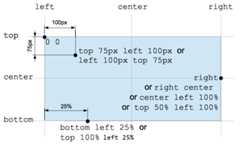
<position> 자료형은 하나 혹은 두 개의 키워드와 함께 선택적인 오프셋을 사용해 지정합니다.
키워드에는center,top,right,bottom,left가 있으며, 각각 요소 박스의 해당하는 방향 모서리 또는 마주보는 두 모서리의 가운데 지점을 의미합니다. 맥락에 따라,center는 좌우 모서리의 중간점일 수도 있고, 상하 모서리의 중간점일 수도 있습니다.
오프셋은 상대적인<percentage> 값 또는 절대적인<length> 값으로 지정할 수 있습니다. 양수는 오른쪽과 아래쪽 중 적합한 방향으로 이동하며, 음수는 그 반대입니다.
하나의 오프셋 값만 지정할 경우 x 좌표를 정의하는 것이며, 다른 축의 값은 기본값으로center를 사용합니다.
/* 1-value syntax */keyword /* Either the horizontal or vertical position; the other axis defaults to center */value /* The position on the x-axis; the y-axis defaults to 50% *//* 2-value syntax */keyword keyword /* A keyword for each direction (the order is irrelevant) */keyword value /* A keyword for horizontal position, value for vertical position */value keyword /* A value for horizontal position, keyword for vertical position */value value /* A value for each direction (horizontal then vertical) *//* 4-value syntax */keyword value keyword value /* Each value is an offset from the keyword that preceeds it */형식 구문
[ [ left | center | right ] || [ top | center | bottom ]| [ left | center | right | <length> | <percentage> ] [ top | center | bottom | <length> | <percentage> ]?| [ [ left | right ] [ <length> | <percentage> ] ] && [ [ top | bottom ] [ <length> | <percentage> ] ]]
참고 :background-position 속성은 세 값 구문도 허용하나,<position>을 사용하는 다른 속성에서는 허용하지 않습니다.
보간
애니메이션에서 점의 가로 값과 세로 값은 각각 따로 보간됩니다. 그러나 두 좌표 모두에 대한 보간 속도는 하나의타이밍 함수가 결정하므로, 점은 직선을 따라 이동하게 됩니다.
예제
유효한 위치
centerleftcenter topright 8.5%bottom 12vmin right -6px10% 20%8rem 14px
유효하지 않은 위치
left rightbottom top10px 15px 20px 15px
명세
| Specification |
|---|
| CSS Values and Units Module Level 4 # position |