Keyboard API
Experimental:This is anexperimental technology
Check theBrowser compatibility table carefully before using this in production.
The Keyboard API provides methods for working with a physical keyboard that is attached to a device running a browser.
It provides several capabilities.Keyboard mapping provides an interface for retrieving the string generated by particular physical key on a keyboard to correctly identify that key to a user.Keyboard locking enables a web page to capture keys that are normally reserved by the user agent or the underlying operating system. The intended use of the Keyboard API is by web applications such as games or remote access apps that provide a fullscreen immersive experience.
Concepts and usage
Keyboard mapping
On physical keyboards, thecode attribute contains the physical location of the key that was pressed, and thekey attribute contains the string generated by pressing the key at that physical location on the keyboard. Thekey value takes into account the keyboard's locale (for example, 'en-US'), layout (for example, 'QWERTY'), and modifier-key state (Shift,Control, etc.). Historically there has been no way to retrieve that information.
The Keyboard Map API provides a way to retrieve the string generated by a particular key press, through theKeyboard interface and theKeyboardLayoutMap interface. TheKeyboard interface is accessed throughnavigator.keyboard.Keyboard provides theKeyboard.getLayoutMap method, which returns a promise that resolves with aKeyboardLayoutMap object that contains members for converting codes to keys. A list of valid code values is found in theWriting System Keys section of theUI Events KeyboardEvent code Values spec.
The following example demonstrates how to get the location-specific or layout-specific string associated with the key labeledW on an English QWERTY keyboard.
if (navigator.keyboard) { const keyboard = navigator.keyboard; keyboard.getLayoutMap().then((keyboardLayoutMap) => { const upKey = keyboardLayoutMap.get("KeyW"); window.alert(`Press ${upKey} to move up.`); });} else { // Do something else.}Keyboard locking
Richly interactive web pages, games, and remote-streaming experiences often require access to special keys and keyboard shortcuts while in fullscreen mode. Examples of such key/key combinations includeEscape,Alt+Tab, andCtrl+N. Those keys and key combinations are typically captured by the user agent or the underlying operating system, as illustrated in the following example.
To capture theW,A,S, andD keys, calllock() with a list that contains the key code attribute value for each of these keys:
navigator.keyboard.lock(["KeyW", "KeyA", "KeyS", "KeyD"]);This captures these keys regardless of which modifiers are used with the key press. Assuming a standard United States QWERTY layout, registeringKeyW ensures thatW,Shift+W,Control+W,Control+Shift+W, and all other key modifier combinations withW are sent to the app. The same applies to forKeyA,KeyS, andKeyD.
Writing system keys
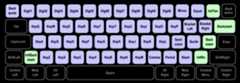
The codes passedKeyboard.lock and the various methods of theKeyboardLayoutMap interface are called "writing system keys".
"Writing system keys" are defined in theWriting System Keys section of theUI Events KeyboardEvent code Values spec, since the physical keys change meaning based on the current locale and keyboard layout. These keys are shown below. Blue keys are present on all standard keyboards while green keys are only available on some keyboards.
Interfaces
KeyboardExperimentalProvides functions that retrieve keyboard layout maps and toggle capturing of key presses from the physical keyboard.
KeyboardLayoutMapExperimentalA map-like object with functions for retrieving the string associated with specific physical keys.
Extensions to other interfaces
navigator.keyboardRead onlyExperimentalReturns a
Keyboardobject which provides access to functions that retrieve keyboard layout maps and toggle capturing of key presses from the physical keyboard.
Specifications
| Specification |
|---|
| Keyboard Lock |
| Keyboard Map |