This tutorial describes how to use Explain reports to locate and fix problematic (slow) queries. It uses theDBT-3 database and begins with the following simple query example.
SELECT * FROM ordersWHERE YEAR(o_orderdate) = 1992 AND MONTH(o_orderdate) = 4AND o_clerk LIKE '%0223'; As shown in the figure that follows, the query example was first executed in the Visual SQL editor. Next, an Explain report was generated by clickingExplain Current Statement from theQuery menu. The initial report shows a Visual Explain image with information that appears when you move your pointer device over theorders table in full table scan.
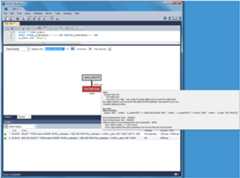
Optionally, you can switch to Tabular Explain as the next figure shows. Use the drop-down list to switch between the visual and tabular representations.

Questions about the query:
Why did this query generate a full table scan?
Why is the indexed
o_orderdatecolumn missing as a possible key?
Looking more closely, also notice that the indexed column is being used in an expression as"WHERE YEAR(o_orderdate) = 1992 AND MONTH(o_orderdate) = 4", so the index is not used. To use the existing index, you can adjust the query as follows.
SELECT * FROM ordersWHERE o_orderdate BETWEEN '1992-04-01' AND '1992-04-30'AND o_clerk LIKE '%0223'; The updated query example results in a Visual Explain image in whichIndex Range Scan replaces theFull Table Scan generated by the last query example. The next two figures show the visual and tabular representations of the modified query example.
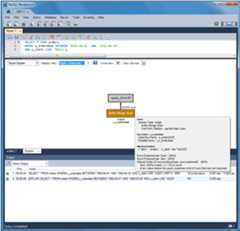

Notice the differences. The Type changed fromALL torange, possible keys (and used key) changed fromNULL toi_o_orderdate, and the number of scanned rows changed from 1.5 million to about 33 thousand. Still, scanning 33 thousand rows while returning just 18 is unnecessary, so the focus can shift to theo_clerk column. The next query example (and Tabular Explain figure) adds the following index that should improve performance.
CREATE INDEX i_o_clerk ON orders(o_clerk); The new index is not being considered as a possible key because the query is searching the suffix of theo_clerk column and indexes do not work with suffixes (although they do work with prefixes). Instead, this simple example could use the entire clerk ID. Adjusting the query as follows shows better results.
SELECT * FROM ordersWHERE o_orderdate BETWEEN '1992-04-01' AND '1992-04-30'AND o_clerk LIKE 'Clerk#000000223';The figures that follow represent the effect of the updated query example in Visual Explain and Tabular Explain respectively.
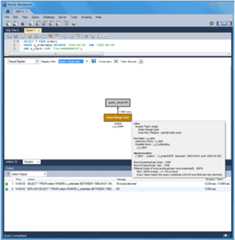

The newo_clerk index was considered and used, and the query scanned 1546 rows instead of 32642, and the query execution improved from 0.281 to 0.234 seconds. However,EXPLAIN estimates that this query scans 1546 rows to return 18. After reviewing the query again, consider that a multiple-column index can meet the conditions of theWHERE clause that is based on both theo_orderdate ando_clerk columns as the next statement shows.
CREATE INDEX io_clerk_date ON orders(o_clerk, o_orderdate)o_clerk appears as the first column in the index becauseo_orderdate uses a range.
Now, executing the adjusted query produces even better results. An estimated 18 rows are both scanned and returned, and the execution time of the query example is 0.234 seconds as the next Visual Explain and Tabular Explain figures show.
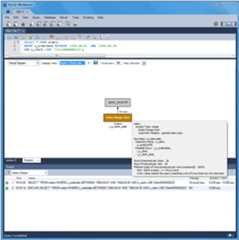

The table that follows summarize the results of the modifications made to the query during this tutorial.
Table 7.2 DBT-3 Explain Tutorial Query Comparison
| Type | Possible keys | Key | Rows Scanned | Duration (seconds) | Extra info | Rows returned |
|---|---|---|---|---|---|---|
| all | NULL | NULL | 1.50M | 1.201 | Using where | 18 |
| range | i_o_orderdate | i_o_orderdate | 32642 | 0.281 | Using index condition; Using where | 18 |
| range | i_o_orderdate, i_o_clerk | i_o_clerk | 1546 | 0.234 | Using index condition; Using where | 18 |
| range | i_o_orderdate, i_o_clerk, i_o_clerk_date | i_o_clerk_date | 18 | 0.234 | Using index condition | 18 |