After installing iODBC, proceed to install the PostgreSQL ODBC drivers.
Download the psqlODBC source tarball file fromhttp://www.postgresql.org/ftp/odbc/versions/src/. Use the latest version available for download, which will be at the bottom of the downloads page. The file will look similar topsqlodbc-09.03.0400.tar.gz. Extract this tarball to a temporary location, open a terminal, and cd into that directory. The installation process is:
$> cd the/src/directory$> ./configure --with-iodbc --enable-pthreads$> make$> sudo make install Verify the installation by confirming that the filepsqlodbcw.so is in the/usr/local/lib directory.
Next, you must register your new ODBC Driver.
Open the iODBC Data Source Administrator application by either executingiodbcadm-gtk in the command-line, or by launching it from theOverview page of the MySQL Workbench Migration Wizard by clicking theOpen ODBC Administrator button.
Go to theODBC Drivers tab in the iODBC Data Source Administrator. It should look similar to the example in the figure that follows.
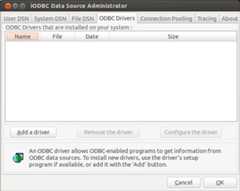
ClickAdd a driver then fill out the form with the following values:
Description of the driver: psqlODBC
Driver file name:
/usr/local/lib/psqlodbcw.soSetup file name: No value is needed here
And lastly, clickingOK will complete thepsqlODBC driver registration.