Define table templates with commonly used columns and settings to create new tables from either a live connection or while creating an EER model.
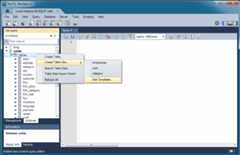
From the SQL editor, selectCreate Table Like from theTables context menu, as shown in the next figure.
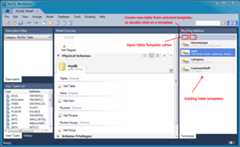
Or while modeling, click the "Open the table template editor" icon underModeling Additions, as the following figure shows.
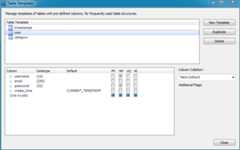
After opening theTable Templates manager, make the adjustments and then clickApply to commit the changes. The following figure shows an example of column, data type, and default values that you can adjust for the user template.
To open an existing template from the SQL editor, hover over theCreate Table Like context menu and select the desired table template. For modeling, double-click on a template in the right modeling sidebar.