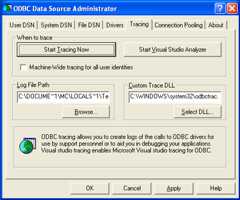
To enable the trace option on Windows:
The
Tracingtab of the ODBC Data Source Administrator dialog box lets you configure the way ODBC function calls are traced.When you activate tracing from the
Tracingtab, theDriver Managerlogs all ODBC function calls for all subsequently run applications.ODBC function calls from applications running before tracing is activated are not logged. ODBC function calls are recorded in a log file you specify.
Tracing ceases only after you click
Stop Tracing Now. Remember that while tracing is on, the log file continues to increase in size and that tracing affects the performance of all your ODBC applications.