Announcing Deno 2




Announcing Deno 2
The web is humanity’s largest software platform — building for it meanspotentially reaching over 5 billion people.But asweb development has accelerated in recent years,it has also become increasingly and unmanageably complex. Before writing asingle line of code, developers must deal with tedious configuration and wadingthrough unnecessary boilerplate, when they would rather focus on shippingproduct and delivering value to users.
Yetdespite these complexities,JavaScript, the language of the web,has remained the most popular language for the past decade,with TypeScript quickly emerging as number three. This is a testament toJavaScript’s ubiquity and usefulness for web development — and a sign thatJavaScript is not going anywhere.
In an effort to simplify web programming, we created Deno: a modern, all-in-one,zero-config toolchain for JavaScript and TypeScript development.
- Native TypeScript support
- Built on web standards: Promises, fetch, and ES Modules
- Batteries included: builtin formatter, linter, type checker, testframework, compile to executable, and more
- Secure by default,just like browsers
Today, hundreds of thousands of developers love using Deno,with repository becoming one of the highest starred Rust project on GitHub secondonly to the Rust language itself.
While we’ve accomplished a ton in Deno 1, the next major version is focused onusing Deno at scale. This means seamless interoperability with legacyJavaScript infrastructure and support for a wider range of projects anddevelopment teams. All without sacrificing the simplicity, security, and“batteries included” nature that Deno users love.
Today, we’re thrilled to announce Deno 2, which includes:
- Backwards compatibility with Node.js and npm, allowing you to run existingNode applications seamlessly
- Native support for
package.jsonandnode_modules - Package management with new
deno install,deno add, anddeno removecommands - A stabilized standard library
- Support for private npm registries
- Workspaces and monorepo support
- Long Term Support (LTS) releases
- JSR: a modern registry for sharing JavaScript libraries across runtimes
We are also continually improving many existing Deno features:
deno fmtcan now format HTML, CSS, and YAMLdeno lintnow has Node specific rules and quick fixesdeno testnow supports running tests written usingnode:testdeno taskcan now runpackage.jsonscriptsdeno doc’s HTML output has improved design and better searchdeno compilenow supports code signing and icons on Windowsdeno servecan run HTTP servers across multiple cores, in paralleldeno initcan now scaffold libraries or serversdeno jupyternow supports outputting images, graphs, and HTMLdeno benchsupports critical sections for more precise measurementsdeno coveragecan now output reports in HTML
Backwards-compatible, forward-thinking
Deno 2 is backwards compatible with Node and npm. This allows you to not onlyrun Deno in your current Node projects, but also incrementally adopt pieces ofDeno’s all-in-one toolchain. For instance, you can usedeno install after youclone a Node project to install your dependencies at lightning speed or rundeno fmt to format your code without needing Prettier.
Deno 2’s compatibility with Node and npm is robust. Deno 2 understandspackage.json , thenode_modules folder, and even npm workspaces, allowingyou to run Deno in any Node project using ESM. And if there are minor syntaxadjustments needed, you can fix them withdeno lint --fix.
Don’t like the clutter ofpackage.json and thenode_modules directory, butstill need to use that npm package? You can directly import npm packages usingnpm: specifiers. Withoutpackage.json and thenode_modules folder, Denowill install your package in the global cache. This allows you to write programswith npm dependenciesin a single file —no dependency manifest, configuration files, ornode_modules needed.
importchalkfrom"npm:chalk@5.3.0";console.log(chalk.blue("Hello, world!"));// Hello, world! (in blue)
For larger projects, a dependency manifest makes it simple to manage yourdependencies. Placing annpm: specifier into an import map in adeno.jsonfile allows importing the bare name of the package:
// deno.json{"imports":{"chalk":"npm:chalk@5.3.0"}}
importchalkfrom"chalk";console.log(chalk.blue("Hello, world!"));// Hello, world! (in blue)
With the ability to import npm packages via thenpm: specifier, you can accessover 2 million npm modules in Deno. This even includes complex packages such asgRPC, ssh2, Prisma, temporal.io,duckdb, polars. Deno even supports advanced features like Node-API nativeaddons.
Finally, you can use Deno 2 with your favorite JavaScript framework. Deno 2supports Next.js, Astro, Remix, Angular, SvelteKit, QwikCity and many otherframeworks.
Deno is now a package manager withdeno install
Not only does Deno 2 supportpackage.json and thenode_modules folder, italso comes with three important subcommands that allow you to easily install andmanage your dependencies.
deno install installs your dependencies at lightning speed. If you have apackage.json it will create anode_modules folder in the blink of an eye. Ifyou don’t usepackage.json, it will cache all of your dependencies to theglobal cache.
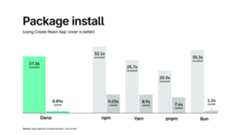
deno install is 15% faster than npm with a cold cache, and 90% faster with ahot cache. We’re already exceptionally fast here, but expect more improvements,especially in cold cache scenarios, in the coming weeks.
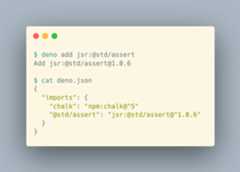
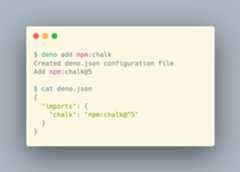
deno add anddeno remove can be used to add and remove packages to/from yourpackage.json ordeno.json. If you’ve usednpm install ornpm removebefore, these will feel very familiar.
JavaScript Registry
Earlier this year we introduced amodern, open sourced JavaScript registrycalledJSR.
It supports TypeScript natively (you can publish modules as TypeScript sourcecode), handles the module loading intricacies multiple runtimes andenvironments, only allows ESM,auto-generates documentation from JSDoc-style comments,and can be used with npm- and npx-like systems (yes, JSR turns TypeScript into.js and.d.ts files, as well).
Because you upload TypeScript to JSR, it has an outstanding understanding of thecode that is being published. This allows us to deliver a seamless developerexperience for both publishing and consuming modules. If you are interested inthe details, you can read our post onhow we architected JSR.
The Standard Library is now stable
While there are over 2 million modules available on npm, the process ofsearching, evaluating, and using a new module can be time consuming. That’s whywe’ve been buildingthe Deno Standard Library for over 4 years.
The Standard Library consists of dozens of heavily audited utility modulescovering everything from data manipulation, web-related logic,JavaScript-specific functionalities, and more. It isavailable on JSR, and can be used by other runtimes andenvironments.
To give you a sense of what kinds of modules are available in the Deno StandardLibrary, here is a partial list of the Standard Library modules and theirequivalent in npm:
| Deno Standard Library module | npm package |
|---|---|
| @std/testing | jest |
| @std/expect | chai |
| @std/cli | minimist |
| @std/collections | lodash |
| @std/fmt | chalk |
| @std/net | get-port |
| @std/encoding | rfc4648 |
For a complete list of available packages visithttps://jsr.io/@std.
Private npm registries
Private npm registries in Deno 2 workthe same way they do in Node and npm, with an.npmrc file:
// .npmrc@mycompany:registry=http://mycompany.com:8111///mycompany.com:8111/:_auth=secretToken
Deno will pick up this.npmrc file automatically, and will let you pullprivate packages with no additional configuration.
Workspaces and monorepos
Deno 2 also supports workspaces, which is a robust solution to managemonorepos. Simply use theworkspace attribute in yourdeno.json to listthe member directories:
// deno.json{"workspace":["./add","./subtract"]}
These members can have separate dependencies, linter and formatterconfiguration, and more.
Not only does Deno support workspaces for Deno packages, it also understandsnpm workspaces. This meansthat you can create a hybrid Deno-npm monorepo(see this example),with workspace members that either have a package.json or deno.json:
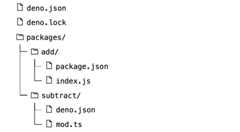
You can also publish workspace members to JSR by runningdeno publish. Forexample, refer tothe Deno Standard Library.No need to manually figure out in what order you need to publish your packages -just rundeno publish, and it will do it all for you.
LTS
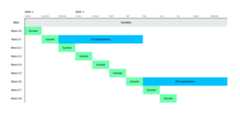
Often, development teams in larger organizations need to carefully audit newreleases before using them in production. With Deno’s weekly bug-fix releases,and 6 weekly minor releases this can become time-consuming. To make it easierfor these teams,we’re introducing a Long Term Support (LTS) releasechannel.
Starting with Deno 2.1, the LTS channel will receive critical bug fixesback-ported for six months, ensuring a stable and reliable base for productionuse. After six months, a new LTS branch will be created based on the lateststable version. All LTS releases are freely available and MIT licensed, makingthem accessible to any team that needs a more stable and secure environment.
Finally, for teams needing advanced support,we’ve introduced theDeno for Enterprise program. It offers prioritysupport, direct access to our engineers, guaranteed response times, and priorityfor your feature requests. We’ve partnered with companies like Netlify, Slack,andDeco.cx to help their engineers move faster and delivermore value to their users.
Deno is fast!
We’ve put tremendous effort into making Deno fast across a wide range ofreal-world scenarios. Our focus is on delivering performance improvements thattruly matter in everyday JavaScript and TypeScript development—whether it’sstartup time, handling complex requests, or overall efficiency.
While benchmarks can never tell the full story, they can provide insight intowhere a runtime excels. Here are some benchmarks that showcase Deno’s strengths,demonstrating its ability to deliver top-notch performance for both developmentand production environments.

Correction:The first HTTP benchmarkshown above was conducted using Deno 1.45, not Deno 2.0. In reality, Deno 2.0 isabout 20% slower than indicated here. This difference is due toour recent disabling of V8 pointer compressionto address cases where users exceeded the 4GB heap limit. We plan to re-enablepointer compression soon, as it’s the ideal default for most users, andintroduce adeno64 build for those needing larger heaps.
FAQs
If Deno is fully backward compatible with Node, why should I use Deno instead of Node?
While Deno can run Node programs, it’s designed to push JavaScript andTypeScript forward. Deno offers features that Node lacks, such as nativeTypeScript support, web-standard APIs, a complete toolchain for JavaScriptdevelopment, and a secure-by-default execution model—all in a single executablewith no external dependencies. Using Deno over Node can save you time on setupand configuration, letting you start coding and delivering value faster.
Will Deno’s opt-in permission system be in effect when running Node programs?
Yes, Deno’s secure-by-default execution model applies when running Node programsor importing npm modules, ensuring the same level of security.
Why the new logo? What happened to the cute dinosaur mascot?
Since the beginning, the cute sauropod in the rain has been Deno’s face. Itsquirky charm has always been a hallmark of Deno, but the design was neverconsistent—there were at least two “official” versions and countless variations.With Deno 2.0, we decided it was time for a refresh.
We wanted to keep the essence of the original character that Deno users lovewhile giving it a more refined look to match Deno’s professional andproduction-grade nature. During the redesign, we realized that the rainybackground, while nostalgic, didn’t scale well and often went unnoticed. It wastoo busy, especially at small sizes, so we had to let it go.
After many iterations, we found that simplifying the design to its core elementsstruck the right balance—simple and friendly, yet serious and reliable—just likeDeno.
(Don’t worry, the cute dino is still here!)
Deno began with an ambitious vision to modernize JavaScript. But with all the work spent on backward compatibility, what’s left of Deno’s original vision?
Rewriting the entire JavaScript ecosystem isn’t practical. As Deno has scaledbeyond small programs, we’ve recognized that supporting Node and npmcompatibility is essential—especially for tools like gRPC and AWS SDKs, whichare impractical to rewrite from scratch.
But Deno’s goal is not to become a Node clone in Rust or a drop-in replacement.Our aim is to level up JavaScript, moving beyond 2010-era CommonJS and narrowingthe gap between server-side and browser environments in a way that developerscan adopt practically. We refuse to accept that JavaScript must remain a tangleof mismatched tooling and endless layers of transpilation, unable to evolve.
Deno’s original vision remains central to everything we do. This includes nativeTypeScript support, built-in web standards like Promises, top-level await, Wasm,fetch, and ES Modules, and a batteries-included toolchain—all packaged in asingle, dependency-free executable. And, of course, it is secure by default,just like the web.
Supporting npm is just one step toward making Deno more versatile. Our missionis to provide a modern, streamlined toolchain that enhances the JavaScriptexperience—not just to support legacy code. While we’ve adjusted our approach,our vision remains the same: to simplify and empower web development.
I loved Deno because it didn’t need any config files, but with the new package manager additions, is Deno 2 becoming more like Node, where you need a package.json to add dependencies?
Not at all. You can still run single-file programs or scripts without any configor dependency manifest—nothing has changed there. The new package managementcommands (deno install,deno add, anddeno remove) are optional toolsdesigned to simplify managing dependencies, whether you use adeno.json orpackage.json file. They’re especially useful for larger, more complex projectsbut won’t get in the way if you prefer the simplicity of no configuration.
One of our core goals is that Deno scales down to simple, single-file programsthat can import any package without additional ceremony. For example, incontexts like Jupyter notebooks or quick scripts, you can easily do:
import*asPlotfrom"npm:@observablehq/plot";
At the same time, Deno scales up to handle large projects with multiple files oreven multiple packages, such as in monorepos. This flexibility ensures that Denois just as effective for small scripts as it is for large, production-gradeapplications.
I have a Fresh project. Are there breaking changes if I upgrade to Deno 2?
Nope! YourFresh project should work out of the boxwith Deno 2—no changes needed.
When should I expect Deno 2 to land on Deno Deploy?
Any moment now!
What’s next
Deno 2 takes all of the features developers love about Deno 1.x — zero-config,all-in-one toolchain for JavaScript and TypeScript development, web standard APIsupport, secure by default — and makes it fully backwards compatible with Nodeand npm (in ESM). This makes not only running Deno in any Node project simple,but also allows incremental adoption of Deno (e.g. runningdeno fmt ordeno lint ) possible in larger, more complex projects. Along with improvedpackage management, JSR, and a slew of features for more advanced developmentteams, Deno is ready to simplify and accelerate your development today.
However, given Deno’s vast capabilities, we weren’t able to cover everything ina single blog post and video. There are many exciting features and use caseswith Deno that we didn’t touch upon. For instance, being able to usedeno compile toturn a JavaScript game into a desktop executablewith cross compilation (yes, Windows) support. Or Deno’sJupyter notebook supportthat allows you to explore and visualize data in TypeScript and@observable/plot. Or generating documentationor a static documentation site from your JSDoc comments and source code withdeno doc.

We invite you to try Deno 2 today and experience the future of JavaScript andTypeScript development. Get started with Deno 2 now:
- Getting Started with Deno (docs)
- 1.x ⇒ 2 Migration Guide
- Deno Tutorial Series
- Watch the Deno 2 Announcement Keynote
Join our community and let’s shape the future of JavaScript together!