Make automatic reports
DanChaltiel
2025-11-18
Source:vignettes/crosstable-report.Rmdcrosstable-report.RmdBeing inserted in automatic reporting is the ultimate goal ofcrosstables.
There are two cases to consider:
- You have a lot of tables and little text? You probably should useofficer.
- You have a lot of text and a few tables? You probably should useRmarkdown.
As I only find myself in the first case, this vignette will only talkabout officer.
Create reports withofficer
Output example
The real power ofcrosstable comes out when used withDavid Gohel’s awesome packageofficer,which allows to automatically create MS Word documents.
For the example, let’s try to create a document like this: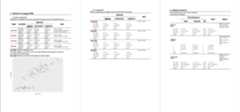
You can also download this examplehere.
Code
This code will produce the example above.
First, we create 3 crosstables using available datasets, along with aggplot. Then, we start a document (usingofficer::read_docx()), add some titles and paragraphs,incorporate our tables and our plot, along with legends, and add somepage breaks. Note that the legends have abookmark argumentthat can be referred to in the text for automatic numbering.
library(officer)library(ggplot2)ct1=crosstable(iris, by=Species, test=TRUE)ct2=crosstable(mtcars2,c(mpg,cyl,disp), by=am, effect=TRUE, total="both", showNA="always")ct3=crosstable(esoph)crosstable_options( crosstable_fontsize_body=8, crosstable_padding_v=0, crosstable_units="cm")my_plot=ggplot(data=iris)+geom_point(mapping=aes(Sepal.Length,Petal.Length))doc=read_docx()%>%#default templatebody_add_title("Dataset iris (nrow={nrow(iris)})",1)%>%body_add_title("Not compacted",2)%>%body_add_normal("Table \\@ref(table_autotest) is an example. However, automatic testing is **bad** and I should feel **bad**.")%>%body_add_crosstable(ct1)%>%body_add_table_legend("Automatic testing is bad", bookmark="table_autotest")%>%body_add_normal()%>%body_add_normal("Let's add a figure as well. <br> You can see in Figure \\@ref(fig_iris) that sepal length is somehow correlated with petal length.")%>%body_add_figure_legend("Relation between Petal length and Sepal length", bookmark="fig_iris")%>%body_add_gg2(my_plot, w=14, h=10, scale=1.5)%>%body_add_break()%>%body_add_title("Compacted",2)%>%body_add_normal("When compacting, you might want to remove the test names.")%>%body_add_crosstable(ct1, compact=TRUE, show_test_name=FALSE)%>%body_add_break()%>%body_add_title("Dataset mtcars2",1)%>%body_add_normal("This dataset has {nrow(ct3)} rows and {x} columns.", x=ncol(ct3))%>%body_add_normal("Look, there are labels!")%>%body_add_crosstable(ct2, compact=TRUE)For demonstration purposes, I tried to cover as many features aspossible, so it contains multiple syntaxes for the same result. Ofcourse, you should use whatever syntax you are most comfortablewith.
Output
To see the resulting Word document, use:
write_and_open(doc,"vignette_officer.docx")While you are still working on your code, you might want to omit thename so that you open the docx file in a temporary file for a quick peek(write_and_open(doc)). This will prevent the errors thathappen when the file is already open.
You can also useprint(doc, "vignette_officer.docx") ifyou don’t want the file to open right away.
Functions
Here is a brief description of the functions used in thisexample:
officer::read_docx(): creates a bare MS Worddocumentbody_add_title(): adds a title paragraph of anylevelbody_add_normal(): adds a normal style paragraph. Youcan also incorporate variables using the syntax{nrow(ct3)}and references using the syntax\\@ref(my_bookmark). Italso support Markdown syntax for bold, italics, colored text… Seehelp(body_add_normal)to see the details.body_add_crosstable(): adds a crosstablebody_add_figure_legend()andbody_add_table_legend(): adds a figure/table legend. Thebookmarkis the key that can be added elsewhere inbody_add_normal().body_add_gg2(): adds a ggplot. Unlikeofficer::body_add_gg(), you can change the unit using theunitsargument or the optionsoptions(crosstable_units="cm").
crosstable comes with manyofficer-likefunctions to help you create your report, see the full list in thereferences.
Also, browsehttps://davidgohel.github.io/officer/ for more insightabout how you can useofficer.
Styles
Crosstable usesWordstyles extensively.
Here, I used the default template ofofficer::read_docx() that comes with default styles. Inyour own custom template, you can edit all styles (for instance you canmake “Normal” have a bold font of size 8) and add your own. Seetheofficial documentation on how to use templates.
The best example here isbody_add_list(), which issupposed to add a bullet list. Unfortunately, the default template doesnot come with list styles so you will have to add one to your customtemplate before using it:
doc=read_docx("my_template.docx) %>% #your custom template body_add_list(c("this is item1", "this is item2"),)#alternatively, you can define the style globally and use the ordered parameteroptions(crosstable_style_list_unordered="bullet")options(crosstable_style_list_ordered="numbered")doc = read_docx("my_template.docx)%>%body_add_list(c("this is item 1","this is item 2"),ordered=FALSE)See?crosstable_options for a list of all styles you canspecify globally and useofficer::styles_info(doc) to seewhich one are available in your template.
Note that you might sometimes encounter the error “Error: could notmatch any style named ‘xxx’” if you are not careful.
Post-production for table/figure legends
If you added some legends or TOC titles, MS Word might ask you to“update the fields”, to which you should answer “Yes”. This will triggerthe automatic numbering of tables and references.
Autofit macro for large tables
Auto-fitting from outside MS Word has its limits, and large tablesmight still overflow your document.
If so, you can use MS Word inner autofit tools on each table one byone(Table Tools > Layout > AutoFit > AutoFit Window),which can be really tedious.
But fear not! You can also use a MS Word macro to do the job for you.Here is how:
In the R console, run
generate_autofit_macro()togenerate the filecrosstable_autofit.basin your workingdirectory.In MS Word, pressAlt+F11 to open the VBEditor.
In the Editor, go to
File>Importor pressCtrl+Mto open the import dialog, and importcrosstable_autofit.bas. There should now be a“CrosstableMacros” module in the “Normal” project.Run the macro, either from the VB Editor or from
View>Macros>View Macros>Run.
This process will make the macro accessible from any Word file onthis computer. Note that, in the Editor, you can also drag the module toyour document project to make the macro accessible only from this file.The file will have to be named with thedocm extensionthough.